Mascot Animation in Figma Prototypes and Developer Handoff
By the Charmotion team · Updated
Figma prototypes can't play Rive files; a reply in Figma's forum relaying Rive's founder says Figma's code doesn't give the access needed to embed them. Show the mascot with animated GIFs or video fills instead, one per state, swapped with interactive component variants, and give developers the .riv plus a written state contract.
Key takeaways
- No official way exists to play a .riv inside a Figma prototype; a third-party plugin announced in 2025 doesn't change that.
- GIFs animate only in presentation view; in the editor they appear static.
- Video fills accept H.264 .mp4 or .mov and VP8 .webm up to 300 MB, need a paid plan to add, and don't play in the Figma mobile app.
- Build the mascot as a component with one variant per state and switch with Change to, After delay and When video ends.
- Hand off the .riv with the state machine, view model, property values, triggers and the screen events that set them.
Can Figma prototypes play Rive files?
No. Figma's forum has requests for Rive embeds and prototype playback going back to March 2024. In February 2025 a community developer announced a beta Rive plugin, and in May 2025 another reply explained that it can't play Rive animations in prototypes, relaying the Rive founder's view that "Figma's code doesn't allow access where it's needed to embed Rive files to play." No Figma staff answer appears in the thread.
So plan the prototype with stand-ins that Figma can play, and keep the real interactive file for the build. That split is healthy anyway: the prototype tests flow and timing with stakeholders, and the .riv carries the real state logic to developers.
Should I use a GIF or a video in a Figma prototype?
Both work; they behave differently.
| Animated GIF | Video fill | |
|---|---|---|
| Formats | GIF | .mp4 or .mov with H.264, .webm with VP8 |
| Plays where | Presentation view only; static in the editor | Prototypes, with autoplay, loop and sound settings in the Prototype tab |
| Limits | Width or height up to 4,096 px | Up to 300 MB; not supported in the Figma mobile app |
| Plans (adding) | Professional, Education, Organization, Government, Enterprise | Same paid plans; Starter teams can edit existing video |
| Export | Figma exports GIFs as static images | Not exported as video |
Two practical consequences. First, a transparent VP9 WebM, the usual web format for a character with alpha, isn't in Figma's list, and Figma's video article doesn't mention transparency, so expect a solid background and match it to the frame. Second, if stakeholders review on phones in the Figma mobile app, use GIFs, because video doesn't play there.
How do I prototype a mascot that changes state?
Make the mascot a component with one variant per state (idle, loading, success, error), each holding that state's GIF or video. Then use interactive components, which add the Change to action for switching between variants:
- Loops (idle, loading, listening) loop forever as GIFs, or as videos with Loop on.
- One-shots (success, error, yes) should play once and return. With video, turn Loop off and connect When video ends to Change to idle. With a GIF, use After delay set to the clip length in milliseconds.
- Screen events drive the switches: a button tap changes the mascot to loading, an After delay on the frame stands in for the server response and changes it to success.
Keep the variants the same size with the character in the same position, or it will jump between states. Name variants after the real states (mood=loading, trigger=success) so the prototype already speaks the developers' language.
What should designers hand developers instead of the GIF?
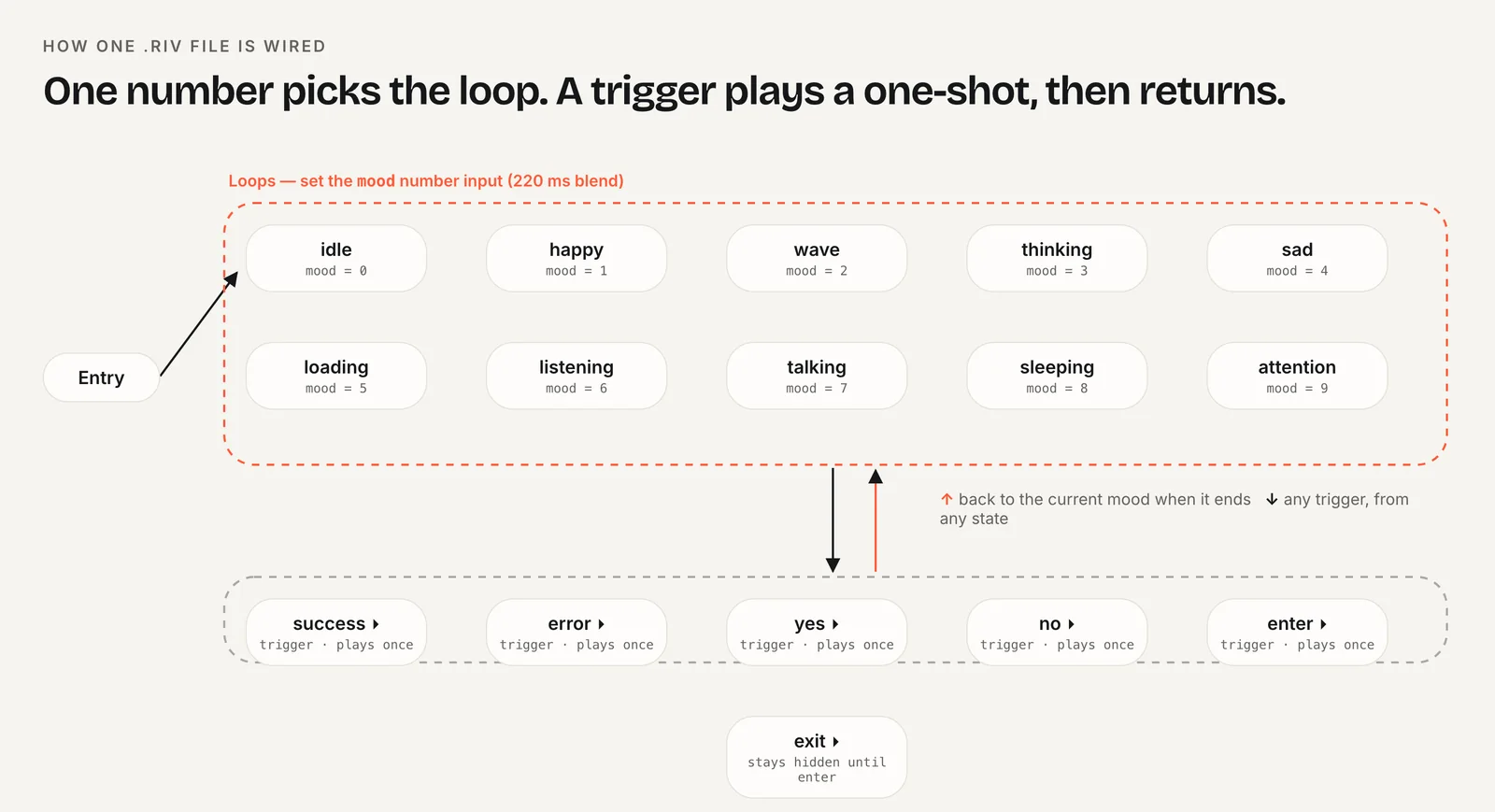
The .riv and a state contract. The GIFs were stand-ins; the build uses the real file, so developers need to know which state machine to run, which properties exist, what each value means and which screen event sets it. Put this next to the frame as a note or annotation:
File:           character.riv
Artboard:       default
State machine:  CharacterViewModelMachine   (autoBind: true)
View model:     Character
  mood (number) 0 idle, 1 happy, 2 wave, 3 thinking, 4 sad,
                5 loading, 6 listening, 7 talking, 8 sleeping, 9 attention
  triggers      success, error, yes, no, enter, exit
Screen events:
  Upload starts        -> mood = 5
  Upload succeeds      -> trigger success, then mood = 0
  Upload fails         -> trigger error, then mood = 4
  Empty inbox          -> mood = 8
Size:           120 x 120 pt, fit Contain
Reduced motion: autoplay off, show poster.png
Fallbacks:      poster.png, idle.mp4
What makes a contract useful:
- Exact names. State machine, view model and property names are case-sensitive in code.
- Events, not animations. Developers wire app events to inputs; the file decides how transitions look.
- Size and fit. The point size in the layout and how the artboard should fit it.
- Reduced motion and fallbacks. What to show when motion is off or the file fails to load.
Platform guides show the other side of the contract: data binding in SwiftUI, React and Next.js and the state machine overview.
How do I move mascot artwork from Figma into Rive?
Copy and paste. Rive's docs say "You can use Copy as SVG and paste it directly into the Rive editor," and Rive announced the workflow on its blog in February 2023. The paste becomes native Rive vector objects you can rig and animate.
- Flatten or outline effects Rive may not read the same way, and Rive's docs suggest converting such parts "to editable paths in your design tool" first.
- Name layers in Figma before copying; the names come along and make rigging easier.
- Paste one character at a time rather than a whole screen.
The "Rive for Figma" plugin from the forum thread is a community project, not an official Rive release, and it doesn't add prototype playback.
Which Charmotion exports work in Figma?
Charmotion delivers each of its 17 animations as separate files, which maps directly to one variant per state. The GIF (480 px, solid background) is in every Charmotion set and plays in the Figma mobile app; match the frame color to the GIF background or place it on a tile. The 1080×1080 MP4 suits video fills when you want smoother motion, and the 9:16 MP4 fits full-screen moments such as a launch. The .riv with its Character view model (mood 0 to 9 and success, error, yes, no, enter and exit triggers) plus web, React and SwiftUI code is the handoff file, so the contract above is mostly filled in already. The .riv is on every paid plan (from $20/month), along with the MP4, GIF and 9:16 launch video on a solid background.
How to prototype a mascot in Figma and hand off the Rive file
- Export stand-ins. Export one GIF or H.264 MP4 per state, all the same size with the character in the same place.
- Build the component. Create a mascot component with a variant per state and place each GIF or video in its variant.
- Wire states. Use Change to with taps, After delay and When video ends to switch variants.
- Review in presentation view. Play the prototype in presentation view, where GIFs animate.
- Write the contract. List the state machine, view model, properties, triggers and the screen events that set them next to the frame.
- Hand off. Attach the .riv and fallbacks, and link developers to the platform guide for their stack.
Frequently asked questions
Why isn't my GIF moving in Figma?
Figma only plays animated GIFs in presentation view. In the editor, its help center says they appear as static images. Open the prototype with the present button to see the animation. GIFs also can't be exported from Figma as animations; Figma exports them as static images.
Can I use a transparent WebM in a Figma prototype?
Figma lists .webm with VP8 encoding, while transparent character videos are usually VP9, and its video article doesn't mention alpha support. Use an H.264 MP4 or a GIF with a background that matches the frame, and keep the transparent files for the real build.
Do Figma prototype videos play on the Figma mobile app?
No. Figma's help center says videos are not currently supported in the Figma mobile app. If reviewers will open the prototype on their phones, use animated GIFs for the mascot states, which play in presentation view, or share a desktop link for video.
Quick answers from this guide
Sources
- Rive animation embed, Figma Forum
- Use videos in prototypes, Figma Learn
- Use animated GIFs in prototypes, Figma Learn
- Create interactive components with variants, Figma Learn
- Prototype triggers, Figma Learn
- SVG and vector assets, Rive
- Copy and paste from Figma to Rive, Rive