What Is Rive? Interactive Animation Explained
By the Charmotion team · Updated
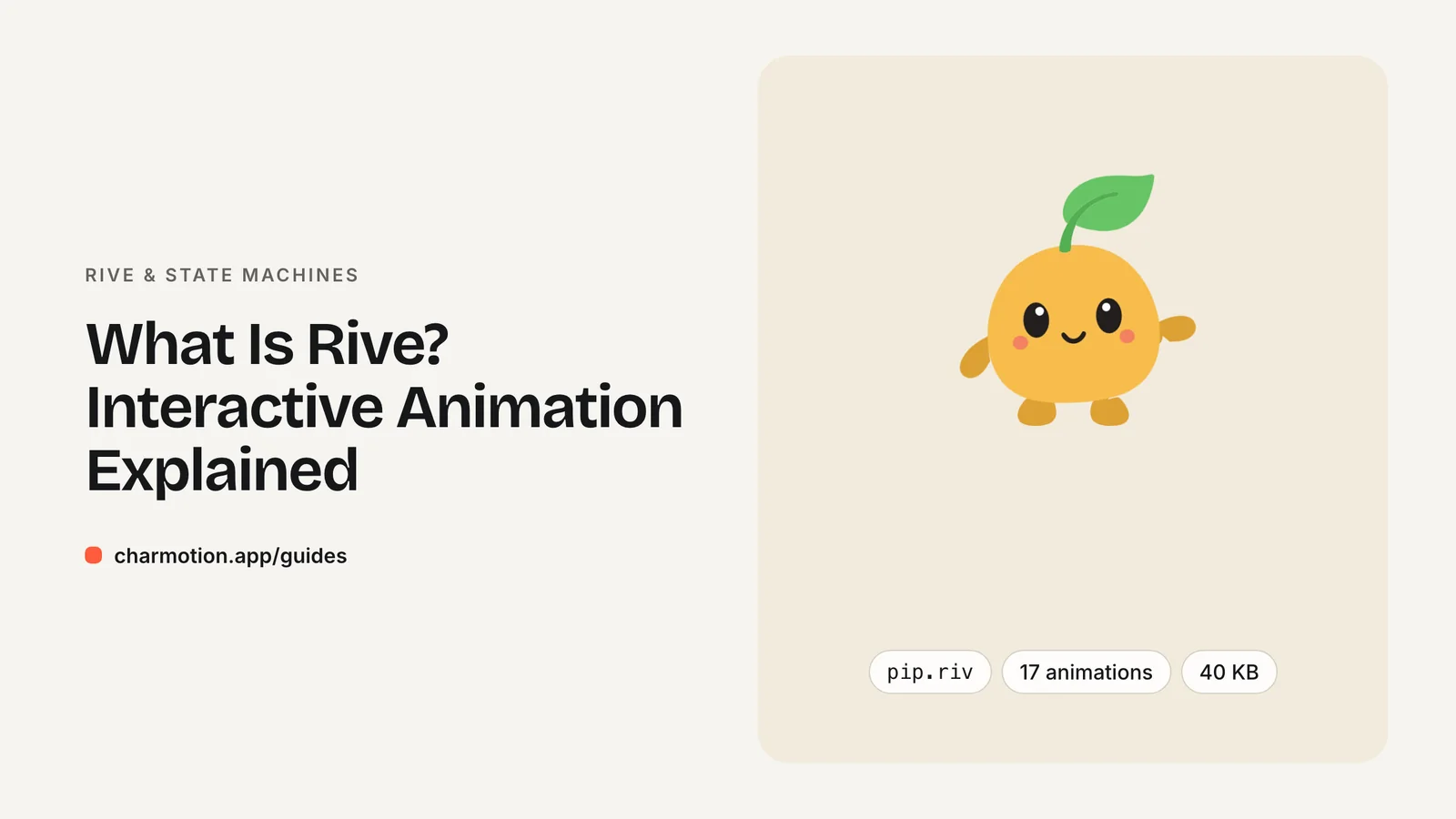
Rive is a tool for building interactive vector animations and a set of open-source runtimes that play them in apps and websites. You design in the Rive editor, export one .riv file, and your code drives its state machine to switch animations live in response to app state or user input.
Key takeaways
- Rive has two parts: a design editor and MIT-licensed runtimes.
- A .riv file can hold artboards, animations and state machines in one binary.
- Official runtimes cover web, React, iOS, Android, Flutter and React Native.
- Your code talks to the file through inputs (legacy) or data binding (current).
What is Rive?
Rive is an animation platform built for interactive graphics. It has two halves. The Rive editor is where designers draw shapes, rig characters with bones, keyframe animations and wire them together. The Rive runtimes are libraries that load the exported file inside your product and render it in real time.
The difference from a video or a GIF is that a Rive animation is not a fixed sequence of frames. The runtime draws vector shapes every frame, and a state machine inside the file decides which animation plays, how animations blend, and how they react to values your code sends. A mascot can idle, switch to a loading loop while a request runs, and play a success reaction when it finishes, all from one file.
That makes Rive a good fit for UI that responds: buttons, onboarding characters, assistant avatars, progress indicators and game HUDs. Duolingo, for example, uses Rive state machines to lip-sync its characters across courses. If all you need is a linear clip that never changes, a video file is usually simpler.
What is a .riv file?
A .riv file is the binary format the Rive editor exports and the runtimes read. It is a runtime file, not a project file: it contains everything needed to play the animation, but you do not edit it by hand.
One .riv can contain:
- Artboards — the canvases that hold the artwork. A file can have several.
- Timeline animations — keyframed clips such as an idle loop or a wave.
- State machines — graphs that pick which animations play and when.
- Inputs or view models — the interface your code uses to control the state machine.
Because the artwork is stored as vectors and the motion as keyframes, many animations can share the same shapes. That is why a single .riv holding a whole set of character states can be smaller than one short video of the same character.
To open a .riv for inspection, drop it into the Rive editor or load it with one of the runtimes. You need to know the names of its artboard, state machine and inputs to control it from code; the file's author should give you those.
Is Rive free for commercial use?
The runtimes are free. Rive states that all its official runtimes are open source under the MIT License and may be used in personal and commercial applications. Shipping a .riv inside your app does not require a Rive account or a paid plan on your side.
The editor is a separate product with its own plans. As of October 2026, Rive's pricing page (yearly billing shown by default) lists:
| Plan | Price per seat per month | Notes |
|---|---|---|
| Free | $0 | Editor and CLI, limited collaborative files |
| Cadet | $9 | Up to 3 seats |
| Voyager | $32 | Up to 25 seats |
| Enterprise | $120 | For companies with $10M+ annual revenue |
Some editor features are paid-only. Exporting video and image sequences (H.264, GIF, WebM, PNG or SVG sequences) from the editor requires a paid plan. Prices and plan limits change, so check the pricing page before you budget.
Are the Rive runtimes open source?
Yes, the runtimes are open source; the editor is not. The runtime source lives on GitHub under the rive-app organization, for example rive-wasm for the web packages and rive-react for React. You can read the code, file issues and pin versions like any other dependency.
The MIT License means you can ship the runtimes in closed-source commercial products. Your obligation is the usual one for MIT code: keep the license notice with the library.
The editor is a hosted commercial application. You can use it on the Free plan, but its source is not published. Licensing for the editor is covered by Rive's plans, not the MIT License. In practice this split matters little for developers: designers use the editor, and engineering only ever touches the open-source runtime and the exported file.
Which platforms can play a .riv file?
Rive maintains official runtimes for the main app and web platforms:
| Platform | Package |
|---|---|
| Web (JS) | @rive-app/webgl2, @rive-app/canvas, @rive-app/canvas-lite |
| React | @rive-app/react-webgl2, @rive-app/react-canvas, @rive-app/react-canvas-lite |
| iOS, macOS, tvOS, visionOS | RiveRuntime (Swift Package Manager or CocoaPods) |
| Android | app.rive:rive-android on Maven |
| Flutter | rive on pub.dev |
| React Native | @rive-app/react-native (Nitro-based; the older rive-react-native is deprecated) |
On the web, Rive now recommends @rive-app/webgl2 for most cases. It uses the Rive Renderer and supports features such as vector feathering, which the Canvas2D-based @rive-app/canvas does not yet support. Both expose the same API.
The same .riv file plays on every runtime, so one export can serve your website, iOS app and Android app. What differs is the code you write to load it and control its state machine, and which control APIs each runtime still supports.
Platform guides: React and Next.js, SwiftUI, and Android, Flutter and React Native.
How big is the Rive runtime?
The runtime adds a fixed cost to your app or page, separate from the size of your .riv files. Rive publishes these figures (last updated January 2026):
| Runtime | Uncompressed | Compressed / download |
|---|---|---|
Web canvas (WASM) | 1,728 KB | 567 KB brotli |
Web webgl2 (WASM) | 2,179 KB | 648 KB brotli |
Web canvas-lite (WASM) | 707 KB | 222 KB brotli |
| iOS | ~4.66 MB install | ~1.67 MB download |
| Android (ARM-v8a) | 7.03 MB install | 2.40 MB download |
The runtime is paid once. Every additional .riv file is usually small, so the trade-off improves as you add more animations. If a page shows a single decorative loop, a short video may be lighter overall; if it shows an interactive character with many states, Rive tends to win.
On the web, load the runtime lazily (only on pages that need it) so it does not block first paint. Browsers also cap WebGL contexts per page; if you render many Rive instances with webgl2, set useOffscreenRenderer: true so they share one context.
Do I need the Rive editor to use a Charmotion file?
No. Charmotion delivers a finished .riv, so you only need the free runtime for your platform. You upload a character, mascot or logo image, and Charmotion returns a set of 17 animations in one .riv file (about 35–45 KB for all 17; the demo character Pip is 40 KB), plus MP4, GIF and transparent WebM/MOV versions and paste-ready web, React and SwiftUI code.
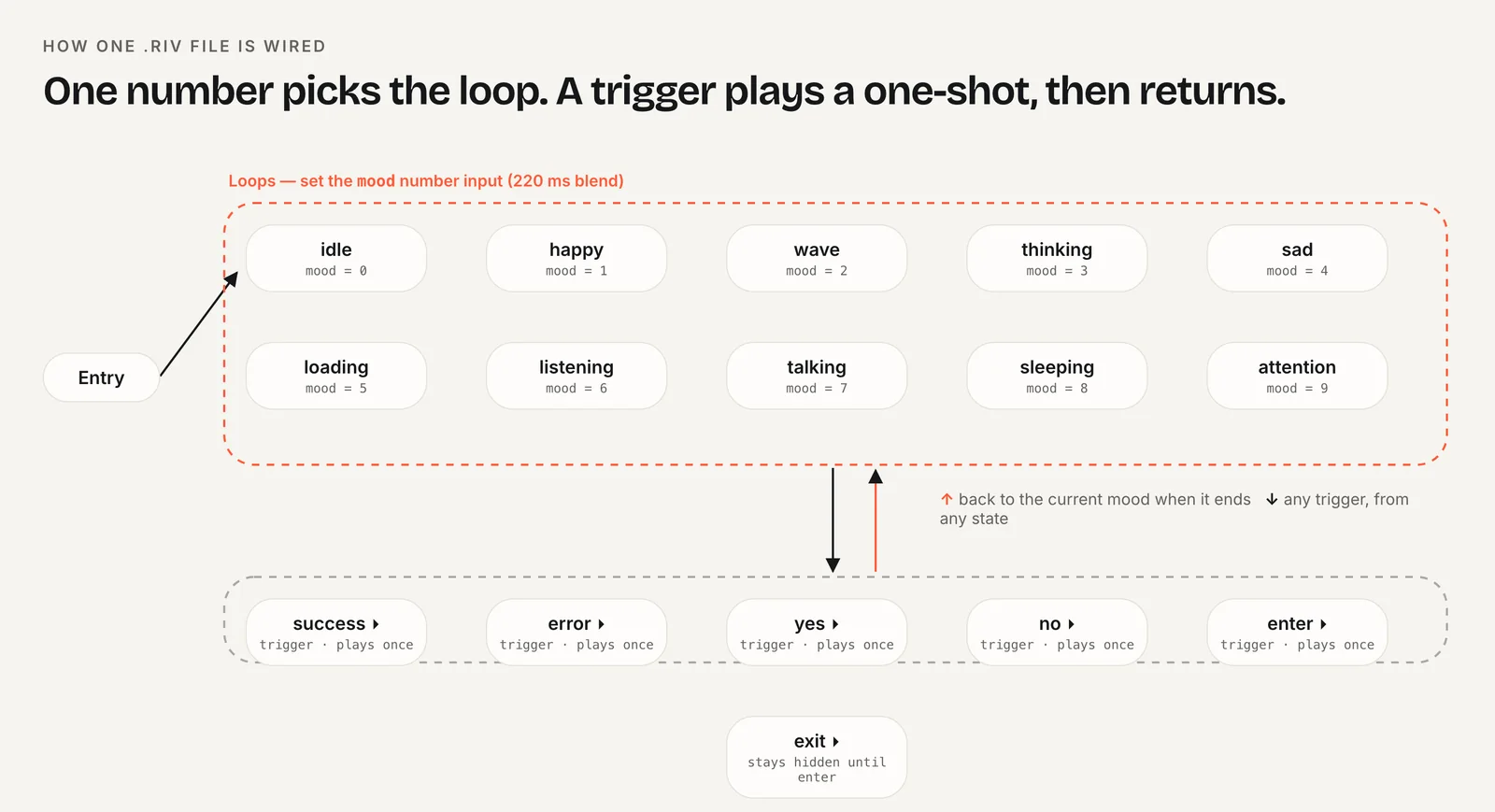
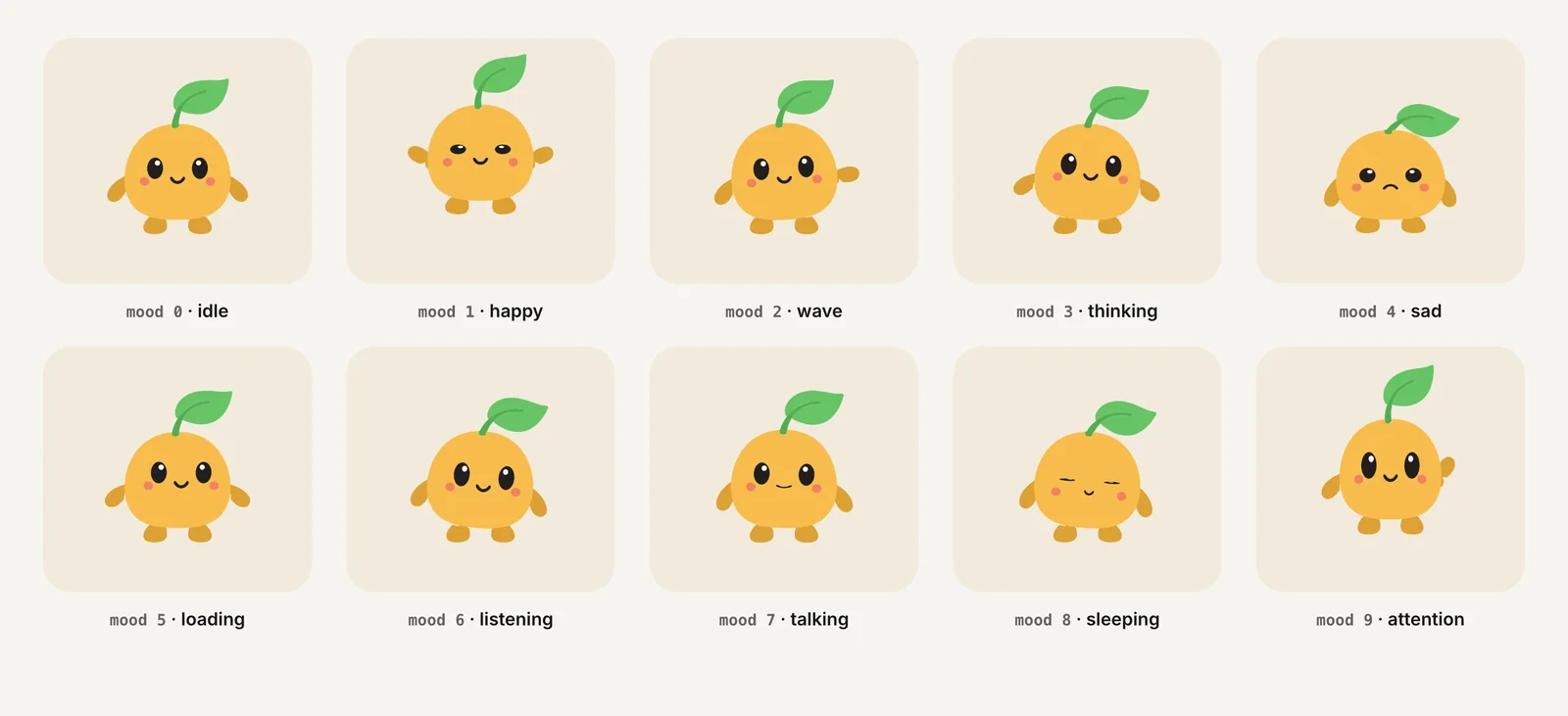
The file contains a state machine called CharacterStateMachine. A number input named mood selects one of 10 loops, and triggers such as success and error play one-shot reactions. A second state machine, LaunchStateMachine, plays a launch intro once and then idles. The state machine guide explains the wiring in detail.
Charmotion files support both control systems. CharacterViewModelMachine is driven by a Character view model (Data Binding: a mood number plus one trigger per reaction), which is what the new Apple runtime and React Native Nitro v0.6+ need. CharacterStateMachine, the default, exposes the same states as legacy inputs for the web, React, Android, Flutter and legacy Apple runtimes.
Frequently asked questions
Is Rive better than GIF or video?
Rive is better when the animation must react to state or input, because one file holds many animations controlled by code. Video is simpler for a fixed clip that never changes, and it needs no runtime. GIF is the weakest option for quality and size; use it only where video and Rive cannot play.
Can I open a .riv file without the editor?
Yes, any official Rive runtime can load and play a .riv file. To edit the artwork or the state machine you need the Rive editor. For controlling playback from code, all you need are the names of the artboard, state machine and inputs or view model properties inside the file.
Does Rive work offline?
Yes. The runtimes render locally, so a .riv bundled with your app or served from your own domain plays without any connection to Rive. Nothing is fetched from Rive's servers at runtime unless you choose to load the file from a remote URL yourself.
What are Rive state machine inputs and data binding?
They are the two ways code controls a Rive file. Inputs are numbers, booleans and triggers on a state machine; Rive now marks them deprecated but existing files keep working. Data binding uses view models with richer property types and is what Rive recommends for new work.
Sources
- Runtimes: Getting started — Rive
- Canvas vs WebGL2 — Rive
- Runtime sizes — Rive
- Rive pricing — Rive
- Exporting for video and static design — Rive
- Feature support — Rive
- Data binding migration guide — Rive
- How Duolingo animates world characters — Duolingo