Rive Data Binding in SwiftUI (New Apple Runtime)
By the Charmotion team · Updated
To use Rive data binding in SwiftUI, create a Worker and File, make a view model instance with file.createViewModelInstance, bind it with artboard.createStateMachine(name, binding: instance), and render Rive(file:artboard:stateMachine:) through RiveUIViewRepresentable(rive:). Keep the instance, then call setValue(of:to:) and fire(trigger:) on it.
Key takeaways
- The new Apple runtime arrived in rive-ios 6.24.0 and uses Swift Concurrency; every call is
asyncand runs on the main actor. - It has no state machine inputs. Numbers, booleans and triggers live in a view model you bind explicitly.
- Retain the
ViewModelInstanceyourself: the state machine has no getter for bound instances. NumberProperty.ValueisFloat, so convert anIntmood withFloat(mood).- Do not use the deprecated
Rive(file:…dataBind:)initializer for new code.
What changed in the new Rive Apple runtime?
Rive's Apple package (RiveRuntime, from rive-app/rive-ios) now contains two APIs. The legacy runtime is built around RiveViewModel and is, in Rive's words, "currently single-threaded on the main thread." The new runtime, introduced in version 6.24.0, is "a Swift-first API leveraging Swift Concurrency, with improved multi-threading support." At the time of writing the latest release is 6.28.1 (October 8, 2026); 6.28.0 added global view models and blob data binding.
Three differences matter in practice:
- Everything is asynchronous. Creating a worker, a file, an artboard, a state machine and the
Riveobject all usetry await. Rive still requires the calls to be made on the main actor; the heavy work happens on the worker's background thread. - No inputs, events or linear animations. The migration guide lists state machine inputs and event listeners as legacy-only, with "no current plans to reintroduce" them. Linear animations must be wrapped in a state machine.
- Data binding is the contract. Your code talks to a view model instance through typed properties (
NumberProperty,TriggerPropertyand so on) addressed by path.
If your .riv only exposes inputs, either stay on the legacy runtime (see Rive in SwiftUI) or use the editor's Menu → Convert Inputs to ViewModels first.
How do Worker, File, Artboard and Rive fit together?
The new runtime splits what RiveViewModel used to do into five objects. Each one is created from the previous one:
| Object | Created with | Job |
|---|---|---|
Worker | try await Worker() | Owns the background thread and shared out-of-band assets (images, fonts, audio). |
File | try await File(source:worker:) | The parsed .riv. Sources are .local(name, bundle), .url(URL) or .data(Data). |
Artboard | try await file.createArtboard() | The canvas to draw; pass a name for a non-default artboard. |
StateMachine | try await artboard.createStateMachine(name, binding: instance) | Runs the logic and reads the bound view model instance. |
Rive | try await Rive(file:artboard:stateMachine:) | The view configuration (fit, background) handed to the view. |
Rive's docs say a Worker "must be alive for the duration of Rive usage" and that a File keeps a strong reference to its worker. One worker roughly equals one background thread; for several heavy graphics you can give each file its own worker, or share one worker so files share registered assets.
Note the initializer: the source code exposes Worker() and Worker(configuration:). Some migration snippets show Worker.shared(), which is an app-level helper in Rive's example, not part of RiveRuntime.
How do I create a view model instance and bind it to a state machine?
Create the instance from the file, then pass it to createStateMachine(_:binding:). .viewModelDefault(from: .artboardDefault(artboard)) means "the default instance of the view model assigned to this artboard." Other sources are .blank(from:) and .name(_:from:) for a named instance, and ViewModelSource.name("Character") selects a view model by name.
Put the setup in an observable model so the instance outlives the view body:
import SwiftUI
import RiveRuntime

@MainActor
final class CharacterModel: ObservableObject {
    @Published private(set) var rive: Rive?
    private var instance: ViewModelInstance?

    private let mood = NumberProperty(path: "mood")

    func load() async {
        guard rive == nil else { return }
        do {
            let worker = try await Worker()
            let file = try await File(source: .local("character", Bundle.main), worker: worker)
            let artboard = try await file.createArtboard()
            let instance = try await file.createViewModelInstance(
                .viewModelDefault(from: .artboardDefault(artboard))
            )
            let stateMachine = try await artboard.createStateMachine(
                "CharacterViewModelMachine",
                binding: instance
            )
            self.instance = instance
            rive = try await Rive(file: file, artboard: artboard, stateMachine: stateMachine)
        } catch {
            print("Rive setup failed: \(error)")
        }
    }

    func setMood(_ value: Int) {
        instance?.setValue(of: mood, to: Float(value))
    }

    func fire(_ trigger: String) {
        instance?.fire(trigger: TriggerProperty(path: trigger))
    }
}

struct CharacterView: View {
    @StateObject private var model = CharacterModel()

    var body: some View {
        RiveUIViewRepresentable(rive: model.rive)
            .frame(width: 240, height: 240)
            .accessibilityLabel("Animated character")
            .task { await model.load() }
    }
}
RiveUIViewRepresentable takes an optional Rive, so the view can appear before loading finishes. The initializer is labeled (rive:) in the source, even though some doc snippets omit the label. If you prefer to keep loading inside the view, AsyncRiveUIViewRepresentable { … } takes an async closure that returns a Rive; you then need another way to keep the instance.
Set initial values before the view is presented when you can. Rive's migration guide notes this avoids a frame showing the file's defaults.
How do I set the mood number and fire triggers from SwiftUI?
Setting a property queues the change and returns immediately; unlike the legacy runtime, you do not call play() afterwards. Triggers have no value, so you fire them:
struct UploadScreen: View {
    @StateObject private var character = CharacterModel()

    var body: some View {
        VStack(spacing: 24) {
            RiveUIViewRepresentable(rive: character.rive)
                .frame(width: 220, height: 220)
            Button("Upload") { Task { await upload() } }
        }
        .task { await character.load() }
    }

    private func upload() async {
        character.setMood(5)                       // loading loop
        let ok = await performUpload()
        character.fire(ok ? "success" : "error")   // one-shot reaction
        character.setMood(0)                       // back to idle
    }
}
Because the state machine owns transitions, your code only says what the app is doing. A well-built file lets a trigger's one-shot finish and then returns to whichever loop mood currently selects.
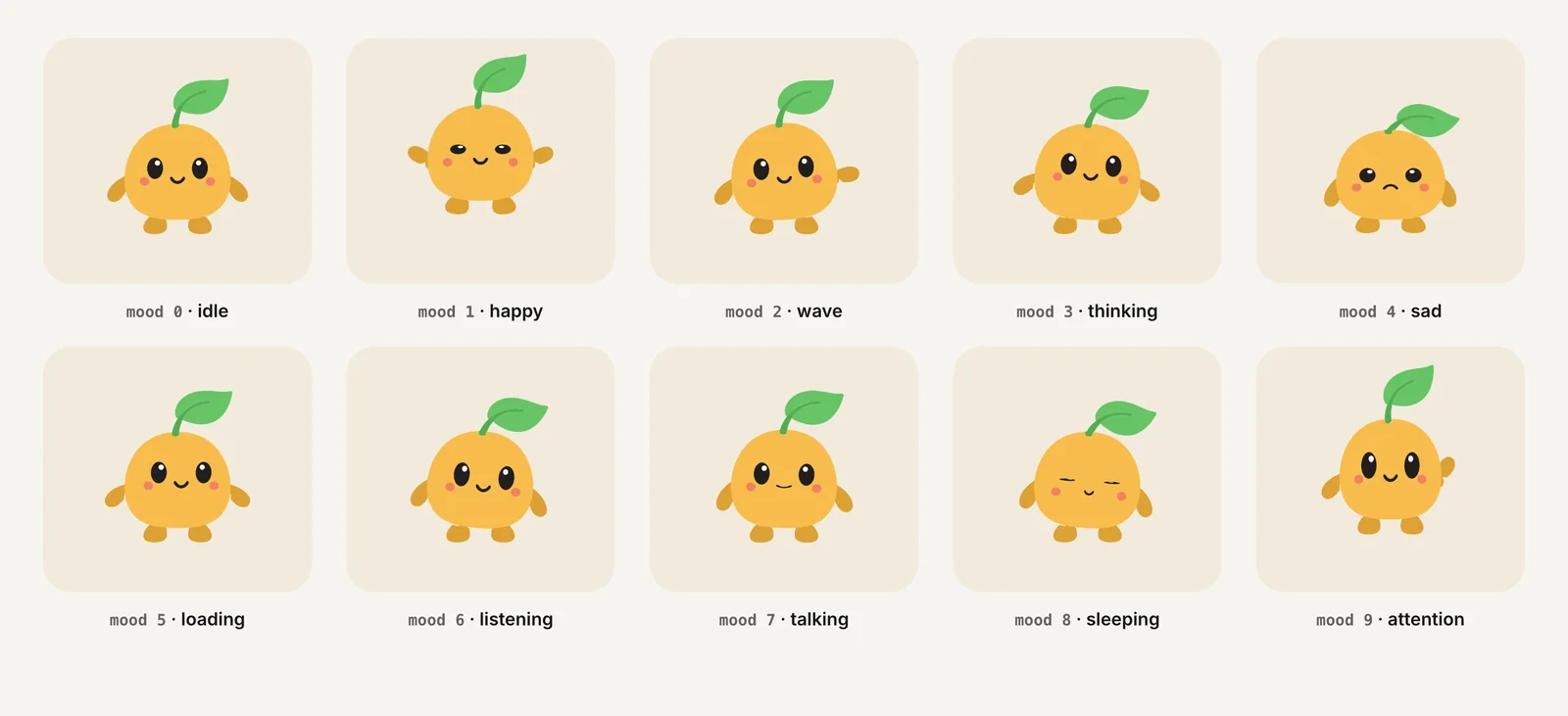
Charmotion files use exactly this contract: a Character view model on CharacterViewModelMachine, with these values. Each set also ships a ready-made {Name}NewRuntimeView.swift for this runtime and a {Name}View.swift for the legacy RiveViewModel.
mood | Loop | mood | Loop |
|---|---|---|---|
| 0 | idle | 5 | loading |
| 1 | happy | 6 | listening |
| 2 | wave | 7 | talking |
| 3 | thinking | 8 | sleeping |
| 4 | sad | 9 | attention |
Triggers: success, error, yes, no, enter, exit.
How do I observe a property change coming back from Rive?
Data binding is two-way: the state machine can change a property, for example when the user taps a hit area in the artboard. String, number, boolean, color and enum properties expose valueStream(of:); triggers expose stream(of:), which emits Void each time the trigger fires. Reading once uses try await instance.value(of:).
extension CharacterModel {
    func watchMood() async {
        guard let instance else { return }
        do {
            for try await value in instance.valueStream(of: NumberProperty(path: "mood")) {
                print("mood is now \(Int(value))")
            }
        } catch {
            print("Stream ended: \(error)")
        }
    }

    func waitForSuccess() async throws {
        guard let instance else { return }
        for try await _ in instance.stream(of: TriggerProperty(path: "success")) {
            break   // first fire is enough
        }
    }
}
Start these loops from .task so SwiftUI cancels them when the view disappears. Rive's docs say the thrown error is a ViewModelInstanceError. You do not need the deprecated dirtyStream() to trigger redraws; the controller redraws after changes to bound instances on its own.
The new runtime has no state-name callback like the legacy RiveStateDelegate. If your app needs to know "the intro finished," model it as a trigger or string property in the file and observe that.
Why is my binding not updating?
Most "nothing happens" reports come down to one of these:
- The instance was not retained. If the
ViewModelInstanceis a local variable in a function, it is gone once setup returns. Rive's docs: "Retain references to any supplied instances you need to read or modify after binding. Bound instances cannot be retrieved through the state machine." - You bound one instance and set another. Creating a second instance with
createViewModelInstancegives you an unbound copy. Setting values on it changes nothing on screen. - You used
Rive(file:)and then looked for the instance. The convenience initializers bind the authored default instance, which you cannot retrieve; the deprecatedrive.viewModelInstancegetter returnsnilwith the current initializers. - Wrong path or type. Paths are case-sensitive and nested properties use slashes (
"settings/volume"). A number in the file must be read withNumberProperty, notStringProperty. - Wrong state machine name.
createStateMachinethrowsArtboardError.invalidStateMachineif the name does not exist. Do not swallow that error silently. - Calls off the main actor. The APIs are
@MainActor. Mark your model@MainActor, as above, and the compiler enforces it.
To inspect an unknown file, file.getViewModelNames(), file.getProperties(of:) and file.getDefaultViewModelInfo(for:) return what the file actually contains.
Which platforms does the new runtime support?
Both runtimes ship in the same package, so they share its minimum versions. The Package.swift manifest declares:
platforms: [.iOS("14.0"), .visionOS("1.0"), .tvOS("16.0"), .macOS("13.1"), .macCatalyst("14.0")]There is no watchOS entry, so treat Apple Watch as unsupported even though one migration page summary has suggested otherwise. See character animation on watchOS and visionOS for alternatives.
The view type is RiveUIView, a Metal-backed UIView (an NSView on macOS). RiveUIViewRepresentable wraps it for SwiftUI and adds modifiers: .paused(_:), .frameRate(_:) (.default, .fps(30) or a .range) and .semantics(_:) for VoiceOver semantics authored in the editor, which only the new runtime supports.
Should I still use RiveViewModel and state machine inputs?
Use the legacy runtime when you have a file that only has inputs and you cannot change it, when you rely on Rive events, or when you target a deployment path you have already shipped and tested. It still ships, and setInput and triggerInput still work there.
For new work, Rive positions the new runtime as the direction. A practical migration path:
- Convert inputs to view models in the editor, keeping the same names (
mood,success). - Replace
RiveViewModel(fileName:stateMachineName:)with the Worker → File → Artboard → StateMachine → Rive chain. - Replace
viewModel.view()withRiveUIViewRepresentable(rive:). - Replace
setInput("mood", value:)withsetValue(of: NumberProperty(path: "mood"), to:)andtriggerInputwithfire(trigger:). - Replace
pause()with.paused(true)andsetPreferredFramesPerSecondwith.frameRate(.fps(30)).
UIKit screens follow the same mapping with RiveUIView; see Rive in UIKit.
Bind a Rive view model in SwiftUI
- Add the package. Add
https://github.com/rive-app/rive-ioswith Swift Package Manager (6.24.0 or later) and bundle your .riv in the app target. - Load the file. In a
@MainActormodel, createtry await Worker()andFile(source: .local("character", Bundle.main), worker:). - Create and retain an instance. Call
file.createViewModelInstance(.viewModelDefault(from: .artboardDefault(artboard)))and store the result in a property. - Bind it. Create the state machine with
artboard.createStateMachine("CharacterViewModelMachine", binding: instance), thenRive(file:artboard:stateMachine:). - Render. Place
RiveUIViewRepresentable(rive: model.rive)with a frame and load it from.task. - Drive it. Call
setValue(of: NumberProperty(path: "mood"), to: Float(5))for loops andfire(trigger: TriggerProperty(path: "success"))for one-shots.
Frequently asked questions
Does the new Rive Apple runtime support setInput?
No. State machine inputs exist only in the legacy runtime, and Rive says there are no plans to bring them back. Convert inputs to view model properties in the editor, keep the same names, and use NumberProperty, BoolProperty and TriggerProperty on a bound view model instance instead.
Why does my NumberProperty setValue not compile with an Int?
NumberProperty's value type is Float. Passing an Int variable fails type checking, so convert it: instance.setValue(of: NumberProperty(path: "mood"), to: Float(mood)). A literal such as 5 works because Swift infers it as Float. Reading the value back with value(of:) or valueStream(of:) also returns a Float, so convert with Int(value) when you map it to an enum.
Is Rive(file:artboard:stateMachine:dataBind:) still okay to use?
It compiles but is deprecated, and the source says it will be removed in a future release. Create and retain the view model instance yourself, bind it with artboard.createStateMachine(name, binding: instance), and then use the Rive initializer without dataBind. That also gives you the instance reference you need for setValue and fire.
Can I use one Worker for several Rive files?
Yes. Files created with the same Worker share its background thread and any out-of-band assets registered on it. Rive suggests separate workers when several heavy graphics should each get their own thread. Either way, keep the worker alive as long as its files are in use.
Quick answers from this guide
Sources
- Apple runtime (new and legacy) — Rive
- Apple runtime: Data binding — Rive
- Migrating from the legacy Rive Apple runtime — Rive
- Artboard.swift (createStateMachine) — Rive (GitHub)
- ViewModelInstance.swift — Rive (GitHub)
- Rive.swift — Rive (GitHub)
- RiveUIViewRepresentable.swift — Rive (GitHub)
- rive-ios Package.swift — Rive (GitHub)