GIF vs WebM vs MP4 vs Lottie vs Rive
By the Charmotion team · Updated
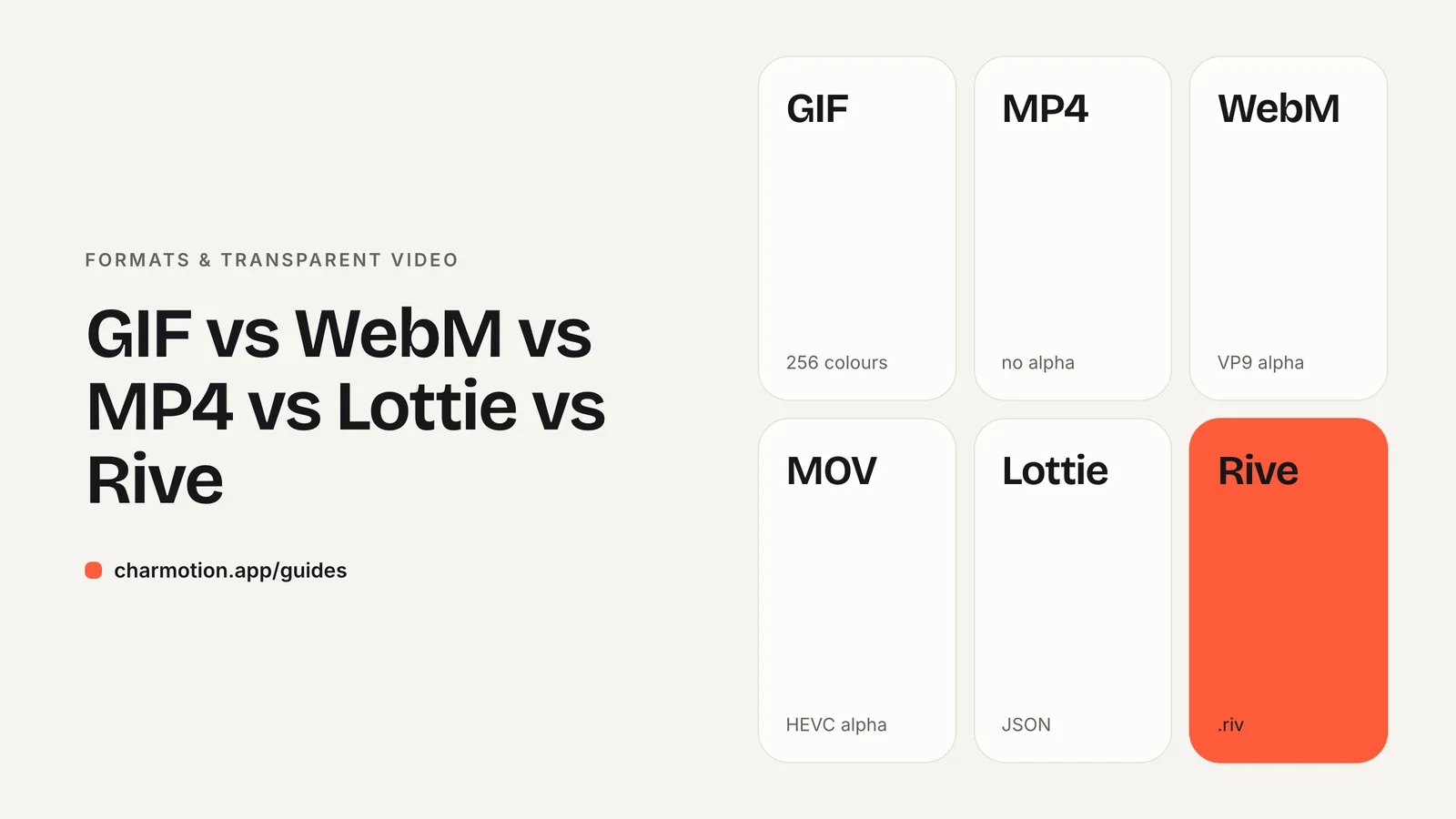
Use MP4 for social posts, decks and anywhere video is accepted; use GIF only where video cannot play, such as many email clients. Use VP9 WebM plus HEVC MOV for transparent web overlays, and Rive or Lottie for interactive, state-driven animation inside apps and sites. GIF is the heaviest and lowest-quality option.
Key takeaways
- GIF is limited to 256 colors and 1-bit transparency, and is usually several times larger than video.
- MP4 (H.264) plays almost everywhere but cannot be transparent.
- Transparent web video needs two files: VP9 WebM for Chromium and Firefox, HEVC MOV for Safari.
- Rive and Lottie are vector formats played by a runtime; both now support state machines.
- Pick by destination: where it plays, whether it needs transparency, and whether it must react to the user.
Which animation format should I use?
Start with where the animation will play, then whether it needs a transparent background, then whether it must respond to the user. That usually narrows the choice to one or two formats.
| Format | Transparency | Interactivity | Typical use | Support |
|---|---|---|---|---|
| GIF | 1-bit only (on or off) | None | Email, chat, legacy embeds | Universal |
| MP4 (H.264) | None | None | Social, slides, product videos, opaque web loops | Universal |
| WebM (VP9) | Full alpha | None | Transparent web overlays | Chrome, Edge, Firefox; Safari plays it without alpha |
| MOV (HEVC alpha) | Full alpha | None | Transparent video for Safari, iOS and Apple apps | Apple platforms (iOS 13+, macOS Catalina+) |
| Lottie / dotLottie | Yes (vector) | Yes, with dotLottie state machines | UI icons and illustrations from After Effects | Web, iOS, Android, React Native, Windows players |
| Rive (.riv) | Yes (vector) | Yes, built-in state machine | Interactive characters and UI in apps and sites | Web, React, Apple, Android, Flutter, React Native runtimes |
Video formats are self-contained: any player shows them with no extra code. Lottie and Rive need a runtime library, but in exchange they scale to any size without blur and can react to app state.
What are GIF's limitations?
GIF is an indexed-color format. Each frame uses a palette of at most 256 colors, so gradients, soft shadows and 3D-rendered artwork band or dither visibly.
Its transparency is binary. MDN describes it as one palette index that is fully transparent, with no partial alpha. Every edge pixel is either fully opaque or fully see-through, which leaves a jagged or haloed outline when the GIF sits on a background different from the one it was made for.
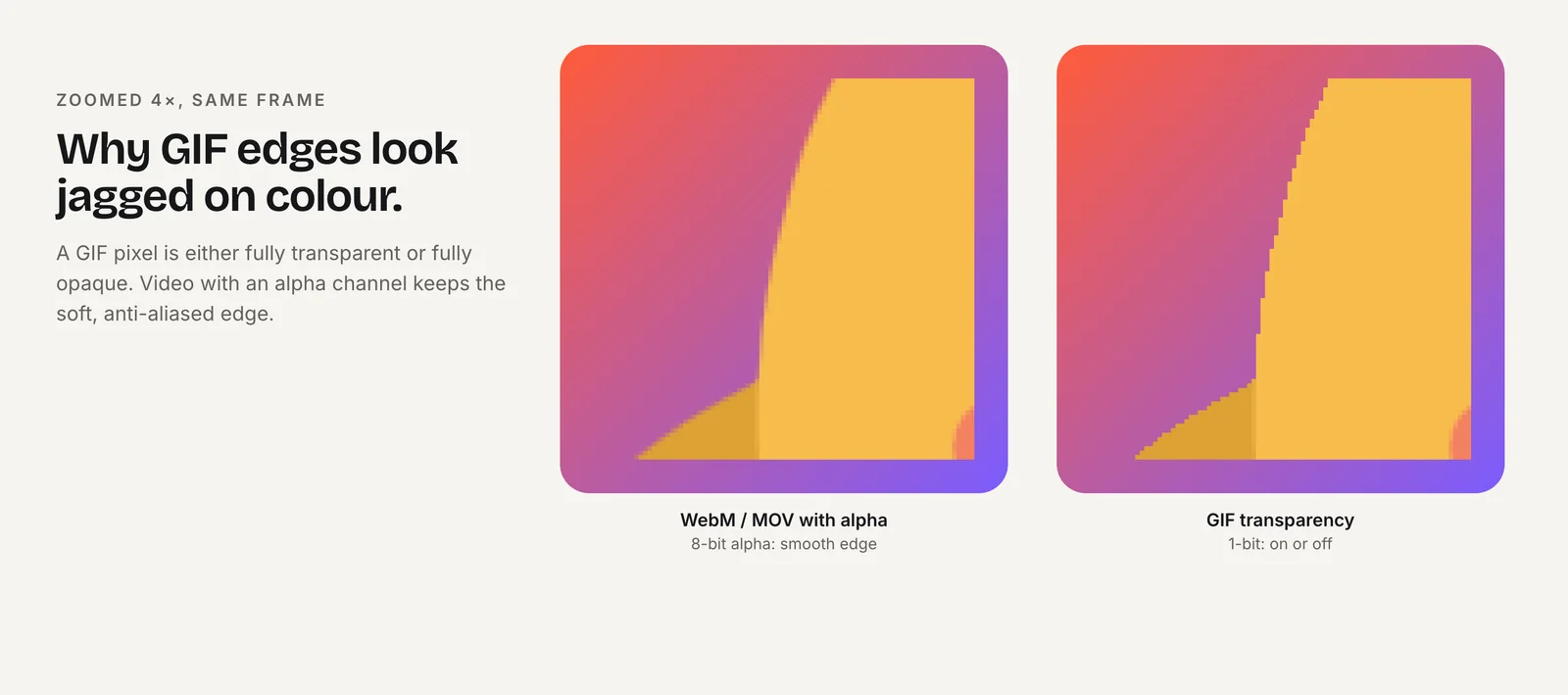
GIF also compresses poorly for motion. In web.dev's example, a 3.7 MB GIF became a 551 KB MP4 and a 341 KB WebM. MDN recommends modern formats such as animated WebP, AVIF or APNG for image sequences on the web.
GIF still wins on one thing: it plays nearly everywhere an image can be shown, including email clients and older chat tools that will not play video.
Why is video smaller than GIF?
Modern video codecs store mostly what changes between frames, using motion prediction and lossy compression tuned to how people see. GIF compresses each frame on its own with lossless LZW and a limited palette, so a short clip at a reasonable size gets heavy fast.
web.dev's guidance is to replace animated GIFs with a video that behaves like one:
<video autoplay loop muted playsinline poster="/media/loop.jpg">
  <source src="/media/loop.webm" type="video/webm">
  <source src="/media/loop.mp4" type="video/mp4">
</video>
Those four attributes reproduce GIF behavior: start on load, repeat, stay silent, and play inside the page on iPhone. Muted autoplay is allowed in Chrome and iOS Safari.
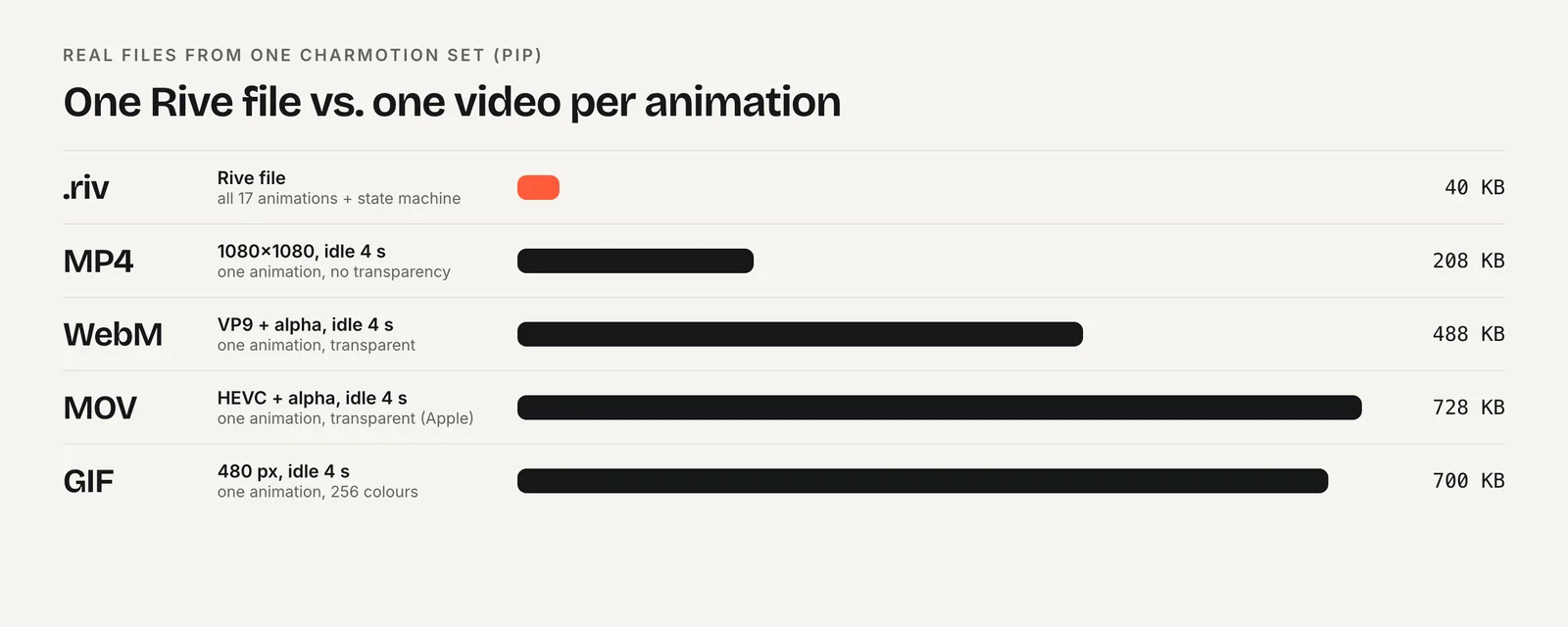
Real numbers from one Charmotion set show the same pattern. A 4-second idle loop is 208 KB as a 1080×1080, 60 fps MP4 and 700 KB as a 480 px GIF, so the GIF is over three times larger at less than half the width.
Which formats support transparency?
Five of the six formats can be transparent, but in very different ways:
- VP9 (or VP8) WebM carries a full alpha channel. Chrome, Edge and Firefox render it; Safari plays the video but drops the alpha.
- HEVC with alpha in a .mov carries a full alpha channel on Apple platforms, including Safari on iOS 13+ and macOS Catalina+.
- Rive and Lottie draw vector shapes on a transparent canvas, so transparency is the default.
- GIF supports only one fully transparent color, which gives hard edges.
- H.264 MP4 has no alpha channel at all.
For a transparent video that works in every major browser, serve the HEVC file first and the WebM second inside one <video> element. The full markup and encoding commands are in Transparent Video on Websites.
When is Rive or Lottie better than video?
When the animation has to respond. A video can only play, pause and seek. A Rive or Lottie file can switch states based on input from your code: a mascot that loops while loading, then plays a success reaction when the request finishes.
Lottie renders After Effects animations exported as JSON with the Bodymovin plugin, with players for web, iOS, Android, React Native and Windows. The dotLottie (.lottie) container compresses that JSON and can bundle several animations, themes and state machines. LottieFiles added no-code state machines to Lottie Creator in 2025, so "Lottie isn't interactive" is no longer accurate.
Rive files are designed in the Rive editor and exported as a binary .riv with a state machine at the core of the format. Rive's official runtimes are open source under the MIT License. Rive's blog cites a 240 KB Lottie recreated as a 16 KB .riv; that is a vendor example, not an independent benchmark.
Both need a player. Rive's web runtime is roughly 222–648 KB brotli-compressed depending on the package, so for a single decorative loop, video is often lighter overall. For a deeper comparison see Rive vs Lottie.
Which format for email, social, slides and apps?
- Social posts and ads: MP4. MP4 at 1080×1080 or 9:16 is accepted everywhere.
- Slides and docs: MP4 for quality. Use GIF only if the tool will not embed video.
- Email: GIF, because many email clients do not play video. Keep it short and small, and make the first frame work as a still.
- Opaque web loops: MP4 (and optionally WebM) in a
<video autoplay loop muted playsinline>element instead of a GIF. - Transparent web overlays: HEVC MOV plus VP9 WebM.
- Interactive web and app UI: Rive or Lottie, driven by your code. See Rive in React and Next.js and Rive in SwiftUI.
If you are unsure, start with the destination's strictest constraint. Email rules out video, a transparent overlay rules out MP4, and a reaction to user input rules out every video format. Whatever is left is usually the answer.
Most products end up shipping more than one. A mascot might live in the app as a Rive file, on the marketing site as a transparent video, and in onboarding emails as a GIF. Keeping every export generated from the same source avoids drift between them.
Frequently asked questions
Is WebM better than MP4?
For the web, WebM (VP9) often compresses better and supports alpha transparency, while H.264 MP4 has the widest compatibility and no transparency. Serve WebM and MP4 together and let the browser choose. For social media and slides, MP4 is the safer single choice.
Why does my transparent GIF have a white or jagged edge?
GIF supports only 1-bit transparency, so each pixel is fully opaque or fully transparent. Anti-aliased edges get baked against the background color used at export. Use a transparent WebM plus HEVC MOV, or a vector format like Rive or Lottie, for clean edges.
Can Lottie animations be interactive?
Yes. Lottie players have long exposed playback control, and since 2025 LottieFiles' Lottie Creator can build no-code state machines that ship inside a dotLottie file and run in the dotLottie player. Rive offers similar logic through its built-in state machine.
Is a Rive file always smaller than a video?
The .riv itself is usually much smaller, often tens of kilobytes for many animations. But the web runtime adds roughly 222–648 KB compressed, per Rive's size table. For one short decorative loop, an MP4 can be lighter overall; for many states, Rive usually wins.
Sources
- Image file type and format guide — MDN Web Docs
- Replace animated GIFs with video for faster page loads — web.dev
- Video with alpha transparency on the web — Jake Archibald
- Alpha transparency in Chrome video — Chrome for Developers
- lottie-web — Airbnb on GitHub
- dotLottie: the open format — LottieFiles
- State machines are finally in Lottie Creator — LottieFiles
- Runtime sizes — Rive