Telegram Mini App Mascot: Loading Screen, Themes and Haptics
By the Charmotion team · Updated
Telegram's own Mini App loading screen takes a placeholder SVG icon plus light and dark background and header colors, set in @BotFather; Telegram documents no animated option. To show an animated mascot, draw the SVG as the character's resting pose, call Telegram.WebApp.ready() when your Rive file has loaded, and play the intro inside the web app in matching colors.
Key takeaways
- Loading screen settings live in @BotFather under Bot Settings, Configure Mini App; the API stores an SVG placeholder and four colors.
ready()hides Telegram's placeholder; if you never call it, the placeholder stays until the page has fully loaded.- Set the BotFather background colors to your app's own background so the hand-off from placeholder to intro has no flash.
- Use
themeParams, the--tg-theme-*CSS variables and thethemeChangedevent to match Telegram's theme. - Pair reactions with
HapticFeedback(Bot API 6.1+):notificationOccurredfor success and error, a lightimpactOccurredfor taps.
Already have a character or logo? See your character in real app screens: splash, onboarding, loading and empty-state screens. It's free, runs in your browser and uploads nothing.
Can I customize the Telegram Mini App loading screen?
Partly. Telegram's Mini Apps page says apps "can customize their loading screen, adding their own icon and specific colors for light and dark themes," configured in @BotFather via /mybots, your bot, Bot Settings, Configure Mini App, Enable Mini App. The Telegram API documentation lists what is stored, in the botAppSettings object:
| Field | What it is |
|---|---|
placeholder_path | The SVG placeholder logo |
background_color, background_dark_color | Loading screen background, light and dark |
header_color, header_dark_color | Header color, light and dark |
Neither page mentions animation for the placeholder, so treat it as a still image. The loading screen ends when your code says so. Telegram describes ready() as the method that "informs the Telegram app that the Mini App is ready to be displayed," adding: "Once this method is called, the loading placeholder is hidden and the Mini App is shown. If the method is not called, the placeholder will be hidden only when the page is fully loaded."
How do I hand off from the static placeholder to an animated intro?
Make the two screens look like one. The placeholder shows while your page and the Rive file load; when the file is ready, call ready() and start the intro on the same background, from the same pose.
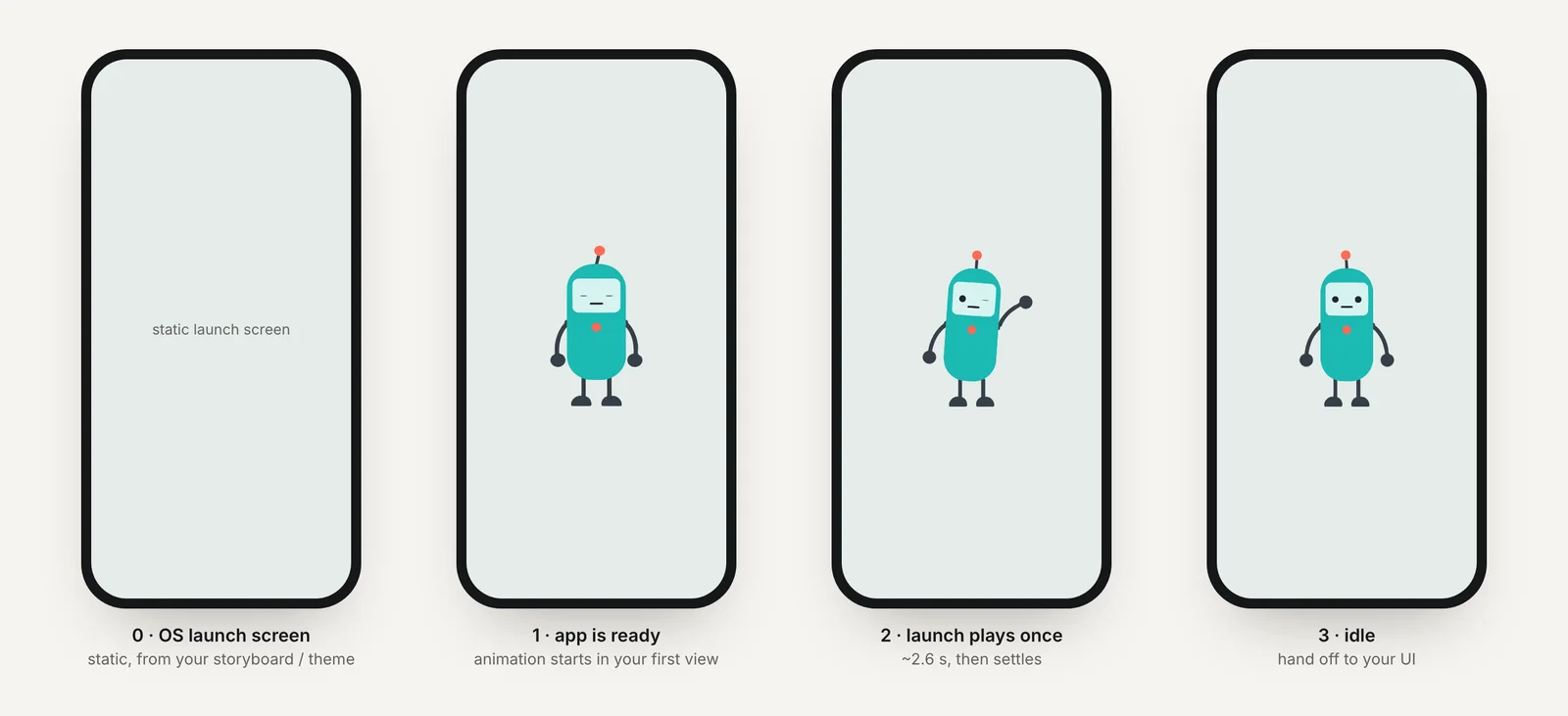
- Draw the SVG as the resting pose (or a simple silhouette of it), centered, so the first frame of the intro picks up where the placeholder left off.
- Use identical colors. Set BotFather's light and dark backgrounds to the colors your page uses for its background in each theme.
- Call
ready()in the RiveonLoad, then play the intro, then switch to the interactive character. - Don't keep the placeholder on screen too long. Telegram recommends calling
ready()"as early as possible," so set a short timeout of your choosing and skip the intro if the file is slow.
<head>
  <script src="https://telegram.org/js/telegram-web-app.js?64"></script>
  <style>
    body { margin: 0; background: var(--tg-theme-bg-color, #ffffff); }
    #mascot { width: 220px; height: 220px; display: block; margin: 48px auto 0; }
  </style>
</head>
<body>
  <canvas id="mascot" role="img" aria-label="Mascot"></canvas>
  <script src="/vendor/rive-canvas-2.47.1.js"></script>
  <script src="/app.js"></script>
</body>
const tg = window.Telegram.WebApp;
const canvas = document.getElementById("mascot");
const INTRO_MS = 2600; // the launch intro fires no end event
let shown = false;
function show() { // hide Telegram's placeholder exactly once
if (shown) return;
shown = true;
tg.ready();
}
const intro = new rive.Rive({
src: "/mascot.riv",
canvas,
stateMachine: "LaunchStateMachine",
autoplay: false, // start only when the app is visible
onLoad: () => {
intro.resizeDrawingSurfaceToCanvas();
show();
intro.play();
setTimeout(startCharacter, INTRO_MS);
},
});
// Don't hold Telegram's placeholder if the file is slow: skip the intro.
setTimeout(() => { if (!shown) { show(); startCharacter(); } }, 1500);
let mascot;
function startCharacter() {
if (mascot) return;
intro.cleanup();
mascot = new rive.Rive({
src: "/mascot.riv",
canvas,
stateMachine: "CharacterViewModelMachine",
autoplay: true,
autoBind: true,
onLoad: () => mascot.resizeDrawingSurfaceToCanvas(),
});
}The intro here plays LaunchStateMachine, which runs once and has no end event, so a timer of the intro's length moves on to the character. Self-hosting the runtime and its WASM (with RuntimeLoader.setWasmUrl()) keeps the first load on your own domain instead of a CDN.
How do I match the mascot to Telegram's light and dark themes?
A Mini App gets the user's current theme from Telegram.WebApp.themeParams: bg_color, secondary_bg_color, text_color, hint_color, link_color, button_color and more, all in #RRGGBB. The same values are available as CSS variables such as var(--tg-theme-bg-color), and colorScheme is "light" or "dark".
- Background: use
var(--tg-theme-bg-color)on the page. A Rive canvas is transparent, so the character sits on whatever the theme is, with no box around it. - Live changes: the
themeChangedevent "occurs whenever theme settings are changed in the user's Telegram app (including switching to night mode)." - Header and background:
setHeaderColor()andsetBackgroundColor()accept#RRGGBBor the keywordsbg_colorandsecondary_bg_color.
Video fallbacks are trickier. A GIF or MP4 has a solid background that won't match every theme, and a transparent WebM needs an HEVC alpha .mov alternative for Apple's WebKit; the transparent video guide explains the pair. That is one reason a Rive canvas is the simpler choice inside Telegram.
How do I add haptic feedback to mascot reactions?
Telegram.WebApp.HapticFeedback arrived in Bot API 6.1 with three methods:
impactOccurred(style)withlight,medium,heavy,rigidorsoft.notificationOccurred(type)witherror,successorwarning.selectionChanged(), which Telegram says to use only when a selection changes, not when one is confirmed.
Fire the haptic in the same call as the animation trigger so the two land together:
const haptics = tg.isVersionAtLeast("6.1") ? tg.HapticFeedback : null;

function react(kind) {               // kind: "success" | "error" | "yes" | "no"
  mascot.viewModelInstance.trigger(kind).trigger();
  if (!haptics) return;
  if (kind === "success" || kind === "error") haptics.notificationOccurred(kind);
  else haptics.impactOccurred("light");
}

tg.onEvent("themeChanged", () => {
  document.body.style.background = tg.themeParams.bg_color || "";
});
tg.onEvent("deactivated", () => mascot && mascot.pause());   // minimized
tg.onEvent("activated", () => mascot && mascot.play());
Telegram's wording is that the app "may play the appropriate haptics," so treat them as an extra rather than the only feedback. The sample also pauses the character on deactivated (Bot API 8.0 events for a minimized Mini App) and resumes on activated.
Will a Rive mascot run smoothly inside Telegram?
A Mini App is a web page shown inside Telegram, so the usual web rules apply.
- Download size: in version 2.47.1 the canvas runtime is about 628 KB of JavaScript plus about 2.2 MB of WASM before compression. Serve them with long cache lifetimes so repeat opens are instant.
- One character: one canvas with moods is lighter than several animations.
- Viewport changes: the Mini App can be dragged taller or shorter. Telegram's
viewportChangedevent passesisStateStable; resize the drawing surface once it istrue, not on every frame of the drag. - Reduced motion: check
prefers-reduced-motionand show a still pose if it is set.
Can the same character become Telegram stickers?
Yes, as video stickers. Telegram's video stickers are WEBM files encoded with VP9, with one side exactly 512 px, at most 3 seconds, up to 30 fps and 256 KB, with no audio. A transparent WebM of the character converts with one ffmpeg command, covered in Telegram video stickers from a character animation.
Animated .TGS stickers are a different format: a subset of Lottie built from After Effects vector shapes. A Rive file or a rendered video can't become a .TGS directly.
What does Charmotion provide for a Mini App?
From one character or logo image, Charmotion builds a .riv with both pieces this page uses: LaunchStateMachine, a launch intro of about 2.6 seconds that ends on the resting pose and fires no end event, and CharacterViewModelMachine with a mood number from 0 to 9 and success, error, yes, no, enter and exit triggers. The set also has transparent WebM and HEVC MOV (good sources for video stickers), MP4, 9:16 video and a GIF, plus web code. It doesn't export .TGS. The whole set, .riv and transparent video included, is on every paid plan (from $20/month).
How to add an animated mascot to a Telegram Mini App launch
- Draw the placeholder. Export the character's resting pose as a simple SVG, centered.
- Configure BotFather. Open Bot Settings, Configure Mini App, upload the SVG and set light and dark background and header colors matching your page.
- Load Telegram's script. Include telegram-web-app.js in the head before other scripts.
- Load the Rive file. Create the intro instance with autoplay off and call Telegram.WebApp.ready() in onLoad, then play.
- Hand off. After the intro's length, start the interactive character, and skip the intro if loading takes too long.
- Add theme and haptics. Use --tg-theme-bg-color, listen for themeChanged and pair reactions with HapticFeedback.
Frequently asked questions
Can the Telegram Mini App placeholder be an animated SVG?
Telegram documents the placeholder as an SVG logo and says nothing about animation, so plan for a still image. Put the motion in your web app instead: call ready() when your Rive file has loaded and start the intro from the same pose and background color.
What happens if a Mini App never calls Telegram.WebApp.ready()?
Telegram keeps its loading placeholder up until the page has fully loaded, then hides it. That can be later than necessary if your page loads large images or scripts. Call ready() as soon as the essential interface, including the mascot's first frame, can be shown.
Do Telegram haptics work everywhere?
Not guaranteed. HapticFeedback needs Bot API 6.1 or later, so check isVersionAtLeast("6.1"), and Telegram's docs say the app may play haptics. Devices without a vibration motor will do nothing, so keep the visual reaction as the main feedback.
Quick answers from this guide
Sources
- Telegram Mini Apps, Telegram
- Mini Apps on the Telegram API (botAppSettings), Telegram
- Stickers: requirements for static, animated and video stickers, Telegram
- Web (JS) runtime, Rive
- Rive parameters (web runtime), Rive
- Preloading WASM, Rive