Transparent Video on Websites (Safari Included)
By the Charmotion team · Updated
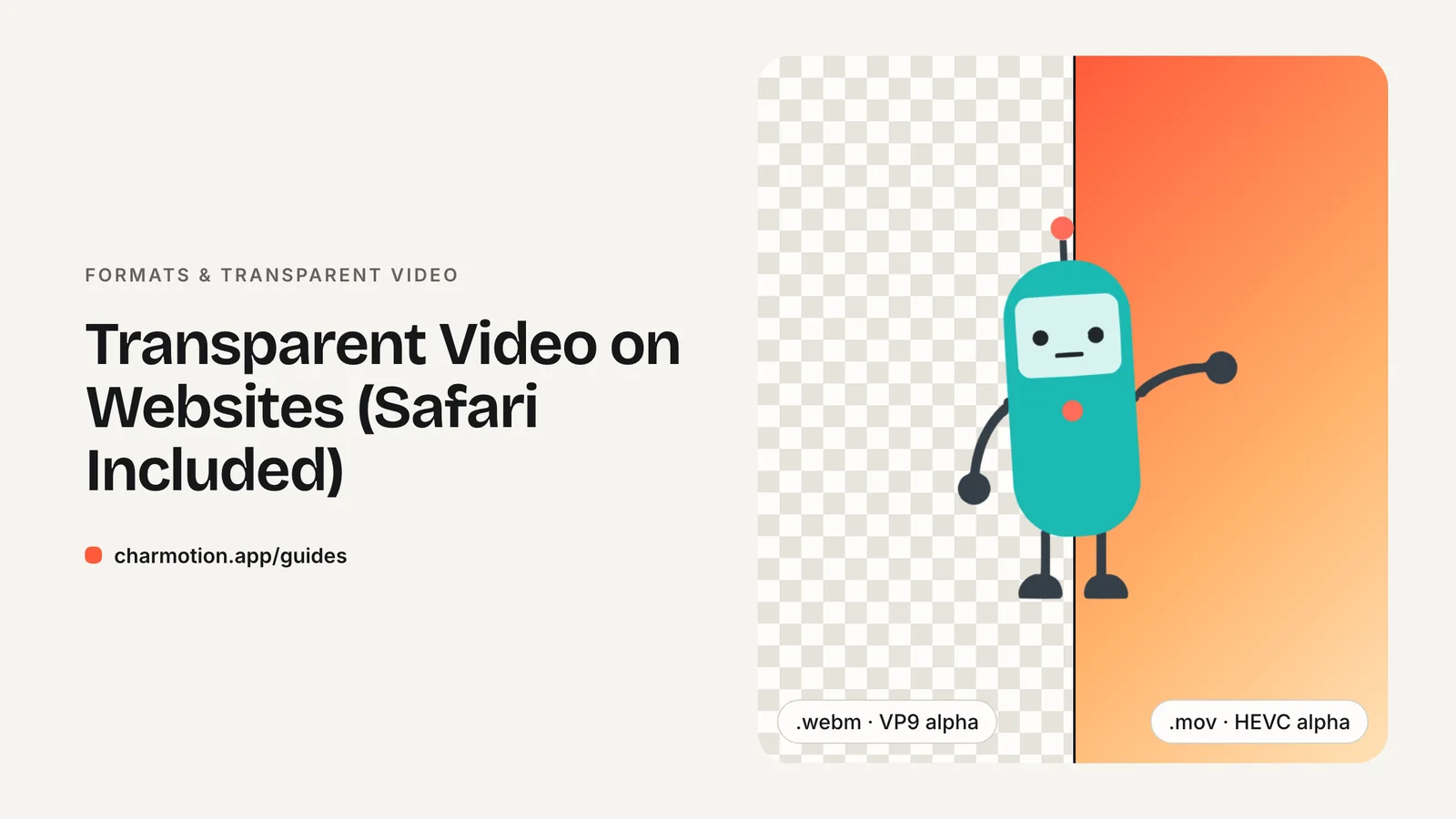
To show a transparent video in every major browser, ship two files in one <video> element: an HEVC-with-alpha .mov listed first for Safari, then a VP9-alpha WebM for Chrome, Edge and Firefox. Add autoplay muted loop playsinline. Safari plays WebM but drops its alpha channel, so the source order matters.
Key takeaways
- VP9 WebM with alpha is transparent in Chrome, Edge and Firefox, not in Safari.
- Safari and iOS 13+ play HEVC with alpha in a .mov container; list it as the first
<source>. - Use
autoplay muted loop playsinline, or iPhone will not autoplay the video inline. - Encode VP9 alpha with ffmpeg's libvpx-vp9 and
yuva420p; encode HEVC alpha on a Mac with AVFoundation orhevc_videotoolbox. - For interactive or state-driven characters, a Rive file is usually smaller than one video per state.
Which browsers support transparent WebM?
Chromium browsers and Firefox play WebM video with an alpha channel. Chrome has honored alpha in WebM encoded with VP8 or VP9 since Chrome 31, and Edge inherits that behavior from Chromium. Firefox also renders VP9 alpha correctly.
Safari is the exception. It has played WebM for a while (full support from Safari 16 on macOS and Safari 17.4 on iOS, per Can I use), but it discards the alpha plane. The video plays, and every transparent pixel turns opaque.
| Browser | VP9 alpha WebM | HEVC alpha MOV |
|---|---|---|
| Chrome, Edge (desktop) | Transparent | Not transparent |
| Firefox | Transparent | Not transparent |
| Safari on macOS Catalina+ | Plays, alpha dropped | Transparent |
| Safari on iOS 13+ | Plays (17.4+), alpha dropped | Transparent |
Mobile has rough edges. In Jake Archibald's 2024 tests, Chrome on Android had an alpha bug that was fixed in Canary at the time, and Firefox on Android sometimes stalled playback. Test on real devices before you ship.
Why is my transparent WebM black in Safari?
Because Safari's WebM decoder ignores the VP9 alpha channel. The color frames decode fine, but the separate transparency data is thrown away, so the background shows as black or gray instead of the page behind it.
This is a known WebKit gap, not a problem with your file. A patch for WebKit bug 275908 was submitted as pull request #64837 in May 2026. Its description says "the alpha plane data was discarded during parsing, causing transparent videos to play fully opaque." As of October 12, 2026 that pull request is still open, so no shipping Safari version renders transparent WebM.
The fix today is not a different WebM setting. It is a second file in a format Safari does render with transparency: HEVC with alpha. You then let each browser pick the file it can show correctly, which is what the markup below does.
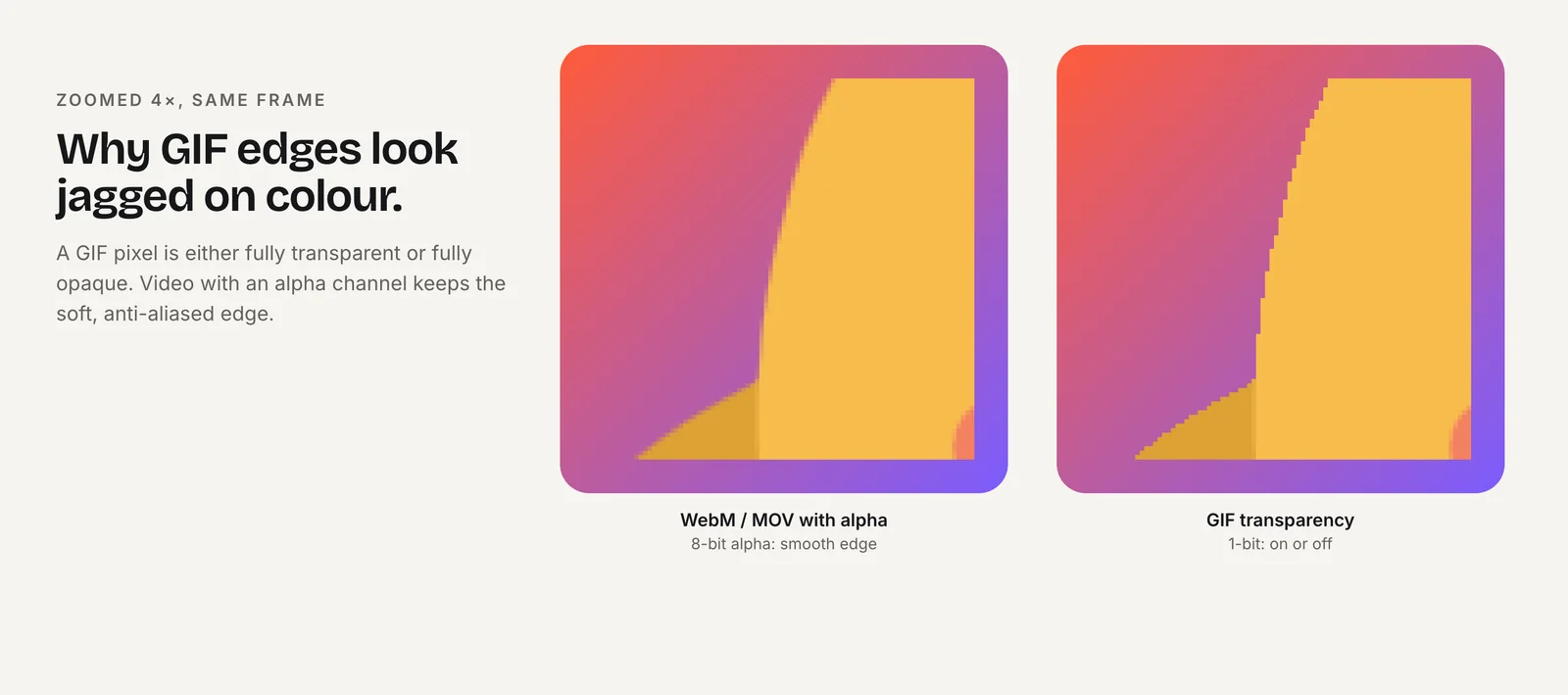
Do not fall back to GIF for transparency. GIF supports only one fully transparent palette index, so soft edges, shadows and anti-aliasing turn into a jagged fringe, as the comparison above shows.
What is HEVC with alpha?
HEVC with alpha is Apple's way of storing a transparency channel alongside H.265 (HEVC) video. Apple introduced playback support in iOS 13, tvOS 13 and macOS Catalina, and Safari on those systems can play it in a regular <video> element.
The file is usually a QuickTime .mov tagged hvc1. Apple's WWDC19 session "HEVC Video with Alpha" covers encoding with AVFoundation (AVAssetWriter, AVAssetExportSession) and VideoToolbox. Compressor and ffmpeg on macOS use the same system encoder.
Two practical points:
- It is Apple-only on the web. Chrome does not render HEVC alpha, which is why you still need the WebM.
- It tends to be larger. In Archibald's test the same clip was 1.1 MB as VP9 alpha and 3.4 MB as HEVC alpha. The ratio depends on content and settings, so measure your own files.
A standard H.264 MP4 cannot carry transparency at all. If a tool offers "transparent MP4," check what codec it actually writes.
What HTML markup works in every browser?
Use one <video> element with two <source> children. The HEVC file must come first. Browsers take the first source they can play, and Safari can play VP9, so if the WebM came first Safari would choose it and lose the transparency.
<video autoplay muted loop playsinline width="480" height="480">
  <source src="/media/mascot-idle.mov"
          type='video/quicktime; codecs="hvc1.1.6.H120.b0"'>
  <source src="/media/mascot-idle.webm"
          type='video/webm; codecs="vp09.00.41.08"'>
</video>
Why each attribute is there:
autoplayandmuted: browsers allow muted autoplay. Chrome's policy says "Muted autoplay is always allowed."playsinline: without it, iPhone Safari plays the video fullscreen instead of in the page.loop: repeats the clip like a GIF.widthandheight: reserve space and avoid layout shift.
Safari recognizes the HEVC codec string and stops at the first source. In Archibald's testing, Chrome and Firefox pass over it and play the WebM. If you also want a non-transparent fallback for very old browsers, you can add an MP4 third, on a background that matches your page.
How do I encode VP9 and HEVC alpha?
Start from a master that already has alpha, such as a PNG sequence or a ProRes 4444 .mov. Then make one file per format.
VP9 alpha WebM (any platform)
ffmpeg -i master.mov -pix_fmt yuva420p -an \
  -c:v libvpx-vp9 -crf 45 -b:v 0 mascot-idle.webm
The yuva420p pixel format is what keeps the alpha plane. A higher CRF means a smaller file and lower quality. Archibald's script also uses two-pass encoding, which helps size at a given quality.
HEVC alpha MOV (macOS only)
ffmpeg -i master.mov -c:v hevc_videotoolbox -require_sw 1 \
  -alpha_quality 0.1 -tag:v hvc1 -q:v 35 mascot-idle.mov
The hevc_videotoolbox encoder uses Apple's system framework, so it only runs on a Mac (FFmpeg 4.4 or later). -tag:v hvc1 is required for Safari to recognize the file. -alpha_quality ranges from 0 to 1. On Apple platforms you can also export HEVC with alpha from AVFoundation in your own tool, or from Compressor.
Drop the audio track (-an) on both. A silent file is smaller and meets autoplay rules without relying on the muted attribute alone.
Why won't my video autoplay on iPhone?
iOS Safari autoplays a <video autoplay> only when three conditions hold. The video has no audio track or is muted. It is visible on screen. On iPhone it also needs playsinline, otherwise playback is fullscreen-only. These rules come from WebKit's "New video policies for iOS."
Treat autoplay as a request, not a guarantee. play() returns a Promise that rejects when the rules are not met, and MDN recommends handling it and offering a play button:
const video = document.querySelector("video");
video.play().catch(() => {
  // NotAllowedError: show a static poster or a play button instead.
  video.controls = true;
});
Always set a poster image that matches the first frame. It shows while the video loads and when autoplay is refused. Use a transparent PNG or WebP poster so the fallback keeps the see-through look.
How do I keep transparent video files small?
Alpha video is heavier than opaque video because it stores an extra plane. A few habits keep it in check:
- Keep loops short. A 3–5 second seamless loop is usually enough for an idle or attention state.
- Size to the display. Encode at the largest size you actually show, often 480–720 px for an inline character, not 1080 px.
- Crop tightly. Empty transparent area still costs bits.
- Tune quality per format. Raise CRF for WebM and lower
-q:vor-alpha_qualityfor HEVC until edges start to break, then step back. - Lazy-load below the fold with
preload="none"and a poster.
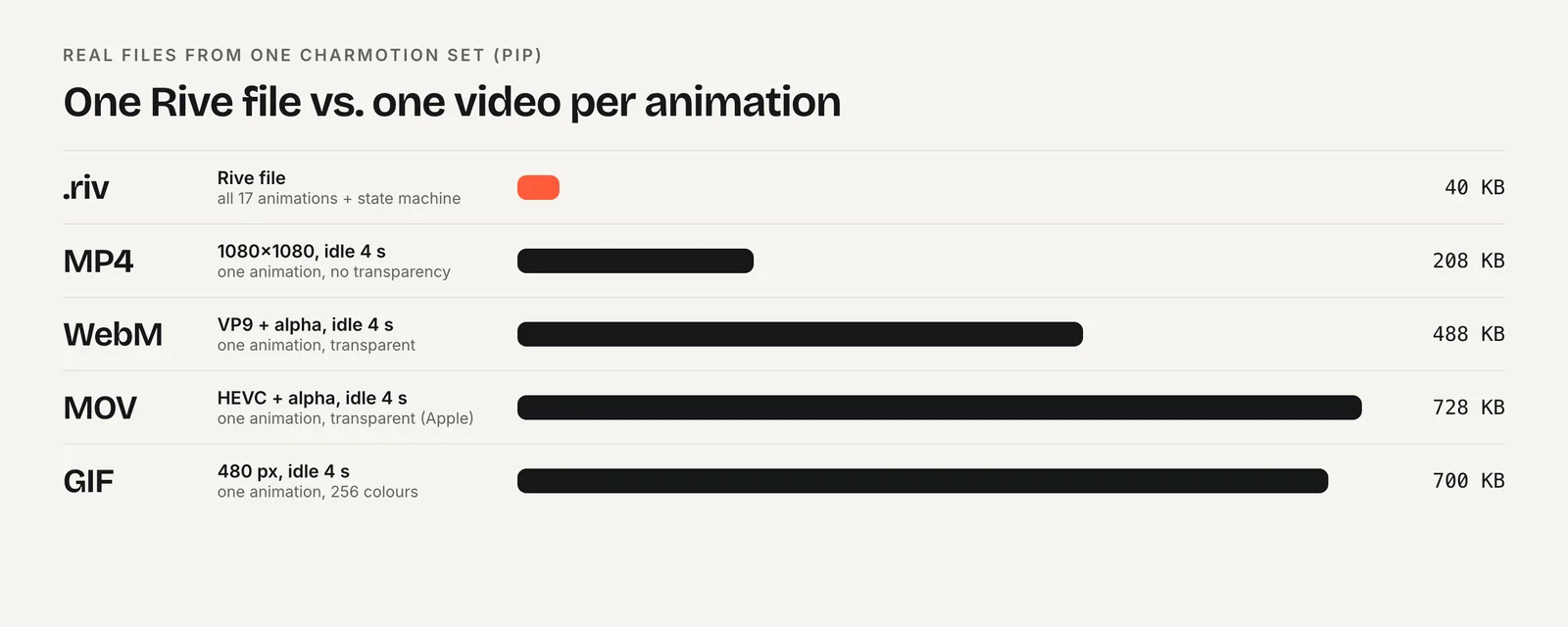
For reference, one 4-second, 1080×1080 idle loop from a Charmotion set measures 208 KB as an opaque MP4, 488 KB as a VP9-alpha WebM and 728 KB as an HEVC-alpha MOV. The same set's Rive file holds all 17 animations in 40 KB.
When should I use Rive instead of transparent video?
Transparent video is the right tool for a single decorative loop, a hero background or a product shot. It works with no JavaScript and is easy to swap later.
It gets awkward when a character needs to react. Each state becomes another pair of files, and switching between them means swapping sources, which can flash or stutter. A Rive file is vector-based and naturally transparent on a canvas, and its state machine moves between idle, loading, success and error inside one file.
The tradeoff is the player. Rive's web runtime is a WASM module of roughly 222–648 KB brotli-compressed depending on the package (Rive's January 2026 size table). That cost pays off when you show several states or several characters, and not for one ornamental loop. For a format-by-format comparison, see GIF vs WebM vs MP4 vs Lottie vs Rive.
How to add a transparent video to a website
- Export an alpha master. Render your animation as a PNG sequence or ProRes 4444 .mov with a transparent background.
- Encode the WebM. Run ffmpeg with
-pix_fmt yuva420p -c:v libvpx-vp9and no audio track to create a VP9-alpha .webm. - Encode the HEVC MOV. On a Mac, run ffmpeg with
-c:v hevc_videotoolbox -alpha_quality 0.1 -tag:v hvc1, or export HEVC with alpha from AVFoundation or Compressor. - Add both sources, HEVC first. Place the .mov source before the .webm source inside one
<video>element so Safari picks the file it renders with transparency. - Set the playback attributes. Add
autoplay muted loop playsinline, width, height and a transparent poster image. - Test on real devices. Check Safari on iPhone and Mac, Chrome on Android and desktop, and Firefox over both light and dark backgrounds.
Frequently asked questions
Can an MP4 have a transparent background?
Not a standard H.264 MP4, which has no alpha channel. Use VP9 WebM for Chrome, Edge and Firefox and HEVC with alpha in a .mov for Safari. ProRes 4444 carries alpha too, but it is an editing format and far too large to serve on a web page.
Will Safari ever support transparent WebM?
Possibly. A WebKit patch for VP9 alpha (bug 275908, pull request #64837) was submitted in May 2026 and was still open on October 12, 2026. Until it ships in a stable Safari release and older versions age out, keep serving HEVC with alpha first.
Do I need the codecs parameter in the type attribute?
It is strongly recommended. The codec string lets each browser decide, before downloading anything, whether it can actually decode the file, which is what makes the source order work reliably. The commonly used values are hvc1.1.6.H120.b0 for the HEVC .mov and vp09.00.41.08 for the VP9 WebM.
Does a transparent video hurt page performance?
It can, because alpha video is larger than opaque video. Keep loops short, encode at display size, use preload="none" below the fold and provide a poster. web.dev notes that a video without a poster is not an LCP candidate, which matters if it sits in your hero.
Sources
- Alpha transparency in Chrome video — Chrome for Developers
- HEVC Video with Alpha (WWDC19 session 506) — Apple Developer
- New video policies for iOS — WebKit
- WebKit pull request #64837: VP9 alpha support (bug 275908) — WebKit on GitHub
- WebM video format — Can I use
- Video with alpha transparency on the web — Jake Archibald
- Autoplay guide for media and Web Audio APIs — MDN Web Docs
- Runtime sizes — Rive