How to Add Animation to a Website (HTML, CSS, JS)
By the Charmotion team · Updated
To add animation to a website, use CSS transitions and @keyframes for interface motion, the Web Animations API when JavaScript must control playback, a muted autoplaying <video> for clips, and a Lottie or Rive player for illustrations and characters. Animate transform and opacity, and respect prefers-reduced-motion.
Key takeaways
- CSS covers most interface motion; wrap or disable it under
@media (prefers-reduced-motion: reduce). element.animate()returns an Animation object you can pause, reverse and await.- Video only autoplays when muted; iPhone also needs
playsinline. - Transparent video needs two files: HEVC-alpha .mov first for Safari, VP9-alpha WebM for everyone else.
- For a character that reacts to events, a Rive state machine is one small file instead of one video per state.
Already have a character or logo? Preview your own character animated in a phone splash, a website hero and an empty state — free, in your browser, nothing uploaded.
Should you use CSS, JavaScript or an animation file?
Pick by job, not by tool. Each option has a clear home:
| Job | Best fit |
|---|---|
| Hover states, menus, fades, button feedback | CSS transitions and @keyframes |
| Motion you start, pause or chain from code | Web Animations API (element.animate()) |
| A marketing clip or product demo | <video> (MP4, WebM) |
| A designed illustration or icon sequence | Lottie or dotLottie |
| A mascot that changes state on events | Rive state machine |
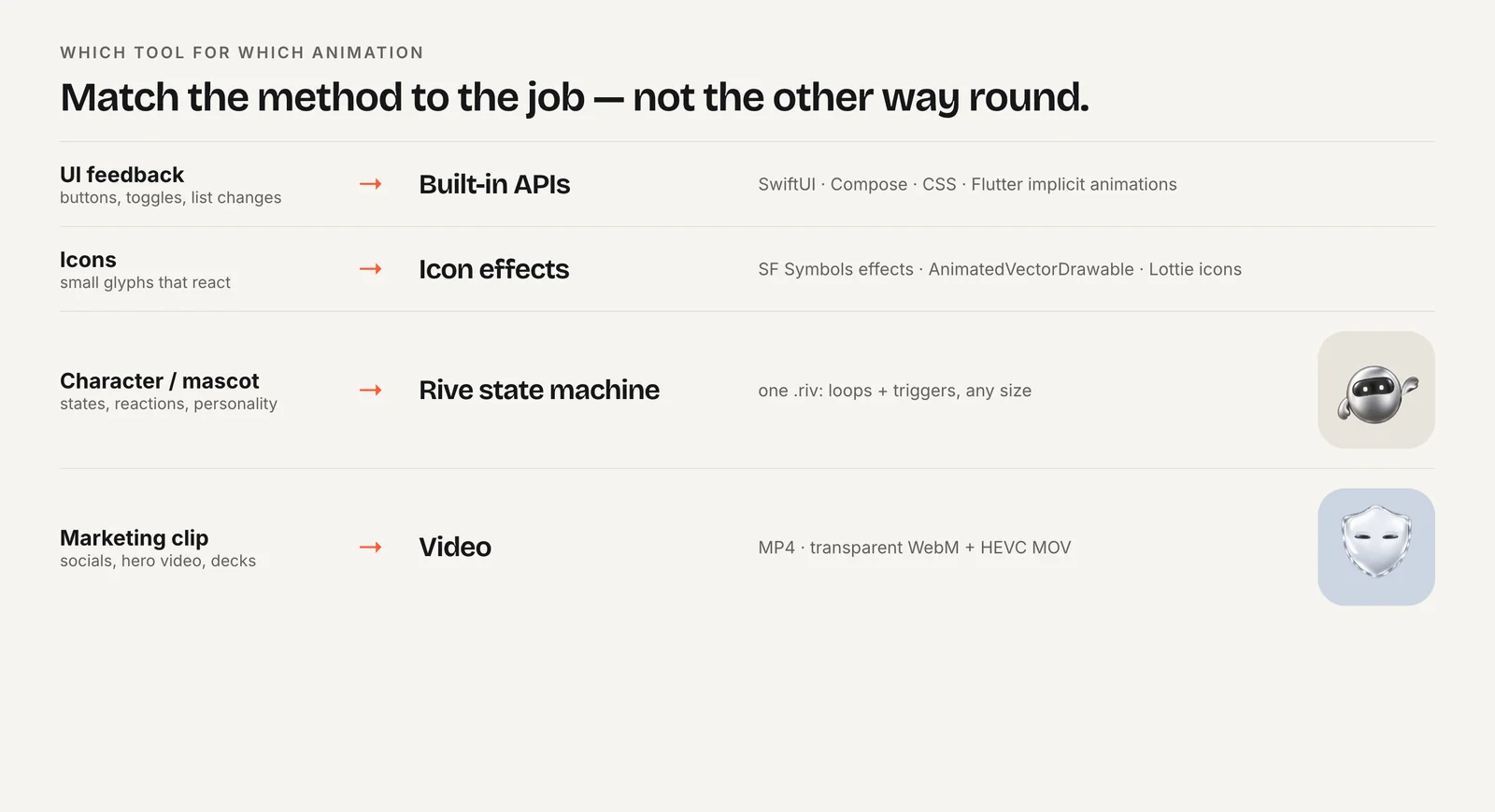
CSS and the Web Animations API cost nothing to load because the browser already ships them. Video, Lottie and Rive each add a file and, for Lottie and Rive, a player script. That cost is worth it when the motion was drawn by a designer rather than described in code. If you only need a spinner or a fade, stay in CSS.
How do CSS transitions and @keyframes work?
A transition animates a property between two values when it changes, such as on :hover. A keyframe animation defines named steps with @keyframes and attaches them with the animation shorthand, so it can run on load, loop or play once.
.badge {
  animation: pop-in 400ms ease-out both;
}

@keyframes pop-in {
  from { opacity: 0; transform: scale(0.8); }
  to   { opacity: 1; transform: scale(1); }
}

@media (prefers-reduced-motion: reduce) {
  .badge { animation: none; }
}
The both fill mode keeps the first frame applied before the animation starts and the last frame after it ends, which avoids a flash of the unstyled state.
The prefers-reduced-motion media feature reports whether the visitor turned on a reduce-motion setting in iOS, macOS, Windows or Android. It has two values, no-preference and reduce, and MDN lists it as widely available since January 2020. Removing large movement for reduce is the minimum; a short opacity fade is usually still fine. The reduced motion guide covers what to keep and what to drop.
When is the Web Animations API better than CSS?
Use the Web Animations API when the animation depends on runtime data or you need to control it after it starts. element.animate(keyframes, options) takes the same keyframes CSS uses, written as JavaScript objects, and returns an Animation object.
const reduce = matchMedia("(prefers-reduced-motion: reduce)").matches;
const card = document.querySelector(".card");

if (!reduce) {
  const anim = card.animate(
    [
      { transform: "translateY(0)" },
      { transform: "translateY(-8px)" },
      { transform: "translateY(0)" },
    ],
    { duration: 600, easing: "ease-out", iterations: 1 }
  );
  anim.finished.then(() => card.classList.add("settled"));
}
The returned object has play(), pause(), reverse() and cancel(), plus a finished promise. That makes it easy to sequence steps, scrub with currentTime, or stop an animation when the user navigates away. CSS cannot do any of that without toggling classes and listening for animationend.
Media queries do not apply to script, so check prefers-reduced-motion with matchMedia yourself, as above.
How do you autoplay a video animation without sound?
Add autoplay muted loop playsinline to the video element. Browsers allow autoplay only when the video is muted or has no audio track. On iPhone, WebKit plays video inline only with playsinline; without it the video waits for a tap and opens full screen.
For a character or logo over your page background, you need transparency, and no single format is transparent everywhere. Safari plays WebM but drops its alpha channel, so list an HEVC-with-alpha .mov first and a VP9-alpha WebM second:
<video autoplay muted loop playsinline preload="metadata"
       width="400" height="400" poster="/mascot-poster.png">
  <!-- Safari: HEVC with alpha must come first -->
  <source src="/mascot.mov" type="video/quicktime; codecs=hvc1.1.6.H120.b0">
  <!-- Chrome, Edge, Firefox: VP9 with alpha -->
  <source src="/mascot.webm" type="video/webm; codecs=vp09.00.41.08">
</video>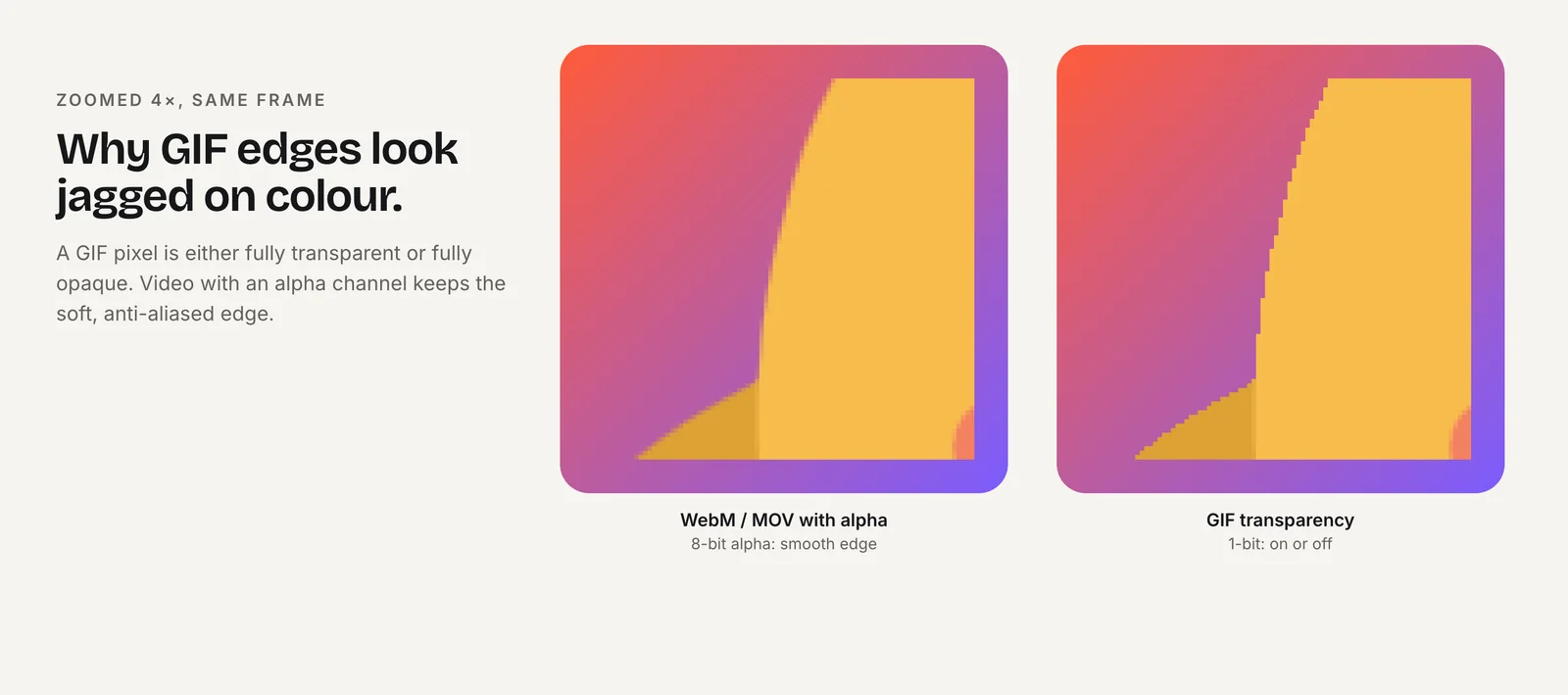
Browsers pick the first source they can play. If the WebM came first, Safari would choose it and show a black box. The transparent video guide covers encoding both files. For reduced motion, pause autoplaying video in script when matchMedia("(prefers-reduced-motion: reduce)") matches, and keep the poster visible.
How do you embed a Lottie or dotLottie animation?
Lottie is a JSON export of an After Effects animation; dotLottie (.lottie) is a compressed package that can hold several animations, themes and state machines. LottieFiles' dotlottie-web project ships players for plain JavaScript, React, Vue, Svelte, Solid and a web component. All of them play both .json and .lottie files.
The web component needs no build step, which makes it the easiest option on a static page:
<dotlottie-wc src="/animations/confetti.lottie" autoplay loop
  style="width: 320px; height: 320px"></dotlottie-wc>
<script type="module"
  src="https://unpkg.com/@lottiefiles/dotlottie-wc@0.10.0/dist/dotlottie-wc.js"></script>
Pin the version you tested instead of @latest, so an update cannot change your page unannounced. With a bundler, install @lottiefiles/dotlottie-wc and add import "@lottiefiles/dotlottie-wc"; instead of the script tag. The older lottie-web library from Airbnb still works for .json files if you already use it.
How do you embed a Rive animation and change its state?
Load the Rive web runtime, point it at a canvas and a .riv file, and name the state machine. Rive recommends @rive-app/webgl2 for most sites; @rive-app/canvas exposes the same API and avoids the browser's per-page limit on WebGL contexts if you show many animations at once. Call resizeDrawingSurfaceToCanvas() in onLoad so the drawing is sharp on high-density screens.
<canvas id="mascot" width="400" height="400"
        role="img" aria-label="Animated mascot"></canvas>
<script src="https://unpkg.com/@rive-app/webgl2@2.44.2"></script>
<script>
  const reduce = matchMedia("(prefers-reduced-motion: reduce)").matches;
  const r = new rive.Rive({
    src: "/mascot.riv",
    canvas: document.getElementById("mascot"),
    stateMachine: "CharacterViewModelMachine",
    autoplay: !reduce,
    autoBind: true,
    onLoad: () => r.resizeDrawingSurfaceToCanvas(),
  });
</script>
With autoBind: true, the runtime binds the file's default view model, and you change state by writing to it. In a file with a mood number and a success trigger, that looks like this:
const vm = () => r.viewModelInstance;

form.addEventListener("submit", () => { vm().number("mood").value = 5; });  // loading
api.onDone = () => { vm().trigger("success").trigger(); vm().number("mood").value = 0; };
Charmotion's .riv files are built this way: upload a character, mascot or logo and you get CharacterViewModelMachine with a mood number from 0 to 9 (idle, happy, wave, thinking, sad, loading, listening, talking, sleeping, attention) and triggers for success, error, yes, no, enter and exit, plus the web, React and SwiftUI code. Files that use the older input system work too; see the state machine guide.
How do you keep website animations fast?
Three habits prevent most jank and slow loads:
- Animate
transformandopacity. Browsers can usually composite these without recalculating layout. Animatingwidth,topormarginforces layout on every frame. - Load players and files only when needed. Rive lists its WebGL2 WASM at 648 KB after brotli compression (January 2026). Load it on pages that show a character, not site-wide, and start it when the canvas scrolls into view with an
IntersectionObserver. - Size every media element. Set
widthandheighton canvases and videos so the page does not shift when they load, and usepreload="metadata"or"none"for below-the-fold video.
new IntersectionObserver(([entry], obs) => {
  if (entry.isIntersecting) { startMascot(); obs.disconnect(); }
}).observe(document.getElementById("mascot"));
Finally, give looping animations an off switch. A visitor who reads a long page next to an endlessly bouncing mascot will thank you for a pause button or a calm idle loop.
How to add an animated character to a web page
- Choose the method. Use CSS for interface motion, video for fixed clips, and a Rive or Lottie file for designed characters.
- Add the files. Put the .riv, .lottie or video files in your static folder, with a poster image for video.
- Add the markup. Add a sized
<canvas>,<dotlottie-wc>or<video autoplay muted loop playsinline>element. - Load the player. Include the pinned player script, or import the package with your bundler, only on pages that need it.
- Wire your events. Set the mood number or fire triggers from form, fetch or click handlers.
- Respect reduced motion. Check
prefers-reduced-motionin CSS and withmatchMediain script, and show a static frame when it is set.
Frequently asked questions
What is the easiest way to add animation to a website?
CSS. A transition on :hover or a short @keyframes animation needs no library and no extra download. Move to the Web Animations API when you need to control playback from JavaScript, and to Lottie, Rive or video only when a designer drew the motion.
Why won't my background video autoplay on iPhone?
It is probably missing muted or playsinline. iOS Safari autoplays only silent or muted video, and plays it inline only with playsinline. Low Power Mode can also block autoplay, so always set a poster image that looks fine on its own.
Is a GIF fine for a website animation?
Usually not. GIFs are far larger than equivalent MP4 or WebM files and support only one fully transparent color, so soft edges look jagged. Use a muted looping video for clips, and a Rive or Lottie file for vector characters and icons.
Do I need a framework to use Rive or Lottie?
No. Both have plain JavaScript players. Rive's web runtime and the dotLottie web component can be loaded with one script tag on a static HTML page, and both also ship npm packages and React wrappers if you use a bundler.
Quick answers from this guide
Sources
- Using CSS animations — MDN Web Docs
- prefers-reduced-motion — MDN Web Docs
- Using the Web Animations API — MDN Web Docs
- New video policies for iOS — WebKit
- Video with alpha transparency on the web — Jake Archibald
- dotlottie-web: players for web, React, Vue, Svelte and web components — LottieFiles on GitHub
- Web (JS) runtime — Rive
- Data binding on the web — Rive