Rive Mascot in Unity UI: Install, uGUI and Data Binding
By the Charmotion team · Updated
Rive has an official Unity runtime for Unity 2021 LTS and later, including Unity 6. Install it from the Asset Store or a git URL, drag the .riv into the Project window, and show it in uGUI with a Rive Panel, a Rive Widget and the Rive Canvas Renderer. Drive its moods from C# through data binding.
Key takeaways
- Supported: Unity 2021 LTS and newer, on WebGL, Metal (Mac, iOS), D3D11, D3D12, OpenGL and Vulkan; consoles are listed as planned.
- A Rive Widget must sit under a Rive Panel; the Rive Canvas Renderer shows the panel inside a uGUI Canvas.
- UI Toolkit isn't supported yet; use uGUI or render to a mesh with the Rive Texture Renderer.
- Set Data Binding Mode to Auto Bind Default, then read the number and trigger properties from
StateMachine.ViewModelInstance. - Each Rive Panel renders to its own Render Texture, so use few panels, especially on mobile.
Does Rive work in Unity, and on which platforms?
Yes. Rive's Unity docs say "the package supports Unity LTS versions from 2021 upwards (including Unity 6)" and that it uses the Rive Renderer, kept up to date with the latest C++ runtime.
| Area | Status in Rive's docs |
|---|---|
| Graphics backends | WebGL, Metal on Mac and iOS, D3D11, D3D12, OpenGL on Windows and Android, Vulkan on Windows, Android and Ubuntu 24.04+ (x86_64) |
| Consoles | Planned |
| uGUI | Supported through the Rive Canvas Renderer |
| UI Toolkit | "Not yet, but we're working on it" |
| Sprite Renderer | Not handled well; render to a quad with the Rive Texture Renderer instead |
Rive keeps a feature support table for the Unity runtime on the same page; check it for newer features before you design around them.
How do I install the Rive Unity package?
There are two routes. The Unity Asset Store package is the simpler install and only carries stable releases: open Window, Package Manager, choose My Assets, find Rive and import it. The GitHub package adds canary tags with newer features. Use Add package from git URL with the latest release tag in place of 0.0.0:
https://github.com/rive-app/rive-unity.git?path=package#v0.0.0or add it to Packages/manifest.json:
"app.rive.rive-unity": "https://github.com/rive-app/rive-unity.git?path=package#v0.0.0"Rive notes that Unity can crash when upgrading the package while the Editor is open; if it does, close Unity, change the version in manifest.json and reopen. The UI components also need com.unity.ugui, which new projects usually include.
How do I show a Rive character in a uGUI Canvas?
Drag the .riv into the Project window; Unity imports it as a Rive Asset. Then either drag it into the Hierarchy, which creates a screen-space setup inside a uGUI Canvas, or build it by hand from the right-click menu:
- Rive, Rive Panel (Canvas) creates a panel already set up with the Rive Canvas Renderer. The panel must be under a uGUI Canvas, and the renderer sits on the same GameObject as the panel.
- Rive, Widgets, Rive Widget goes under that panel. Assign the Rive Asset, the artboard and the state machine (for example
CharacterViewModelMachine).
The Canvas Renderer sizes the panel from the uGUI Canvas and handles render order and raycasting, so the character layers with your buttons and receives pointer input for any Rive listeners in the file. If nothing appears, Rive's FAQ lists the usual causes: the widget isn't under a Rive Panel, or there is no camera in the scene.
To put the character on a 3D object instead, such as a screen inside the game world, drop the .riv onto a GameObject with a MeshRenderer; Unity adds a Rive Panel and a Rive Texture Renderer.
How do I bind the mascot's mood to game state?
Use data binding. In the Rive Widget's Inspector, under Data, set Data Binding Mode to Auto Bind Default, which binds the artboard's default view model instance. Then get the properties once the widget has loaded:
using Rive;
using Rive.Components;
using UnityEngine;

public class MascotController : MonoBehaviour
{
    [SerializeField] private RiveWidget m_riveWidget;

    private ViewModelInstance m_vm;
    private ViewModelInstanceNumberProperty m_mood;

    private void OnEnable()  { m_riveWidget.OnWidgetStatusChanged += HandleStatus; }
    private void OnDisable() { m_riveWidget.OnWidgetStatusChanged -= HandleStatus; }

    private void HandleStatus()
    {
        if (m_riveWidget.Status != WidgetStatus.Loaded) return;
        // Data Binding Mode on the widget: Auto Bind Default
        m_vm = m_riveWidget.StateMachine.ViewModelInstance;
        m_mood = m_vm.GetNumberProperty("mood");
    }

    // Call from game code: SetMood(5) while loading, SetMood(0) when idle.
    public void SetMood(int mood)
    {
        if (m_mood != null) m_mood.Value = mood;
    }

    // One-shot reactions: "success", "error", "yes", "no", "enter", "exit".
    public void Fire(string trigger)
    {
        if (m_vm == null) return;
        var t = m_vm.GetTriggerProperty(trigger);
        if (t != null) t.Trigger();
    }
}
Call it from wherever game state changes:
// Example wiring from a game manager
mascot.SetMood(5);            // loading the level
yield return LoadLevel();
mascot.SetMood(0);            // idle
...
if (playerWon) mascot.Fire("success"); else mascot.Fire("error");- Rive's docs note that a property change "will not apply to their bound elements until the state machine or artboard advances," which the widget does every frame while playing.
- Number properties take a
float; whole numbers such as 5 are fine. - To react when something happens inside the file, subscribe to a property's
OnValueChanged(orOnTriggeredfor triggers) and unsubscribe inOnDestroy. - Rive marks its low-level state machine API as legacy in Unity and recommends the component API with data binding.
Keep a written list of property names next to the code; a renamed property in the file returns nothing at runtime. The state machine guide explains how moods and triggers are usually wired.
How do I keep Rive UI fast on mobile and WebGL?
Rive's Unity best practices start from one fact: "one Rive Panel renders into one Render Texture by default," and every widget under that panel draws into the same texture. From that:
- Prefer fewer panels, "especially on mobile," and group widgets under a shared panel.
- Build larger chunks of UI in Rive rather than instancing many small Rive buttons in uGUI.
- Use data binding lists for repeated items instead of many widgets.
- Disable or destroy widgets you aren't showing, so they stop advancing and rendering.
- Let state machines settle. Rive's runtime stops advancing a state machine when nothing will change, which saves work while a mascot holds a still pose.
On WebGL, Rive's renderer uses a pixel local storage extension when the browser exposes it and otherwise falls back to MSAA on WebGL 2, where Rive notes that advanced blend modes cost more performance. Test WebGL builds in the browsers your players use.
Is there a Rive runtime for Unreal Engine?
Yes. Rive documents an Unreal runtime for Unreal Engine 5.7.3 and above, with state machines, view model data binding and property observation. Its platform list includes DirectX 11 and 12, PC Vulkan, macOS, PlayStation 5, Nintendo Switch and Switch 2, Xbox Series X and Steam Deck, with visionOS marked experimental. Mobile support is "planned but not yet available." Rive also marks legacy state machine inputs as deprecated there, so new Unreal work should drive characters through view models.
Can a Charmotion character run in Unity?
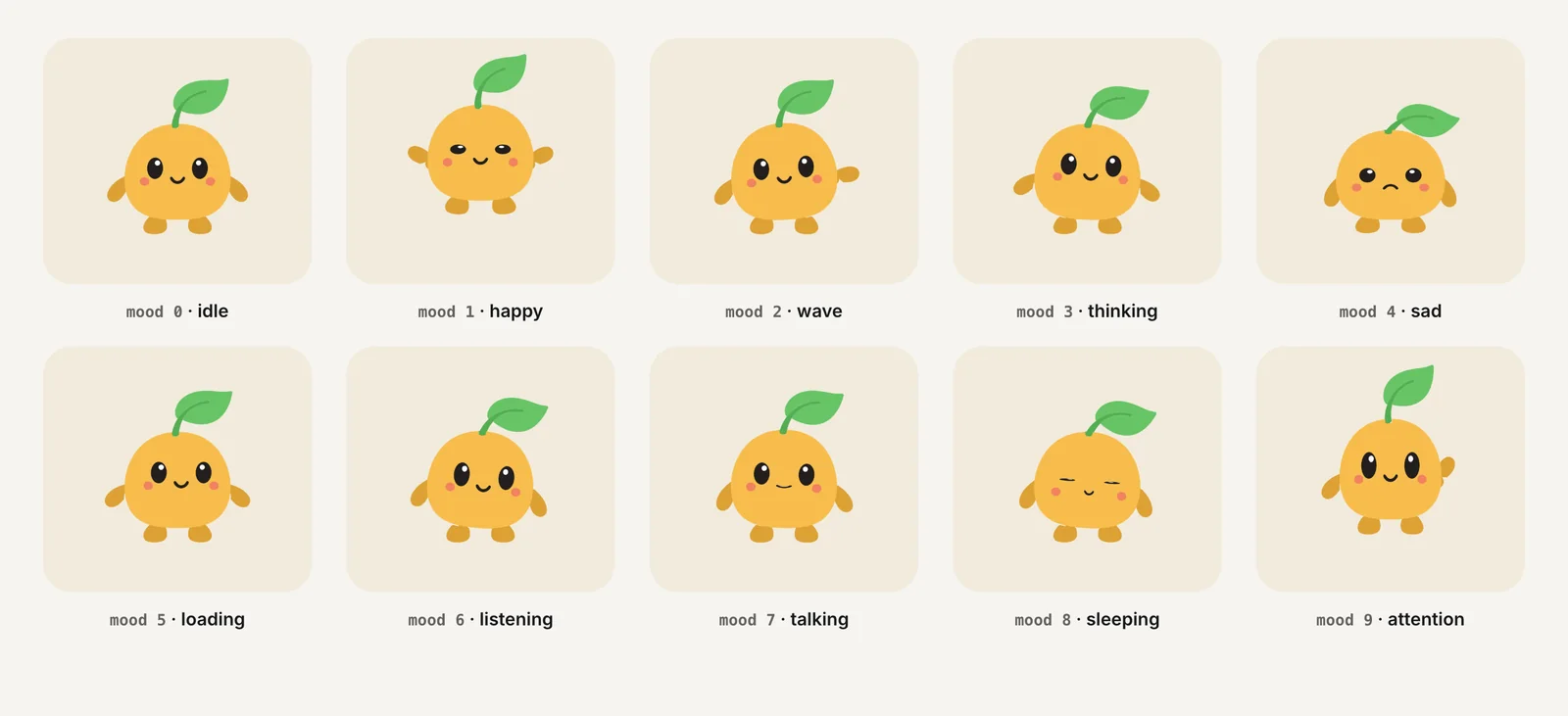
A Charmotion .riv is a standard Rive file, so it imports like any other. It has a Character view model on CharacterViewModelMachine: a mood number from 0 to 9 (idle, happy, wave, thinking, sad, loading, listening, talking, sleeping, attention) and success, error, yes, no, enter and exit triggers, which match the controller above. Charmotion ships web, React and SwiftUI code, not C#, so the script on this page is the part you add. The .riv is on every paid plan (from $20/month).
How to add a Rive mascot to Unity UI
- Install the package. Import Rive from the Asset Store or add the rive-unity git URL with a release tag in Package Manager.
- Import the file. Drag the .riv into the Project window to create a Rive Asset.
- Create the panel. Add Rive, Rive Panel (Canvas) under your uGUI Canvas.
- Add the widget. Add a Rive Widget under the panel and choose the asset, artboard and state machine.
- Bind data. Set Data Binding Mode to Auto Bind Default and get the mood and trigger properties in C# once the widget has loaded.
- Wire game events. Call SetMood and Fire from your game logic and test on target devices.
Frequently asked questions
Does Rive support Unity's UI Toolkit?
Not yet. Rive's Unity FAQ answers "Not yet, but we're working on it" and recommends uGUI through the Rive Canvas Renderer, or rendering Rive onto a mesh. If your menus are in UI Toolkit, put the character in a small uGUI canvas layered on top.
Why isn't my Rive widget showing in Unity?
Check the two causes in Rive's FAQ: the Rive Widget must be a child of a Rive Panel, and the scene needs a camera. For uGUI, also confirm the panel is under a Canvas and has the Rive Canvas Renderer on the same GameObject.
Can Rive for Unity run on consoles?
Not today. Rive's Unity overview lists consoles under planned support. Rive's separate Unreal runtime does list PlayStation 5, Nintendo Switch, Switch 2 and Xbox Series X, so console projects in Unreal have an option now.
Quick answers from this guide
Sources
- Unity runtime overview, Rive
- Unity: Getting started, Rive
- Unity: Components, Rive
- Unity: Data binding, Rive
- Unity: Best practices, Rive
- Unity: FAQ, Rive
- Unity: State machines, Rive
- Rive Unity WebGL, rive-unity on GitHub
- Unreal Engine runtime, Rive