Open-Source README Mascot GIFs: Size, Dark Mode and Licensing
By the Charmotion team · Updated
For a README mascot, commit two small GIFs, one on a light background and one on a dark one, and wrap them in a picture element so GitHub shows the right one for each theme. Images added through GitHub's editor are capped at 10 MB, but aim far smaller. Add alt text, and license the mascot separately from the code.
Key takeaways
- GitHub has supported the picture element with prefers-color-scheme in Markdown since August 2022.
- A GIF on a solid background needs one export per theme; there is no clean partial transparency in GIF.
- Editor uploads are capped at 10 MB for images and GIFs; Git warns on files over 50 MiB and GitHub blocks files over 100 MiB.
- GitHub lets users stop GIF autoplay, and by default follows the system reduced-motion setting.
- Code licenses say little about artwork; the Go gopher, for example, is CC BY 4.0, separate from Go's code license.
Already have a character or logo? See your character in real app screens: splash, onboarding, loading and empty-state screens. It's free, runs in your browser and uploads nothing.
How big can a README GIF be on GitHub?
It depends on how you add it.
- Dragged into an issue, PR or the web editor: GitHub's limit is 10 MB for images and GIFs, 10 MB for videos on free plans and 100 MB on paid plans (GitHub Docs).
- Committed to the repository: Git warns on files over 50 MiB, GitHub blocks files over 100 MiB, and browser uploads are limited to 25 MiB (GitHub Docs).
Those are ceilings, not targets. Everyone who clones the repo downloads every version of the GIF you ever committed, and the README loads it on every visit. A short loop at the size it displays is plenty. This palette-based command resizes and recolors a clip; it was run with ffmpeg 7.1.1 on a demo MP4:
ffmpeg -i wave.mp4 -vf "fps=15,scale=240:-1:flags=lanczos,split[a][b];[a]palettegen[p];[b][p]paletteuse" mascot.gifKeep the files in a folder such as .github/assets/ or docs/ so they don't clutter the project root.
How do I show a different GIF in GitHub dark mode?
Use the HTML picture element with prefers-color-scheme. GitHub announced support for it in Markdown in 2022 (GitHub Changelog), and the GitHub Blog shows this pattern (GitHub Blog):
<picture>
  <source media="(prefers-color-scheme: dark)" srcset=".github/assets/mascot-dark.gif">
  <source media="(prefers-color-scheme: light)" srcset=".github/assets/mascot-light.gif">
  <img alt="Kiko, the project mascot, waving" src=".github/assets/mascot-light.gif" width="240">
</picture>
The img is the fallback when no source matches or a renderer ignores picture, and it carries the alt text. Older READMEs use #gh-dark-mode-only and #gh-light-mode-only URL fragments; the picture element is the approach GitHub's own blog now shows.
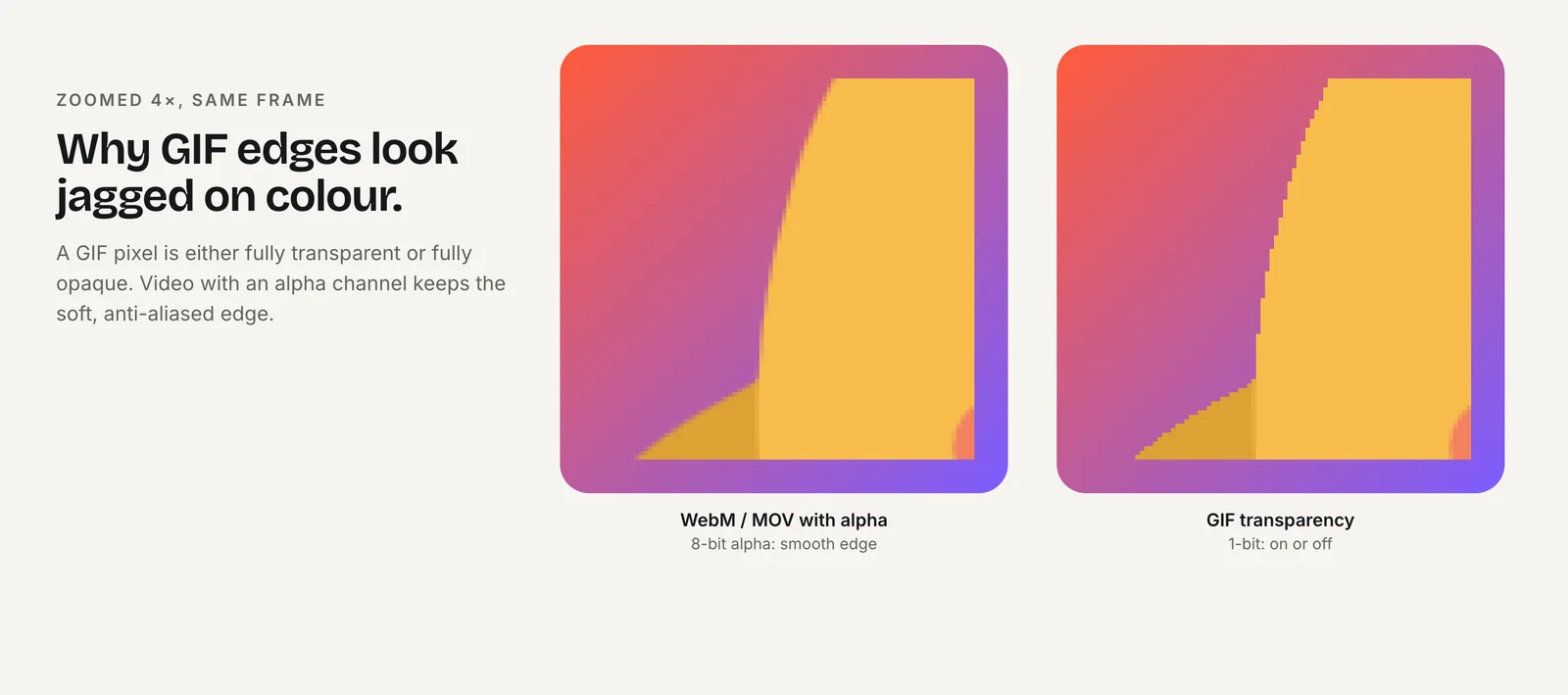
Why two GIFs? GIF has no partial transparency: each pixel is either fully visible or fully transparent, which leaves jagged, haloed edges on a background the GIF wasn't made for. A GIF on a solid background avoids the halo but shows a box on the other theme. Since GitHub offers several dark themes, don't try to match one exact color: put the mascot on a rounded card color that looks deliberate on all of them.
To make the dark version from a transparent WebM, composite it onto a color and build the palette in one pass. This was tested with ffmpeg 7.1.1; set the color size to match the WebM (1080×1080 here):
ffmpeg -c:v libvpx-vp9 -i wave.webm -f lavfi -i color=c=0x22272e:s=1080x1080 -filter_complex "[1:v][0:v]overlay=shortest=1,fps=15,scale=240:-1:flags=lanczos,split[a][b];[a]palettegen[p];[b][p]paletteuse" mascot-dark.gifDoes the picture trick work outside GitHub?
Test each place your README is shown. GitHub's blog says the approach works in repository READMEs, GitHub-hosted documentation and other Markdown rendered on GitHub.com. Package registries, other code hosts and editor previews use their own Markdown renderers and may show only the fallback img, or strip HTML entirely.
Two habits keep the mascot looking right everywhere:
- Choose a fallback that works on both themes. The light GIF on a rounded card, or a still PNG, is safer than the dark GIF.
- Use absolute URLs where the README is republished. Relative paths resolve on GitHub but can break when a registry copies the README; a raw file URL or a release asset avoids that.
Is an autoplaying README GIF an accessibility problem?
It can be, so keep it short and calm. GIFs loop forever by default. Under WCAG 2.2.2, moving content that starts automatically and lasts more than five seconds beside other content should be pausable (W3C).
GitHub helps here: since 2022 it has offered a setting to stop animated images from playing automatically, which follows the operating system's reduced-motion preference by default and adds play and pause controls when autoplay is off (GitHub Changelog). You can do your part:
- pick a gentle loop, such as idle or wave, rather than a bouncing reaction,
- or make it play once: ffmpeg's GIF muxer takes
-loop -1for no looping, - always write alt text that names the mascot and what it does.
How do I use the Rive file on a docs site?
Docs sites built on React can show the live character instead of a GIF. Docusaurus, for example, lets you import your own components or npm packages into MDX pages (Docusaurus). With Rive's React runtime (Rive):
// src/components/Mascot.jsx
import { useRive } from "@rive-app/react-canvas";

export default function Mascot() {
  const { RiveComponent } = useRive({
    src: "/mascot.riv",
    stateMachine: "CharacterStateMachine",
    autoplay: true,
  });
  return <RiveComponent style={{ width: 160, height: 160 }} aria-hidden="true" />;
}
Then import Mascot from "@site/src/components/Mascot"; in an MDX page. If the build fails during server rendering, wrap the component in Docusaurus's BrowserOnly.
- The Rive canvas is transparent, so one file works on light and dark docs themes.
- Rive's canvas-lite web runtime 2.44.0 is about 373 KB compressed with brotli, and the other builds are larger (Rive); load it on the docs home or a welcome page, not on every page.
- Show a still when
prefers-reduced-motionis set.
How should I license the project's mascot?
Separately from the code, and in writing. A software license such as MIT or Apache 2.0 is written for code; it doesn't clearly say whether people can print your mascot on stickers, remix it in fan art or use it to promote a fork.
The Go gopher is a well-known model: "The gopher images are Creative Commons Attribution 4.0 licensed", with credit to the designer, Renee French (The Go Blog). Anyone can adapt it with attribution, while the Go project's code has its own license.
A simple setup for your project:
- a short
ARTWORK.mdor a section in the README naming the owner, the license (for example CC BY 4.0) and the credit line, - a note on what the license doesn't cover, such as using the mascot in a way that implies official endorsement,
- if someone drew the mascot for you, a written assignment or license from them first; without it, they likely still own the copyright.
Charmotion's terms let you use the animation files it produces from your own artwork for any lawful purpose, so licensing the animated versions follows whatever you decide for the original. A set gives you 17 animations of the mascot as a .riv and as MP4 and 480 px GIFs on a solid background (paid plans, from $20/month); make the second-theme GIF from the transparent WebM on a paid plan, or from your own artwork. It doesn't make new poses, such as the mascot holding your logo or a laptop, or a version per release.
Frequently asked questions
Should I use an animated GIF or a video in my README?
A GIF for a short mascot loop, because it plays inline like an image and works in the picture element for themes. GitHub also accepts MP4, MOV and WebM uploads up to 10 MB on free plans, which suit longer demos that viewers start themselves.
Does the gh-dark-mode-only trick still work?
Older READMEs use #gh-dark-mode-only and #gh-light-mode-only fragments on image URLs. GitHub's own blog now shows the picture element with prefers-color-scheme, which is standard HTML and degrades to a normal img fallback elsewhere, so use it for new READMEs.
Can I use the MIT license for my project's mascot?
You can, but it fits artwork poorly, because it says nothing clear about merchandise, fan art or endorsement. Many projects license the mascot under Creative Commons instead; the Go gopher is CC BY 4.0. Write the artwork license down separately from the code license.
Quick answers from this guide
Sources
- Specify theme context for images in Markdown (GA), GitHub Changelog
- How to make your images in Markdown on GitHub adjust for dark mode and light mode, The GitHub Blog
- Attaching files, GitHub Docs
- About large files on GitHub, GitHub Docs
- Option to prevent animated images from playing automatically, GitHub Changelog
- Understanding SC 2.2.2: Pause, Stop, Hide, W3C WAI
- The Go Gopher, The Go Blog
- MDX and React, Docusaurus
- React runtime, Rive
- Runtime sizes, Rive