Animating a School or Nonprofit Mascot: Rights, Crests and Screens
By the Charmotion team · Updated
To animate a school, university, library or nonprofit mascot, first confirm who owns it: usually the institution, sometimes the artist who drew it. Only the owner, or someone with written permission, should upload it. Then use simple states for scoreboards, lobby screens and social posts, keep official crests barely moving, and thank donors with a short GIF.
Key takeaways
- A mascot drawn by a volunteer, student or freelancer belongs to the artist unless it was a work made for hire or the rights were assigned in writing.
- University trademark offices such as Syracuse's require written approval and forbid altering marks without it; treat animation as a change to clear first.
- Detailed crests and seals: animate them as they are, with subtle states only, or animate the mascot and keep the seal still.
- Scoreboards and lobby screens take silent H.264 MP4; older Outlook shows only a GIF's first frame in donor emails.
- Game moments map to states: tip-off to attention, score to success, timeout to idle.
Already have a character or logo? See your character in real app screens: splash, onboarding, loading and empty-state screens. It's free, runs in your browser and uploads nothing.
Who owns a school or nonprofit mascot?
Two separate questions: who owns the copyright in the drawing, and who controls the mascot as a trademark.
Copyright. Under US law, the U.S. Copyright Office explains that a work is "made for hire" in two situations: when an employee creates it as part of their regular duties, or when certain kinds of commissioned work are covered by a written agreement, signed by both sides, that says it is a work made for hire. In those cases the employer or commissioning party is the author and owner (U.S. Copyright Office). Outside them, the artist owns the copyright.
That matters for schools and nonprofits, because mascots are often drawn by a parent volunteer, a student, an alumnus or a local designer as a favor. If there is no written assignment, the organization may only have an informal permission to use the drawing. Before animating, find the paperwork or get a short written assignment or license from the artist.
Trademark. A school's name, logo and mascot used to identify its teams and programs are usually managed as trademarks by the institution, often through a marketing, athletics or licensing office. Copyright and trademark can sit with different people; you need both to be in order.
This is general information, not legal advice. Laws differ by country, so check with your institution's legal or brand office.
What permission do I need before animating it?
Written approval from whoever manages the brand. University policies are explicit about this. Syracuse University's trademark office, for example, says use of its marks "requires written approval from the Office of Trademark Licensing", that it must approve all orders and artwork, and that "no alterations may be made to the Marks or artwork without the Office of Trademark Licensing's prior written approval" (Syracuse University).
Animation bends, stretches and moves the artwork, so treat it as an alteration. A smooth approval request includes:
- who is asking (department, club, booster group, alumni chapter),
- where it will appear (scoreboard, lobby screen, social accounts, website, donor emails),
- whether anything will be sold (merchandise usually has its own licensing rules),
- a preview of the states you plan to use.
Only the owner, or someone the owner has authorized, should upload the mascot to any animation service. Charmotion's terms require that you own what you upload or have permission to use it.
How do I animate a detailed crest or seal?
Carefully, or not at all. Crests and seals have fine lines, small lettering and symbols that institutions protect closely. Redrawing them in a simpler style changes the mark.
Three options, from safest to boldest:
- Animate the mascot, keep the seal still. The character waves and cheers; the crest stays a static image beside it.
- Subtle states only. Animate the crest as it is, with a launch intro, a gentle idle and attention, and skip squash-heavy reactions that would bend lettering.
- Full set. Only for playful marks without text, and only with brand approval.
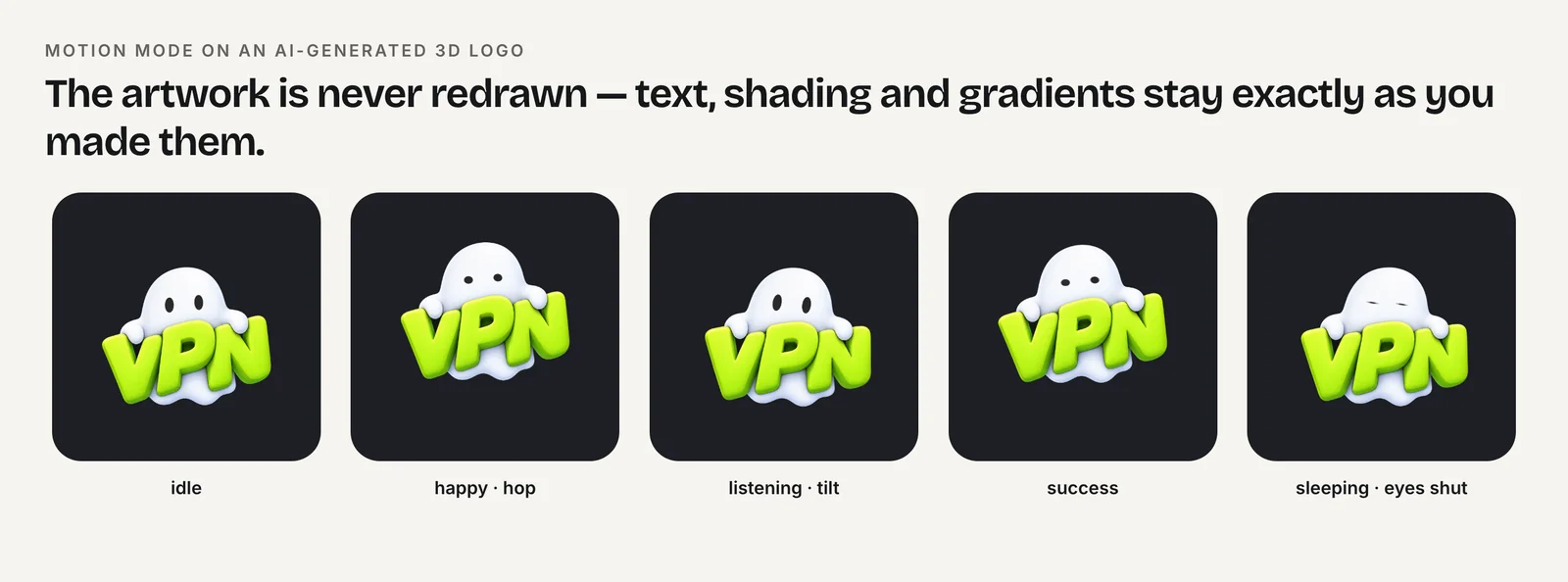
For detailed, photographic or 3D artwork, Charmotion's Motion mode keeps the original pixels and moves them with squash, stretch, tilts, hops and blinks rather than redrawing the crest. Preview every state before you publish: a stretch that looks fine on a cartoon can distort a motto.
Which files work on scoreboards and lobby screens?
A silent H.264 MP4 is the safest choice. Video board controllers and lobby signage systems vary, so check your vendor's supported formats; signage players such as BrightSign document H.264 and H.265 in MP4 and MOV (BrightSign). Padding, looping and orientation are covered in animated logos for café and gym screens.
| Moment | State |
|---|---|
| Pre-game, walk-out | launch intro, then attention (9) |
| Score, goal, basket | success |
| Crowd prompt ("Make some noise") | attention (9) |
| Timeout, halftime | idle (0) or wave (2) |
| Win | success, then happy (1) |
| Loss | idle (0); no sad face on the big screen |
| Library open, welcome desk | wave (2) |
| Library quiet hours, after hours | sleeping (8) |
Big screens in public venues need one extra check: nothing in the clip should flash more than three times in a second, the WCAG threshold for photosensitive seizures (W3C). Never taunt the opponent with the mascot; it represents the whole institution.
How can a nonprofit use the mascot for donations and thank-yous?
Use it to say thank you, never to guilt.
- Thank-you email. A short GIF of the success or wave state. Can I email lists Outlook for Windows 2007 through 2019 as not playing animated GIFs (Can I email), so make the first frame the happy pose and include alt text such as "Thank you from our mascot".
- Donation confirmation page. Play success only after the payment is confirmed, never when the donor taps Give.
- Campaign progress. Keep your own thermometer or progress bar; put the mascot beside it in idle, and fire success when a milestone is reached.
- Never sad to push a gift. A crying mascot next to "Only 3 days left" is a guilt tactic. Deceptive Patterns calls guilt-based pressure confirmshaming (Deceptive Patterns).
Which formats fit social posts, websites and apps?
| Use | File |
|---|---|
| Scoreboard, lobby TV | Silent MP4, padded to the screen |
| Instagram, TikTok, YouTube Shorts | 9:16 launch video, square MP4 clips |
| Newsletters, donor emails | GIF with a meaningful first frame |
| Website hero over a photo | Transparent WebM plus HEVC MOV for Safari |
| School or library app | Rive .riv with mood and triggers |
Charmotion turns one image of the mascot into 17 animations. One set on Starter ($20/month) has the MP4s, the 9:16 video and the GIFs for screens, socials and email, plus the .riv, transparent video and code for websites and apps. What it can't do: new poses such as dunking a ball or holding a book, uniform or seasonal outfit changes, walk cycles, or lip-sync for announcements. It is one character, animated in place.
Frequently asked questions
Can a student club animate the school mascot?
Only with approval from whoever manages the school's brand, usually marketing, athletics or a licensing office. Many universities require written approval for any use and forbid altering marks without it. Ask first, describe where the animation will appear, and keep the approval email on file.
Who owns a mascot designed by a parent volunteer?
In the US, usually the volunteer, unless they signed a written assignment or the work qualifies as a work made for hire, which needs employment or a specific written agreement. Before animating or licensing the mascot, get a short written transfer or license from the artist.
Should a school mascot look sad after a loss?
Not on the big screen or official channels. A sad mascot after a loss can read as mocking your own team or the players. Use a calm idle or wave, thank the fans, and save expressive states for wins, scores and crowd prompts.
Quick answers from this guide
Sources
- Circular 30: Works Made for Hire, U.S. Copyright Office
- Use Syracuse University trademarks, Syracuse University Office of Trademark Licensing
- Video formats and codecs, BrightSign
- Understanding SC 2.3.1: Three Flashes or Below Threshold, W3C WAI
- GIF image format support in email clients, Can I email
- Confirmshaming, Deceptive Patterns