PNG to Transparent Animated GIF: Halos, Edges and Better Formats
By the Charmotion team · Updated
Yes, a GIF can be transparent, but only with 1-bit transparency: each pixel is fully transparent or fully opaque. Soft PNG edges are forced one way or the other, which causes jagged edges or white and dark halos. Flatten the edges against the background color first, convert with ffmpeg's palettegen and paletteuse, or switch to animated WebP, APNG or WebM.
Key takeaways
- GIF marks one palette color as fully transparent; there is no partial transparency.
- Halos come from anti-aliased edge pixels that were blended with a different background.
- For a known background, flatten the edges onto that color and keep only the hard alpha cutout.
- With a WebM source, put
-c:v libvpx-vp9before-ior ffmpeg drops the alpha. - APNG and animated WebP keep smooth alpha and are supported by all major browsers; use GIF only where it is required.
Can a GIF have a transparent background?
Yes, with a big limitation. MDN's image format guide explains that GIF pixels "are opaque, unless a specific color index is designated as transparent, in which case pixels colored that value are entirely transparent." So a GIF has one see-through palette entry and nothing in between. People call this 1-bit transparency.
GIF is also limited to a palette of at most 256 colors per frame, so gradients and soft shadows are dithered. MDN's own advice for animation sequences is to "consider WebP, AVIF or APNG" instead.
For a flat logo with hard edges, a transparent GIF can look fine. For a character with anti-aliased outlines, a drop shadow or a glow, it will show its edges.
Why does my transparent GIF have a white or dark halo?
Because the edge pixels of your PNG are partly transparent, and GIF can't store that. A smooth outline has a ring of pixels at, say, 30% or 70% opacity. When you convert, each of those pixels must become either fully opaque or fully transparent.
- If the converter keeps them opaque, they keep whatever color they were blended with. If that was white and your GIF sits on a dark page, you see a white fringe.
- If it drops them, the outline becomes stair-stepped.
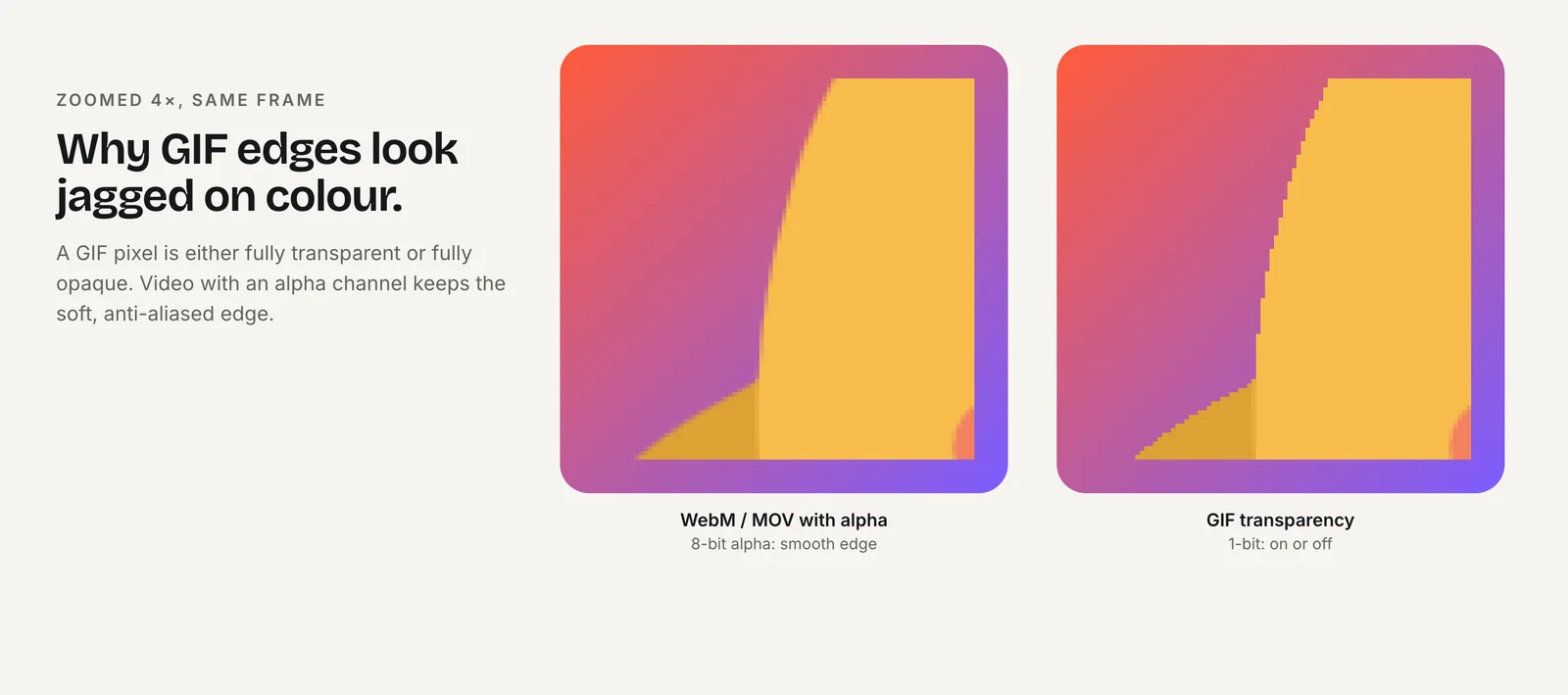
There is no setting that removes this completely, because the information GIF needs is missing. The fixes are to blend the edges with the color the GIF will actually sit on, to accept a hard cutout, or to use a format with real alpha.
How do I turn a PNG into a transparent GIF?
For a single PNG, ffmpeg builds a palette with one entry reserved for transparency, then maps the image to it. alpha_threshold sets the cutoff: pixels with alpha below it become transparent, the rest opaque. In our test this kept the logo's transparent area intact.
ffmpeg -i logo.png -filter_complex "split[a][b];[a]palettegen=reserve_transparent=1[p];[b][p]paletteuse=alpha_threshold=128" logo.gifFor an animation exported as a PNG sequence (frame_001.png, frame_002.png and so on), the same filter works across frames. This version also drops to 15 fps and 320 px wide, which keeps the file small:
ffmpeg -framerate 30 -i frame_%03d.png -filter_complex "fps=15,scale=320:-1:flags=lanczos,split[a][b];[a]palettegen=reserve_transparent=1[p];[b][p]paletteuse=alpha_threshold=128" -loop 0 character.gifWhat the parts do, per the FFmpeg filter docs: palettegen=reserve_transparent=1 reserves "a palette entry for transparency"; paletteuse=alpha_threshold=128 sets "the alpha threshold for transparency" (0 to 255); split lets one input feed both steps; -loop 0 loops forever. Raise the threshold for a tighter cutout, lower it to keep more of the soft edge as opaque pixels.
How do I convert a transparent WebM to a GIF with ffmpeg?
Use the same filter chain, with one extra flag: -c:v libvpx-vp9 before -i. ffmpeg's built-in VP9 decoder ignores the WebM's alpha channel; libvpx reads it. In our test the same command produced a GIF with 77% transparent pixels with that flag, and 0% without it.
ffmpeg -c:v libvpx-vp9 -i character.webm -filter_complex "fps=15,scale=320:-1:flags=lanczos,split[a][b];[a]palettegen=reserve_transparent=1[p];[b][p]paletteuse=alpha_threshold=128" -loop 0 character.gifIf you know the GIF will always sit on one background color, such as a white email or a white slide, you can avoid halos by flattening the soft edges onto that color while keeping the hard cutout. This command composites the character over white, then puts the original alpha back for paletteuse to threshold:
ffmpeg -c:v libvpx-vp9 -i character.webm -filter_complex "[0:v]format=rgba,split=3[fg][al][sz];[sz]drawbox=c=white:t=fill[bg];[bg][fg]overlay[flat];[al]alphaextract[a];[flat][a]alphamerge,fps=15,scale=320:-1:flags=lanczos,split[x][y];[x]palettegen=reserve_transparent=1[p];[y][p]paletteuse=alpha_threshold=128" -loop 0 character-on-white.gifChange c=white to your background color. The result looks clean on that color and haloed on others, so make one GIF per background if you need several.
When are WebP, APNG or WebM better than GIF?
Almost always, if the destination accepts them:
| Format | Transparency | Where it works |
|---|---|---|
| GIF | 1-bit | Everywhere, including email clients and platforms that require GIF (Twitch emotes, many chat apps) |
| APNG | Full 8-bit alpha | All major browsers (MDN lists Chrome 59, Edge 79, Firefox 3, Opera 46, Safari 8); iMessage stickers |
| Animated WebP | Full alpha | Modern browsers; WhatsApp stickers |
| VP9 WebM | Full alpha | Chrome, Edge, Firefox; Safari plays it without alpha |
Use GIF where it's the only option. For a website, a transparent video pair (HEVC MOV first for Safari, then WebM) is lighter and sharper; see transparent video on websites. For stickers, see converting transparent WebM to sticker formats.
Can I get a transparent GIF from a Charmotion set?
Not directly. Charmotion's GIFs are 480 px previews on a solid background, meant for chat, docs and email where a background is fine. Charmotion does not export transparent GIFs, because a 1-bit GIF would put the halo problem above on every soft edge of your character.
Transparency comes from the paid plans' transparent video: a WebM (VP9 alpha) and a MOV (HEVC alpha), both 1080×1080. If a platform insists on a transparent GIF, use that WebM as character.webm in the commands above, and pick the matte color of the place it will be shown.
Frequently asked questions
Why is my converted GIF black where it should be transparent?
The alpha channel was lost before the palette step. With a WebM source, put -c:v libvpx-vp9 before -i so ffmpeg reads the alpha, and use palettegen=reserve_transparent=1.
What does alpha_threshold do in ffmpeg's paletteuse?
It decides which pixels become transparent. Pixels with alpha below the threshold (0 to 255, default 128) turn fully transparent and the rest fully opaque, because GIF can't store anything in between. Higher values cut tighter around the character.
Is APNG better than GIF for a transparent animation?
Usually, yes. APNG supports full alpha, so soft edges and shadows stay smooth, and MDN lists support in Chrome, Edge, Firefox, Opera and Safari. Use GIF only when the destination requires it, such as Twitch emotes or older email clients.