Convert Transparent WebM to Every Sticker Format
By the Charmotion team · Updated
Put -c:v libvpx-vp9 before -i so ffmpeg decodes the WebM's alpha, then choose the encoder for the target: libvpx-vp9 with yuva420p for Telegram, libwebp_anim with -loop 0 for WhatsApp, palettegen and paletteuse for a GIF, and the APNG muxer for Discord or iMessage.
Key takeaways
- ffmpeg's built-in VP9 decoder ignores WebM alpha; force libvpx with
-c:v libvpx-vp9before-i. - ffprobe often says
yuv420peven when alpha exists; look forALPHA_MODE=1. - Animated WebP needs
-loop 0, because libwebp_anim defaults to playing once. - GIF keeps only on/off transparency; APNG and WebP keep soft edges.
- All five commands here were run on ffmpeg 7.1.1 against a 1080×1080 transparent WebM with alpha preserved.
Already have a character or logo? Preview your own character animated in a phone splash, a website hero and an empty state — free, in your browser, nothing uploaded.
Why does ffmpeg drop my WebM's transparency?
A transparent VP9 WebM stores alpha as a separate stream of data alongside the color frames. ffmpeg's native VP9 decoder reads the color frames and ignores the alpha, so frames come out opaque. This is a long-standing, community-documented behavior, and it reproduced in local tests on ffmpeg 7.1.1.
The fix is to choose the libvpx decoder for the input by putting the codec option before -i:
ffmpeg -c:v libvpx-vp9 -i character.webm ...Placed after -i, the same option selects the encoder for the output instead, which is why many commands include it twice. With libvpx decoding, the local test returned RGBA frames in which 75% of pixels were transparent, as expected for a character on an empty background.
To check whether a file has alpha, don't trust the pixel format line. ffprobe commonly reports pix_fmt=yuv420p for alpha WebMs; the reliable signal is the ALPHA_MODE=1 stream tag:
ffprobe -v error -show_streams character.webm | grep -i alpha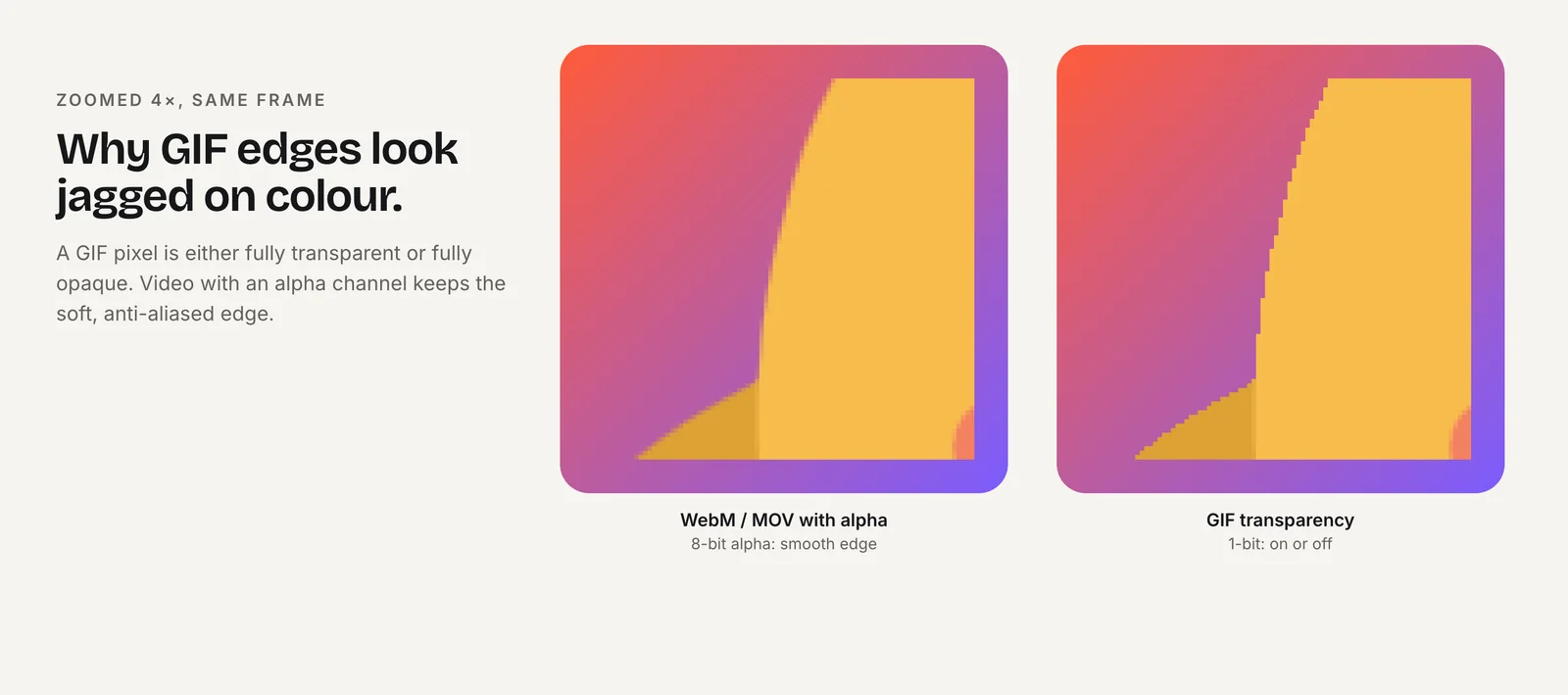
Which ffmpeg command makes a Telegram video sticker?
Telegram wants a .WEBM with VP9, one side exactly 512 px, at most 3 seconds, up to 30 fps, at most 256 KB and no audio stream:
ffmpeg -c:v libvpx-vp9 -i character.webm -t 3 -vf "fps=30,scale=512:512:force_original_aspect_ratio=decrease" -c:v libvpx-vp9 -pix_fmt yuva420p -b:v 0 -crf 40 -deadline good -an sticker.webmIn the local test this produced a 512×512, 3.000-second file of 27 KB with ALPHA_MODE=1. -pix_fmt yuva420p is what keeps alpha in the output; -an removes audio. For a 100×100 custom emoji:
ffmpeg -c:v libvpx-vp9 -i character.webm -t 3 -vf "fps=30,scale=100:100" -c:v libvpx-vp9 -pix_fmt yuva420p -b:v 0 -crf 40 -an emoji.webmCheck the byte count afterward:
ls -l sticker.webm # must be <=262144 bytes for Telegram; lower -crf → bigger file, raise crf (e.g. 45-50) or fps 24 to shrinkIf the file is over 262,144 bytes, raise CRF to 45 or 50, or drop to fps=24. Keep -deadline good for a better size-to-quality tradeoff than the realtime setting. The -t 3 cut applies to the output, so a longer source is simply trimmed; make sure the cut point does not interrupt a motion. Full upload steps are in Telegram Video Stickers From a Character Animation.
Which command makes a WhatsApp animated WebP?
WhatsApp needs animated WebP at exactly 512×512, 500 KB or less, with frames of at least 8 ms and a total of 10 seconds or less:
ffmpeg -c:v libvpx-vp9 -i character.webm -vf "fps=15,scale=512:512:force_original_aspect_ratio=decrease,pad=512:512:-1:-1:color=0x00000000" -c:v libwebp_anim -lossless 0 -quality 60 -loop 0 -an sticker.webp- The
padfilter centers the scaled character on a transparent 512×512 canvas, so non-square sources still meet the exact size. -lossless 0 -quality 60is lossy WebP with alpha. FFmpeg's docs say "Alpha is supported for either mode."-loop 0is required. The libwebp_anim encoder's loop default is 1, which plays once.
Local output: 512×512, animated, alpha present, loop count 0, as reported by webpinfo. If the file is over 500 KB, lower quality toward 45 or fps toward 12. More in WhatsApp Animated Stickers: Specs and Conversion.
How do I make a transparent GIF without halos?
Generate the palette from the actual frames and reserve one entry for transparency, in a single filter graph:
ffmpeg -c:v libvpx-vp9 -i character.webm -filter_complex "fps=15,scale=128:128:flags=lanczos,split[a][b];[a]palettegen=reserve_transparent=1[p];[b][p]paletteuse=alpha_threshold=128" -loop 0 emoji.gifsplit[a][b]sends the frames to two branches.palettegen=reserve_transparent=1creates "a palette of 255 colors maximum" and reserves the last one for transparency, which is the default.paletteuse=alpha_threshold=128sets pixels below the threshold fully transparent; 128 is the default.-loop 0loops forever, the GIF muxer's default (-1disables looping).
Local output: 128×128 with transparency. Halos usually come from GIFs made against a solid matte; working from real alpha avoids that. Edges are still thresholded, though, because GIF transparency is on or off. Where the platform accepts APNG or WebP, use those for soft edges. GIF frame delays can't be shorter than one centisecond.
How do I make an APNG for Discord or iMessage?
ffmpeg's APNG muxer writes animated PNG with full 8-bit alpha:
ffmpeg -c:v libvpx-vp9 -i character.webm -vf "fps=15,scale=320:320" -plays 0 -f apng sticker.png-plays 0 loops forever; per FFmpeg's docs, "0 causes an infinite loop, with 1 there is no loop." Local output: 320×320 RGBA. That matches Discord's 320×320 sticker size; for iMessage, change the scale to 300, 408 or 618 px for small, regular or large.
APNG frames are lossless, so file size climbs with frame rate, duration and dimensions. Discord stickers allow 512 KiB and iMessage stickers 500 KB, so lower fps or shorten the clip if you go over.
Discord also caps animated stickers at 5 seconds, so add -t 5 after the input if the source is longer. ffmpeg writes an APNG with a .png extension, which is what both platforms expect; the file still opens as a still image in tools that ignore APNG animation chunks, so preview it in a browser to confirm it moves.
Which format keeps what?
| Output | Alpha | Loop setting | ffmpeg encoder or muxer | Used by |
|---|---|---|---|---|
| VP9 WEBM | 8-bit (with yuva420p) | Player loops it | libvpx-vp9 | Telegram stickers and emoji |
| Animated WebP | 8-bit | -loop 0 (default 1) | libwebp_anim | |
| GIF | On/off (one color) | -loop 0 (default) | GIF encoder + palettegen/paletteuse | Slack, Discord emoji, iMessage |
| APNG | 8-bit | -plays 0 | APNG muxer | Discord stickers, iMessage |
The source matters as much as the command. A transparent VP9 WebM is the most reliable master here. From a GIF, drop the leading -c:v libvpx-vp9; you inherit its hard edges. For an HEVC-alpha .mov, also drop that option, but decoding HEVC alpha in ffmpeg was not verified in these tests, so convert from the WebM when you have both.
How do I check alpha and file size before uploading?
Run three checks on every file:
- Dimensions and duration:
ffprobe -v error -show_entries stream=width,height:format=duration sticker.webm - Alpha: for WebM, look for
ALPHA_MODE=1; for WebP,webpinforeports an alpha flag; for GIF and APNG, open the file over a colored background. - Bytes:
ls -land compare against the limit in bytes: 262,144 for Telegram's 256 KB and Discord's 256 KiB emoji, 524,288 for Discord's 512 KiB stickers.
Charmotion generates 17 animations from an uploaded character, mascot or logo in about 1–2 hours, including transparent WebM (VP9 alpha) and MOV (HEVC alpha) at 1080×1080, MP4, a 480 px GIF and a .riv file. It does not export sticker packs, but its transparent WebM (Studio plan, $29/month) is the kind of master every command on this page expects as character.webm.
How to convert a transparent WebM to sticker formats with ffmpeg
- Confirm the source has alpha. Run ffprobe and look for the
ALPHA_MODE=1tag. - Decode with libvpx. Start every command with
ffmpeg -c:v libvpx-vp9 -i character.webm. - Pick the target encoder. Use libvpx-vp9 with yuva420p for Telegram, libwebp_anim with
-loop 0for WhatsApp, palettegen/paletteuse for GIF, or-f apng -plays 0for APNG. - Match the platform size and length. Scale to 512, 100, 320, 128 or the iMessage size, and trim with
-twhere a duration limit applies. - Verify. Check dimensions, duration, alpha and byte count against the platform limit before uploading.
Frequently asked questions
Why does ffprobe say yuv420p for my transparent WebM?
ffprobe often reports yuv420p for VP9 WebMs that do carry alpha, because the alpha is stored separately from the main color frames. Look for the ALPHA_MODE=1 stream tag instead. If that tag is present, decode with -c:v libvpx-vp9 before -i to get the transparency.
Is lossy WebP able to keep transparency?
Yes. FFmpeg's libwebp documentation states that alpha is supported in both lossy and lossless modes. Lossy mode with -quality around 45–60 keeps animated stickers well under WhatsApp's 500 KB limit, while lossless files of the same animation are usually far larger and harder to fit.
Can I convert MP4 to a transparent sticker?
Not with real transparency. A standard H.264 MP4 has no alpha channel, so every pixel is opaque. You would need to key out a solid background, which leaves rough edges. Start from a VP9-alpha WebM, a ProRes 4444 master or a PNG sequence with transparency instead.
Quick answers from this guide
Sources
- FFmpeg codecs documentation (libwebp, libvpx) — FFmpeg
- FFmpeg filters documentation (palettegen, paletteuse) — FFmpeg
- FFmpeg formats documentation (GIF and APNG muxers) — FFmpeg
- ffmpeg loses WebM alpha with the default VP9 decoder — VideoHelp Forum
- Stickers: requirements for static, animated and video stickers — Telegram
- WhatsApp stickers: Android README (sticker and pack requirements) — WhatsApp on GitHub