How to Add an Animated Logo to Your Website Header
By the Charmotion team · Updated

To add an animated logo to a website header, export it as a small muted video or a Rive file, give it fixed width and height so the header does not shift, play it once on load and then hold a still frame, and skip the motion entirely when the visitor prefers reduced motion. Avoid GIF.
Key takeaways
- A header logo should play once, briefly, then rest. Endless motion beside navigation distracts and may need a pause control under WCAG 2.2.2.
- Use a muted, inline video without
loop, or a Rive file with an intro that ends on idle. GIF has 256 colors and hard-edged transparency. - Set explicit width and height (or
aspect-ratio) so the logo never causes layout shift. - Show a static image when
prefers-reduced-motion: reducematches.
Already have a character or logo? Preview your own character animated in a phone splash, a website hero and an empty state — free, in your browser, nothing uploaded.
Which format should a header logo use?
A header logo is small, appears on every page and sits next to navigation, so the format has to be light and the motion has to be short.
| Format | Transparency | Good for |
|---|---|---|
| SVG + CSS | Yes | Flat vector logos with simple moves (draw-on, fade, slide). |
| Rive (.riv) | Yes | Character-like logos, a play-once intro, hover or click reactions. |
| MP4 (H.264) | No | Logos on a solid header color you can match exactly. |
| HEVC .mov + VP9 WebM | Yes (alpha) | Complex, pre-rendered logos over any header background. |
| GIF | One bit only | Last resort. |
GIF is limited to a 256-color palette and all-or-nothing transparency, so soft edges and shadows look jagged on anything but the exact background they were exported against (MDN). It is also heavy: in a web.dev example a 3.7 MB GIF became a 551 KB MP4 and a 341 KB WebM (web.dev).
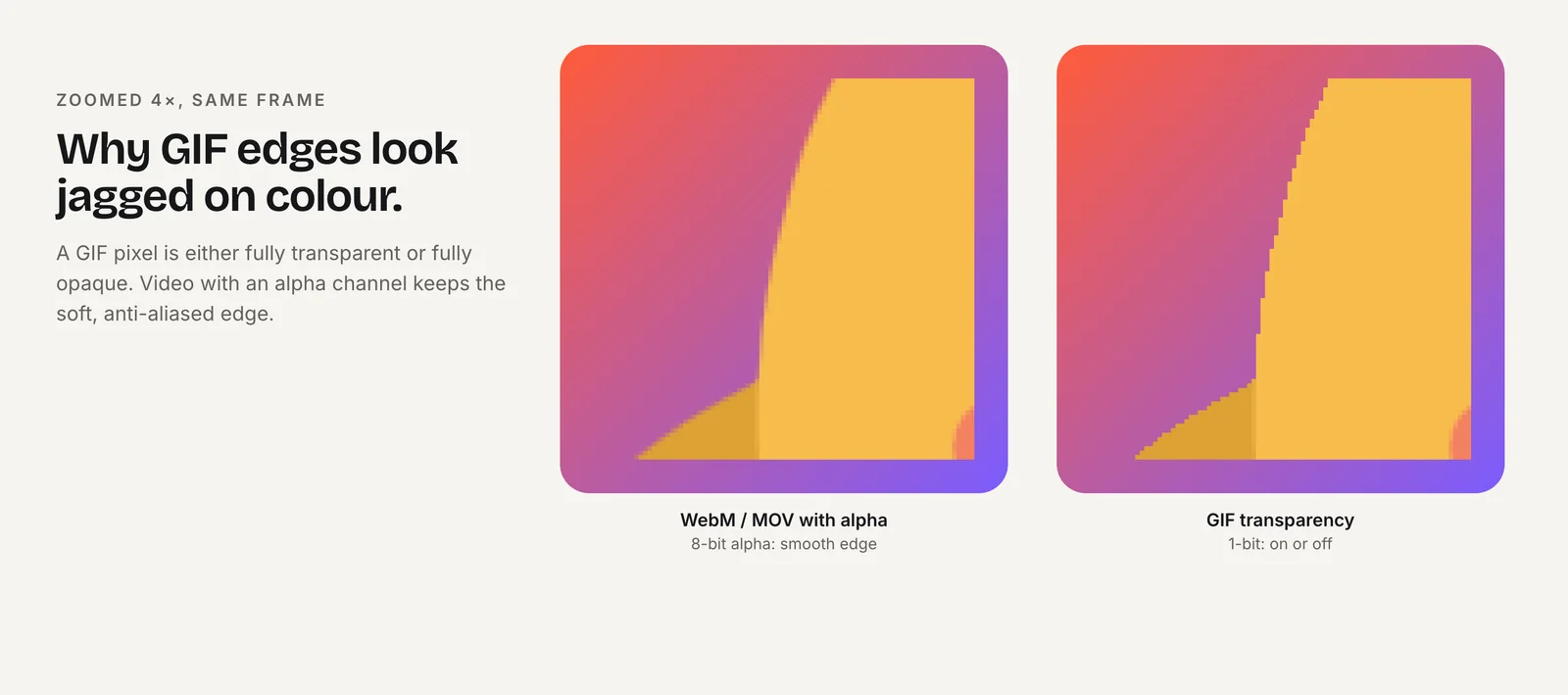
For transparent video, Safari needs HEVC with alpha and Chromium and Firefox need VP9 with alpha; the transparent video guide covers the encoding.
Why does my GIF logo show as a static image?
Usually because something between your upload and the page converted it. Many theme logo pickers and image pipelines resize uploads and re-encode them to a static format such as JPEG, PNG or WebP, keeping only the first frame. Check the rendered <img> source in your browser's developer tools: if the URL no longer ends in .gif, or includes resize parameters, the animation has been stripped.
Other common causes:
- The GIF was exported to play once and finished before you looked. Reload to check.
- A CSS background or
object-fitwrapper is showing a fallback image instead of the GIF. - A reduced-motion setting in some browsers or extensions pauses animated images.
Rather than fighting the logo picker, place the animation yourself in the header markup: a custom code block, a theme section, or the header template. That also lets you switch to a video or Rive file, which look better and weigh less than the GIF.
How do you play the logo animation once, then stay still?
With video, leave out loop. A finished video stays on its last frame, so make the last frame your resting logo. Muted, inline video is allowed to autoplay in Chrome and iOS Safari (MDN, WebKit), but start it from script so you can honor reduced motion:
<a href="/" class="logo" aria-label="Acme home">
  <video id="logo-anim" width="160" height="40" muted playsinline preload="auto"
         poster="/logo-still.png" aria-hidden="true">
    <source src="/logo.mov" type='video/quicktime; codecs="hvc1"'>
    <source src="/logo.webm" type="video/webm">
  </video>
</a>

<script>
const v = document.getElementById("logo-anim");
if (!matchMedia("(prefers-reduced-motion: reduce)").matches) {
  v.play().catch(() => {}); // blocked: the poster stays visible
}
</script>
The poster is the still logo, so visitors with reduced motion, blocked autoplay or a slow connection all see a correct header. The link keeps its accessible name through aria-label.
With Rive, use a state machine whose intro ends on an idle state, and keep the idle subtle or fully still. You can also play the intro only on a visitor's first page view by storing a flag in sessionStorage, so the logo does not replay on every navigation.
Charmotion's set includes this pattern: upload your logo and the .riv contains a launch intro that plays once and settles on idle, plus success and attention reactions you can fire on events such as a completed sign-up.
Keep the intro well under five seconds. WCAG 2.2 SC 2.2.2 requires a pause, stop or hide mechanism for automatic motion that lasts longer than five seconds next to other content (W3C), and a looping header logo falls into that category.
How do you keep the header logo crisp and lightweight?
- Reserve the space. Set
widthandheightattributes on the video or canvas, oraspect-ratioin CSS, so the header is laid out before the file loads. Elements that resize after load cause layout shift, which Core Web Vitals measures as CLS (web.dev). - Export at display size, doubled. A logo shown at 160 × 40 CSS pixels needs about 320 × 80 pixels for high-density screens. A 1080-pixel square video is wasted bandwidth here.
- Trim the clip. One to three seconds is usually enough. Shorter clips are smaller.
- Size the Rive canvas to its box. Call
resizeDrawingSurfaceToCanvas()inonLoadso the vector art renders sharply at the device pixel ratio (Rive). - Do not block the page. Load the Rive runtime asynchronously; the poster or a static
<img>fills the slot until it is ready.
Test the header on a phone width too. Many sites shrink the logo on mobile; if the animation's details disappear at that size, show the static mark there instead.
How do you make the logo react to hover or clicks?
A small reaction on hover or click can make a logo feel alive without running constantly. Keep it to one short one-shot that returns to the resting state.
For an SVG logo, a CSS transition on :hover and :focus-visible is enough, such as a slight scale or rotation using transform. For a Rive logo, fire a trigger from your own event handlers rather than relying on Rive listeners, so keyboard focus can play it too:
const link = document.querySelector(".logo");
const reduce = matchMedia("(prefers-reduced-motion: reduce)");

function react() {
  if (reduce.matches) return;
  r.viewModelInstance?.trigger("success").trigger();
}
link.addEventListener("mouseenter", react);
link.addEventListener("focus", react);
The trigger API shown is Rive's web Data Binding (autoBind: true); with legacy inputs, call fire() on the trigger input instead. Rate-limit the reaction, for example once every few seconds, so moving the pointer across the header does not replay it repeatedly.
WCAG 2.2 SC 2.3.3 (Animation from Interactions, Level AAA) asks that motion triggered by interaction can be disabled unless it is essential (W3C). Checking prefers-reduced-motion before firing covers that for most sites. The Rive state machine guide explains triggers in more depth.
How do you add it in Webflow, WordPress or Shopify?
The principle is the same everywhere: place the animation in the header markup rather than through the logo upload field.
- Webflow supports Rive natively. Upload the .riv to Assets and drag the Rive element from Add > Media into the navbar, then pick the artboard, state machine, fit and autoplay setting (Rive).
- WordPress: the core Video block has Autoplay, Loop, Muted, Play inline and Poster settings, so you can build a play-once header video without code in a block theme's header template part (WordPress.org). For Rive, paste the web runtime snippet into a Custom HTML block.
- Shopify has no native Rive or Lottie section. If your theme offers a Custom Liquid section, you can add the video or Rive markup there (Shopify); otherwise it means editing the header section in the theme code.
Platform-specific walkthroughs: Webflow, WordPress and Shopify.
How to add an animated logo to a website header
- Choose the format. Use SVG for simple vector moves, a Rive file for an intro plus reactions, or an HEVC .mov and VP9 WebM pair for a pre-rendered transparent logo. Avoid GIF.
- Export at the right size. Render at about twice the displayed CSS size, keep the clip to a few seconds, and make the final frame the resting logo.
- Reserve the space. Set width and height or
aspect-ratioon the video or canvas so the header does not shift when it loads. - Play once from script. Leave out
loop, addmutedandplaysinline, and callplay()only when reduced motion is not requested. - Keep a static fallback. Use the still logo as the poster, keep an accessible name on the home link, and check the header at mobile width.
Frequently asked questions
Should an animated header logo loop?
Usually not. A logo that plays once and rests draws attention without competing with navigation. Continuous motion longer than five seconds next to other content needs a pause, stop or hide mechanism under WCAG 2.2 SC 2.2.2, which is awkward to add to a logo.
Can I use an animated SVG for my logo?
Yes, for flat vector logos with simple motion such as a draw-on stroke or a fade. Animate transform and opacity where possible and wrap the motion in a prefers-reduced-motion check. Complex character motion is easier to build and control in Rive.
Will an autoplaying logo video play on iPhone?
Yes, if it is muted and has the playsinline attribute. iOS Safari only autoplays silent or muted video that is visible on screen. If play() is refused, the poster image stays visible, so set the poster to your still logo.
Does an animated logo hurt page speed?
Not if it is small and its space is reserved. Export at display size, keep the clip short, set width and height to avoid layout shift, and load the Rive runtime or video without blocking the rest of the page.
Quick answers from this guide
Sources
- Image file type and format guide — MDN Web Docs
- Replace animated GIFs with video for faster page loads — web.dev
- Autoplay guide for media and Web Audio APIs — MDN Web Docs
- Understanding SC 2.2.2: Pause, Stop, Hide — W3C WAI
- Understanding SC 2.3.3: Animation from Interactions — W3C WAI
- Cumulative Layout Shift (CLS) — web.dev
- Web (JS) runtime — Rive
- Rive is natively supported in Webflow — Rive