Rive vs Lottie: Which to Use in 2026
By the Charmotion team · Updated
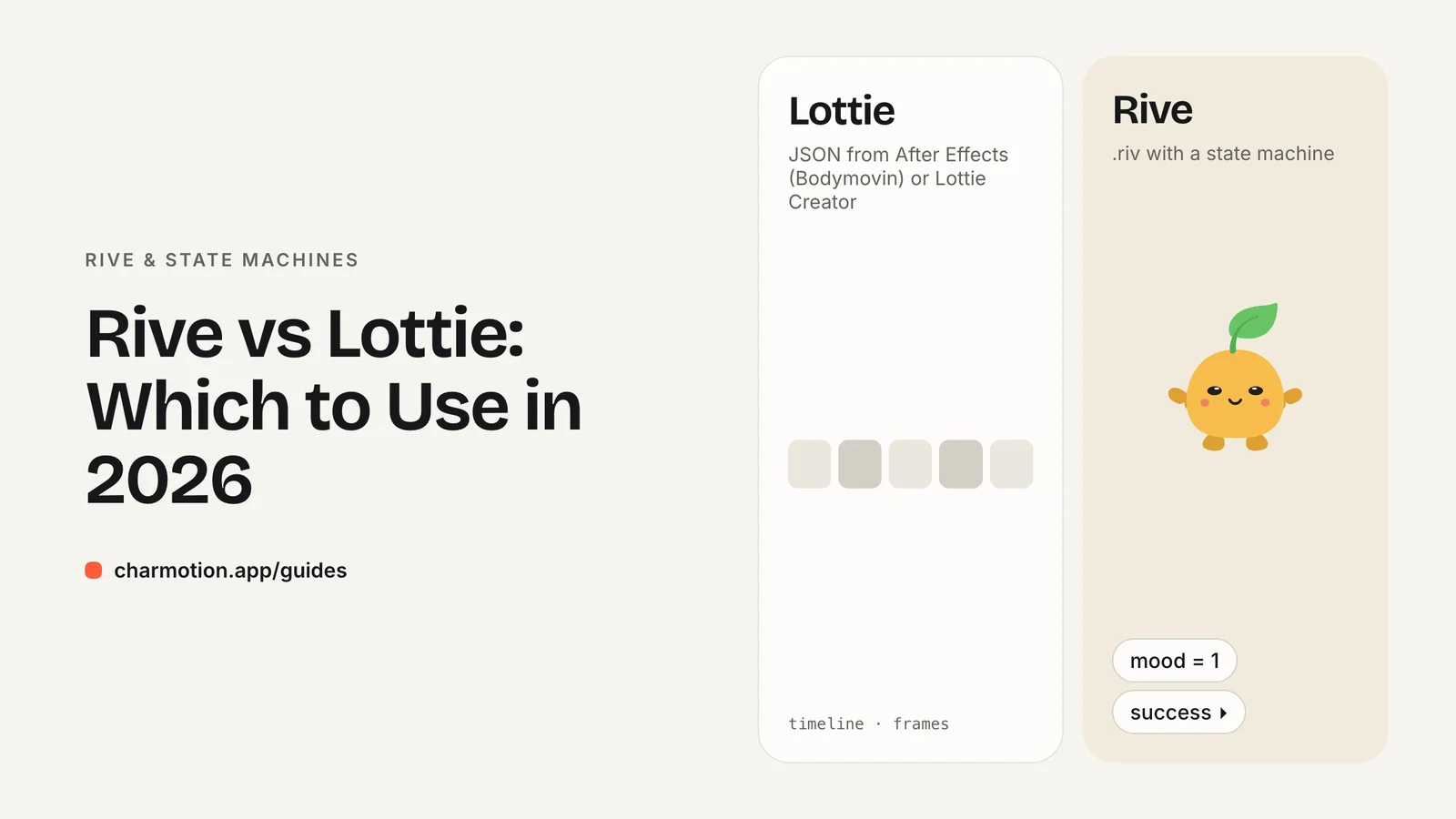
Choose Lottie when your animations already come from After Effects and are mostly linear; choose Rive when one character or control needs many states driven by code. Both now support interactive state machines, so the real differences are the authoring workflow, the file format, the runtime and how much logic lives in the file.
Key takeaways
- Lottie plays After Effects animations exported as JSON; Rive has its own editor and binary format.
- Both have state machines today: Rive natively, Lottie through Lottie Creator and dotLottie.
- Rive claims much smaller files, but that is a vendor claim, not an independent benchmark.
- Pick based on your team's tools and how interactive the animation must be.
What is the difference between Rive and Lottie?
Lottie is a playback format and library family. It renders Adobe After Effects animations that were exported as JSON with the Bodymovin plugin, on web, iOS, Android, React Native and Windows. The newer dotLottie (.lottie) format is a compressed container, maintained by LottieFiles under the MIT license, that can package several animations, assets, themes and state machines in one file.
Rive is an integrated tool: a dedicated editor plus open-source runtimes that play its binary .riv format. Animation, rigging and state machine logic are all built in the Rive editor and exported together.
| Lottie | Rive | |
|---|---|---|
| File format | JSON (.json) or dotLottie (.lottie) | Binary .riv |
| Main authoring tools | After Effects + Bodymovin, Lottie Creator | Rive editor |
| State machines | Yes, via Lottie Creator in dotLottie files | Yes, built in |
| Runtime license | Open source | MIT |
| Typical strength | Reusing motion-design work | Interactive, stateful graphics |
Neither is strictly better. They grew from different workflows and still reflect them.
Which one supports state machines and interactivity?
Both do. The old claim that "Lottie has no interactivity" is out of date. In 2025 LottieFiles added no-code state machines to Lottie Creator; the logic ships inside the .lottie file and runs in the dotLottie player.
Rive has had state machines at the center of its design for longer. A Rive state machine can blend between animations, layer several of them, listen for pointer events on parts of the artwork, and respond to values sent from code. Rive is also moving its runtime control model from state-machine inputs (numbers, booleans and triggers) to data binding with view models, which adds strings, enums, colors, lists and nested properties. Existing input-based files keep working.
The practical question is where you want the logic to live and who builds it. If designers already build everything in After Effects, adding interactions in Lottie Creator keeps that pipeline. If you are designing an interactive character from scratch, with many states that your app switches between, Rive's editor is built around exactly that job.
For a deeper look at how Rive state machines work, see Rive state machine: inputs, triggers and moods.
Which produces smaller files?
It depends on the animation, and there is no neutral benchmark that settles it. Rive's own blog claims that a 240 KB Lottie animation was recreated in Rive at 16 KB, about 15 times smaller. That is a vendor example, chosen by Rive, and should be read as such.
The structural reasons behind such differences are real, though. Lottie JSON is text, and After Effects exports often include redundant keyframe data. dotLottie narrows the gap by compressing the JSON with Deflate and sharing assets between animations. Rive's .riv is a compact binary, and several animations in one file can reuse the same shapes and bones.
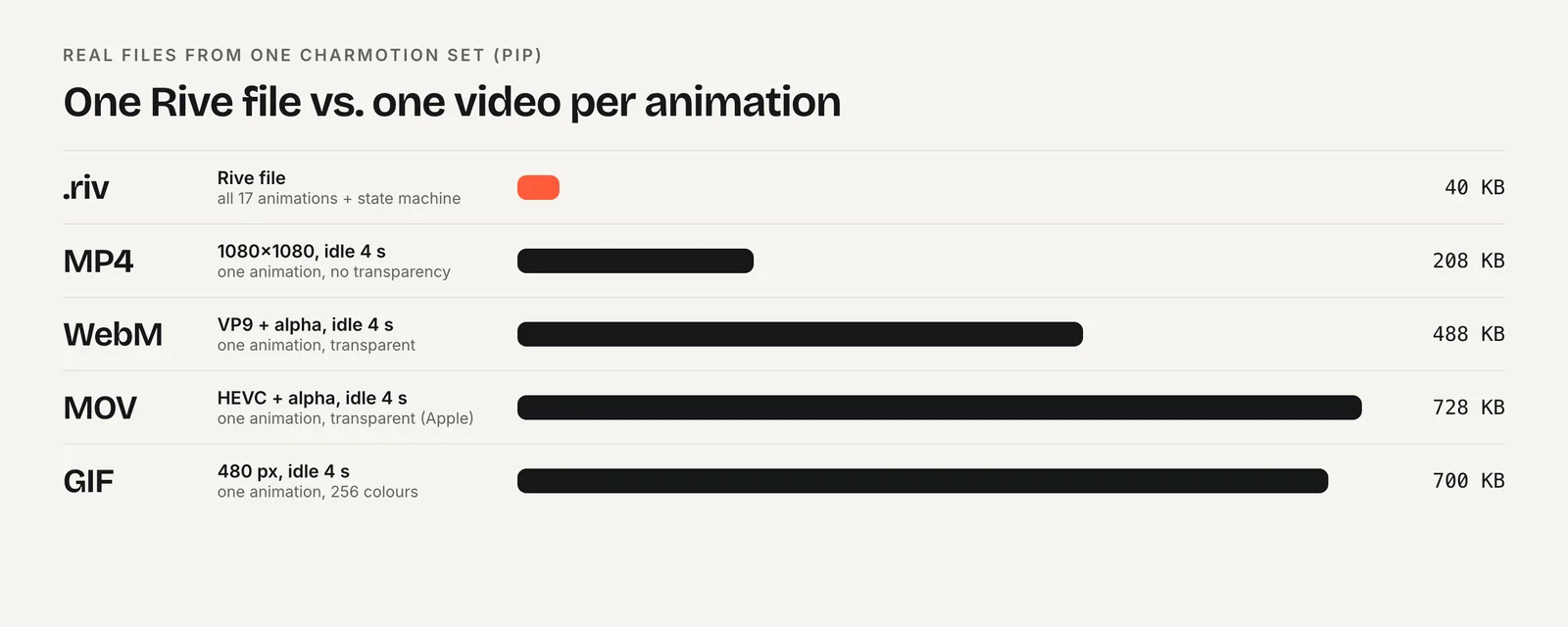
File size is also only half the cost. Both need a player library. Rive publishes its runtime sizes: on the web the canvas WASM build is 567 KB brotli-compressed and canvas-lite is 222 KB (January 2026 figures). Measure the runtime plus your actual files on your actual pages before you decide. For a set like the one in the chart, all character states fit in one .riv smaller than a single video clip.
Which runtimes are supported?
Both cover the mainstream platforms.
- Lottie: the original libraries support web, iOS, Android, React Native and Windows. The dotLottie players add support for .lottie files and their state machines.
- Rive: official runtimes for web (JS/WASM), React, Apple platforms (iOS, macOS, tvOS, visionOS), Android, Flutter and React Native, all MIT-licensed.
Both ecosystems are in transition, so check package names. Rive's React Native runtime moved from the deprecated rive-react-native package to a Nitro-based @rive-app/react-native, and its web docs now recommend @rive-app/webgl2. On the Lottie side, interactive features depend on using a dotLottie player rather than an older JSON-only player.
If your target is something unusual, such as a game engine or an embedded device, check each project's runtime list for that platform specifically rather than assuming parity.
When should you choose Lottie?
Lottie is the pragmatic choice when:
- Your motion designers work in After Effects and you want to reuse that work directly.
- The animations are mostly linear: an icon that animates in, a short illustration, a celebratory burst.
- You want to start from a large library of existing animations.
- Your app already ships a Lottie player, so adding more animations costs only the files.
- The interactivity you need is modest and Lottie Creator's state machines cover it.
Lottie's maturity is an advantage. It has been in production in many apps for years, and tooling, tutorials and community answers are easy to find. If your animation needs are a handful of independent clips rather than one character with many states, switching tools rarely pays for itself. Keep using what your team already ships well.
When should you choose Rive?
Rive is the stronger choice when:
- One character or component has many states that your code switches between, such as a mascot that idles, listens, thinks, talks and celebrates.
- Transitions between states need to blend smoothly instead of cutting.
- Parts of the artwork react to pointer input, such as eyes following the cursor.
- You want all of those states in one small file with one runtime.
- You plan to bind live data (text, numbers, colors) into the animation, which Rive's data binding supports.
Assistant avatars are a clear example. Vercel's AI Elements library ships a Persona component powered by Rive with idle, listening, thinking, speaking and asleep states. Duolingo uses Rive state machines for character lip-sync. Both are cases where the animation is driven by app state rather than played start to finish.
Frequently asked questions
Does Lottie support state machines?
Yes. LottieFiles added no-code state machines to Lottie Creator in 2025. The logic is stored inside the dotLottie (.lottie) file and runs in the dotLottie player, so older JSON-only Lottie players will not run it. Check that your platform's player supports dotLottie state machines before relying on them.
Is Rive really 15 times smaller than Lottie?
That figure comes from Rive's own blog, which recreated one 240 KB Lottie animation at 16 KB. It is a vendor example, not an independent benchmark. Real results depend on the animation and on whether you compare against JSON Lottie or compressed dotLottie, so measure your own files.
Can I convert a Lottie file to Rive?
Not losslessly in one click for every file. Rive and Lottie use different formats and feature sets, so complex After Effects work usually needs rebuilding in the Rive editor. Simple shapes and paths transfer more easily than effects, expressions or precomps. Plan time for rework rather than expecting a direct conversion.
Which is better for an app mascot?
Rive is usually better for a mascot that reacts to app state, because one file can hold all its loops and reactions with smooth blends controlled by code. Lottie works well if the mascot only plays a few independent clips or your team already produces it in After Effects.
Sources
- lottie-web — Airbnb (GitHub)
- dotLottie format — LottieFiles
- State Machines Are Finally in Lottie Creator — LottieFiles
- Rive as a Lottie alternative — Rive
- Runtimes: Getting started — Rive
- Runtime sizes — Rive
- Data binding migration guide — Rive
- How Duolingo animates world characters — Duolingo