Lottie Alternatives in 2026: 7 Options Compared
By the Charmotion team · Updated
The best Lottie alternative depends on the job: Rive for interactive characters and controls, CSS or the Web Animations API for simple UI motion, transparent video for rendered marketing clips, and Spline for real-time 3D. Before switching, check whether dotLottie, Lottie's newer format, already solves your problem.
Key takeaways
- Replace Lottie only for a concrete reason: interactivity, size, platform support or authoring cost.
- Rive is the closest alternative for interactive, multi-state vector animation.
- CSS and the Web Animations API need no extra runtime and cover most UI transitions.
- Video beats any vector format for rendered or 3D-looking art; GIF is a last resort for email and chat.
When should you replace Lottie at all?
Lottie is mature, widely supported and free to play. Many teams that look for an alternative have one specific problem, and some of those problems have fixes inside the Lottie ecosystem:
- "Lottie isn't interactive." Out of date. Lottie Creator added state machines in September 2025, stored in dotLottie (
.lottie) files and run by dotLottie players. - "The JSON is too big." dotLottie zips the JSON and can bundle several animations in one file. LottieFiles says this cuts size substantially (a vendor claim).
- "It's slow on iPhone." lottie-ios 4.0 made a Core Animation engine the default for supported animations, which removes per-frame main-thread work.
Real reasons to switch include: you need one character with many states and smooth blends, you don't use After Effects and don't want to, your art is raster or 3D, or the place you need to show it (email, a chat app, a video editor) can't run a player at all.
The rest of this guide covers the seven options people usually weigh, including dotLottie itself, since upgrading within Lottie is often the cheapest move.
How do the main Lottie alternatives compare?
A quick overview. "Runtime cost" means what the viewer downloads besides the animation itself.
| Option | Interactivity | Runtime cost | Authoring | Transparency | Best for |
|---|---|---|---|---|---|
| Rive | State machines, data binding, pointer events | 222–648 KB web WASM (Rive says) | Rive editor | Yes | Interactive characters and controls |
| dotLottie (still Lottie) | State machines via Lottie Creator | about 433 KB brotli WASM (our measurement) | After Effects, Lottie Creator | Yes | Teams already on Lottie |
| CSS / Web Animations API | Full, in your own code | None | Code | Yes | UI transitions and micro-interactions |
| Video (MP4, WebM, MOV) | Play and pause only | None (browser built-in) | Any video tool | WebM VP9 and HEVC MOV only | Rendered, 3D-looking or long clips |
| Animated SVG | Via CSS or JavaScript | None | Vector tool plus code | Yes | Icons and simple illustrations |
| GIF | None | None | Any tool | 1-bit only | Email and chat apps |
| Spline | Events and states in 3D scenes | A 3D runtime | Spline editor | Depends on export | Real-time 3D |
Is Rive the best Lottie alternative for interactive UI?
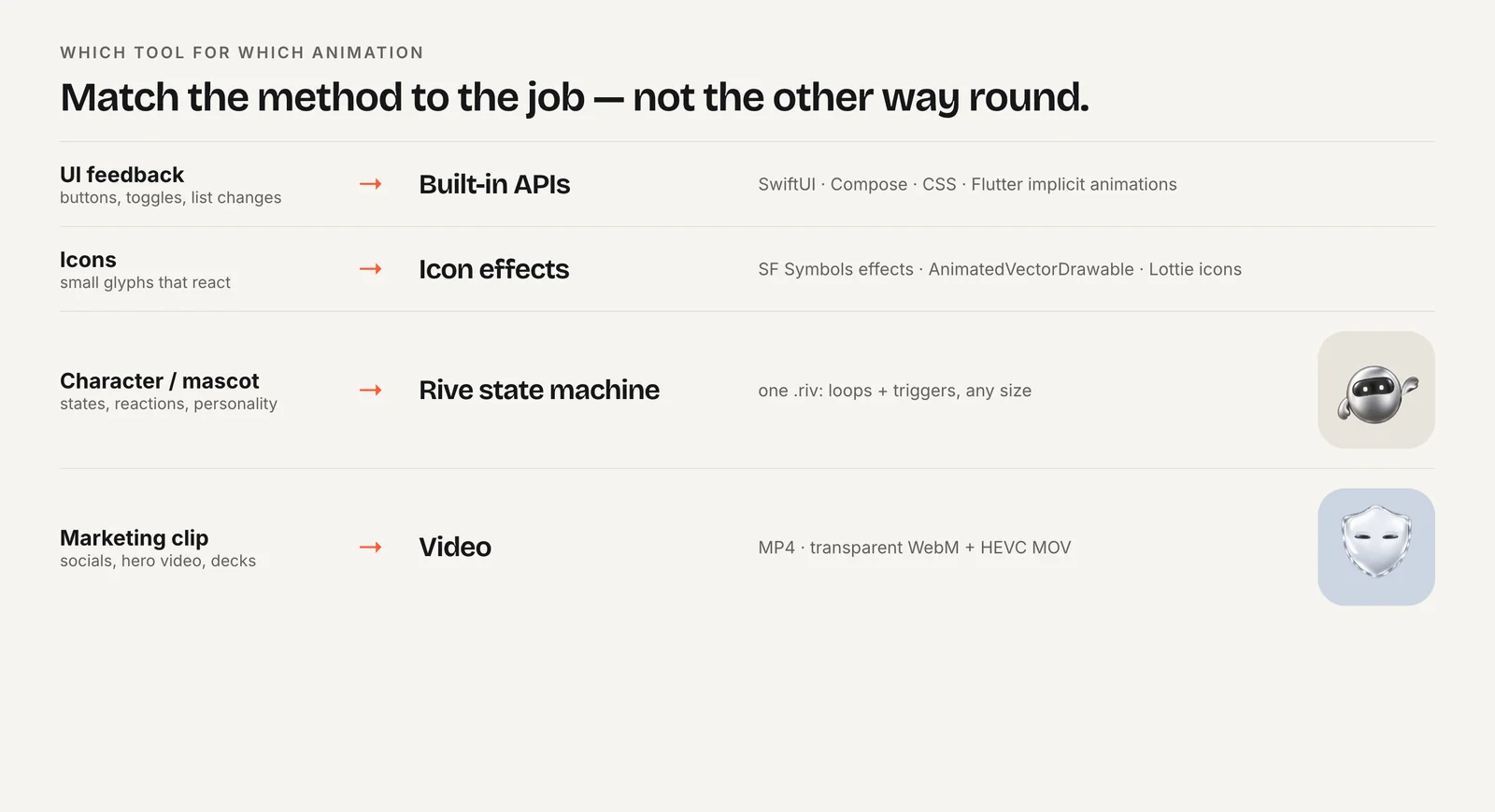
For interactive vector animation, it is the closest match. Rive pairs an editor with open-source runtimes for web, Apple platforms, Android, Flutter and React Native. Its state machines can blend between animations, layer them, react to pointer events and respond to values set from code. Rive now recommends data binding with view models over the older input system, which still works but is labeled legacy.
Where Rive is clearly stronger: one file that holds many states of a character, smooth transitions between them, and app-driven control. The only independent benchmark we found, Callstack's 2023 React Native test, measured about 60 FPS for Rive against 17 FPS for Lottie on an old Android phone, with Rive using somewhat more memory. On file size, Rive says .riv files are typically 10–15 times smaller than equivalent Lottie JSON; that is a vendor claim.
Where it is weaker: you must learn a new editor, After Effects work does not transfer directly, the web runtime is heavier than lottie-web, and the free Rive plan adds a splash screen to exported files and excludes video export (pricing as of October 2026).
For the full comparison see Rive vs Lottie and the performance and runtime size guide.
When are CSS or the Web Animations API enough?
More often than people expect. Buttons that press, cards that slide in, menus that expand, toasts that fade, skeleton shimmer and progress bars rarely need a designer-made asset. CSS transitions and keyframes handle them with no extra download, and the Web Animations API (element.animate()) adds play, pause, reverse and timing control from JavaScript.
Performance is good when you follow the standard advice: animate transform and opacity, which browsers can composite without layout work, and use will-change sparingly. Libraries such as Motion (formerly Framer Motion) build on these primitives for React and plain JavaScript.
Code-based animation stops being practical when the motion lives inside illustrated artwork: a character blinking, a hand-drawn icon morphing, a mascot changing expression. Writing that by hand is slow and hard for designers to adjust. That is the boundary where Lottie or Rive earn their runtime.
A useful test: if a designer would hand you a timeline rather than a set of start and end values, you probably want an authored asset. If you could describe the motion as "move this, fade that", code is enough.
When is a video (MP4/WebM with alpha) better than Lottie?
When the art is rendered rather than vector: 3D characters, photographic textures, heavy gradients, particle effects or long sequences. Vector players redraw every shape each frame, so complex art gets expensive; a video decoder handles it in hardware at a predictable cost.
Video is also the universal fallback. It needs no JavaScript, plays in every browser and app, and drops into video editors and social posts. web.dev's example of replacing a GIF shrank a 3.7 MB GIF to a 551 KB MP4 and a 341 KB WebM.
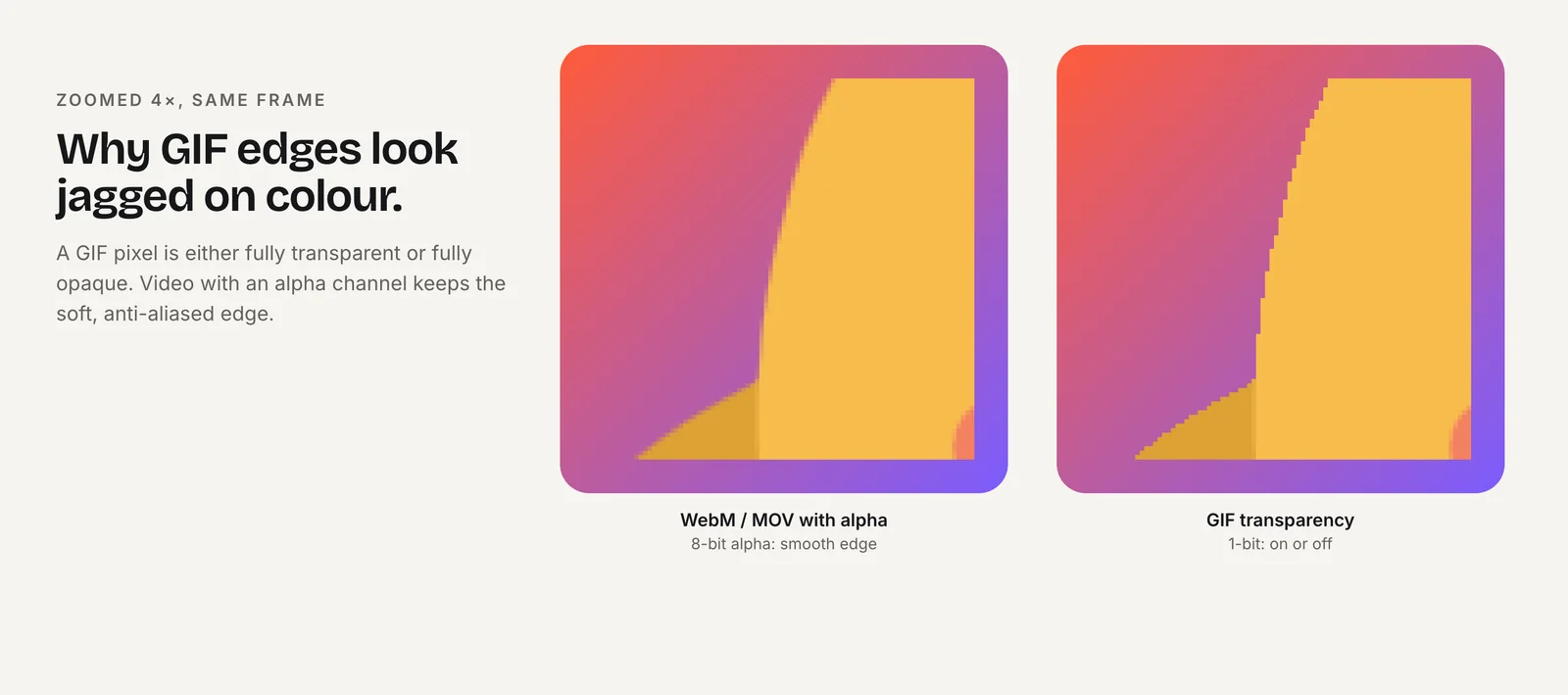
The trade-offs are interactivity and transparency. A video can play, pause and loop, but it can't switch states smoothly mid-animation. For transparent backgrounds you need two files: VP9 WebM with alpha for Chrome, Edge and Firefox, and HEVC with alpha in a .mov for Safari. Safari plays WebM but drops the VP9 alpha channel, so the HEVC source must be listed first.
Video also scales poorly. A 1080-pixel clip is blurry at 4K and wasteful at 64 pixels, while vector formats stay sharp at any size.
Is animated SVG or GIF a real alternative?
Animated SVG is a good alternative for icons, logos and simple illustrations. You keep a sharp vector file and animate its elements with CSS or the Web Animations API, with no player library. It gets unwieldy as complexity grows: dozens of animated paths are hard to author by hand, and design tools don't export rich timelines to clean SVG reliably. Past that point, Lottie or Rive are easier to maintain.
GIF is the alternative you use when nothing else runs. Email clients and many chat apps show GIFs but won't run a Lottie or Rive player. The costs are real: GIF is limited to a 256-color palette and 1-bit transparency, so edges on transparent backgrounds look jagged, and files are large. LottieFiles cites The Washington Post turning a 2 MB GIF into a 385 KB Lottie JSON (a vendor-reported example).
Use SVG when the motion is simple and you control the code. Use GIF only where video and vector players are unavailable, and keep it short. See Lottie vs GIF and Lottie vs SVG and CSS animation for detail.
What about 3D with Spline, and can one source give you every format?
Spline is a browser-based 3D design tool. If your animation is a real-time 3D scene, Lottie and Rive are the wrong category, and Spline is a natural alternative. Spline's docs list code export for vanilla JavaScript, Three.js, React, Next.js and react-three-fiber, with animations and events enabled only in the vanilla JavaScript and React exports; its FAQ also describes video export. Expect a heavier runtime and more GPU work than 2D vector playback. See Rive vs Spline.
One source, many formats. Most products need the same character in several places: interactive in the app, a looping clip on the landing page, a GIF in an email, a vertical video for social. Rebuilding it per format is the hidden cost of any choice. Charmotion takes this route for characters, mascots and logos: you upload an image and get 17 animations in about 1–2 hours as one .riv file plus MP4 (1080×1080 and 9:16), GIF, transparent WebM and MOV, and code for web, React and SwiftUI. It does not produce Lottie files, so it suits teams that are moving to Rive or video rather than staying on Lottie.
Which Lottie alternative should you choose?
- Stay on Lottie (with dotLottie) if your team works in After Effects, your animations are mostly linear and Lottie Creator's state machines cover the interactivity you need.
- Choose Rive if one character or control needs many states driven by app logic, with blends between them.
- Choose CSS or the Web Animations API if the motion is UI chrome: transitions, presses, reveals.
- Choose video if the art is rendered or 3D-looking and only needs to play, or it must work in editors and social posts.
- Choose animated SVG if it's a simple icon or logo and you want zero runtime.
- Choose GIF if the destination is email or a chat app.
- Choose Spline if you need an interactive 3D scene.
Many products end up using more than one: CSS for interface motion, an interactive file for a character, and video for marketing. That is normal, not a failure to pick.
Frequently asked questions
What is the best free alternative to Lottie?
For UI motion, CSS and the Web Animations API are free and need no runtime. For interactive vector characters, Rive's runtimes are open source and free, and its free editor plan can export .riv files, though those play a Rive splash screen. Paid plans remove it (as of October 2026).
Is dotLottie an alternative to Lottie?
Not really; it is Lottie's newer container format. A .lottie file is a ZIP that can hold several Lottie animations, images, themes and state machines. Switching to dotLottie keeps your After Effects pipeline while adding compression and interactivity, which is often cheaper than moving to a different tool.
Should I replace Lottie with video?
Replace it with video when the art is rendered, 3D-looking or long, or when it must play in places without a player. Keep Lottie when you need sharp scaling, small vector files or interactivity. For transparent video you need both a VP9 WebM and an HEVC .mov for Safari.
Is Rive harder to learn than Lottie?
It depends on your starting point. Motion designers fluent in After Effects can export Lottie with little new learning. Rive has its own editor with rigging and a state machine graph, so it takes time to learn, but one person can design, animate and wire the interactive logic in one tool.
Sources
- State machines are finally in Lottie Creator — LottieFiles
- Rive as a Lottie alternative — Rive
- Lottie vs. Rive: Optimizing Mobile App Animation — Callstack
- Using the Web Animations API — MDN
- How to create high-performance CSS animations — web.dev
- Video with transparency — Jake Archibald
- Replace animated GIFs with video — web.dev
- Exporting as code — Spline