Rive vs Lottie Performance and Runtime Size
By the Charmotion team · Updated
Rive is often faster than Lottie, but the evidence is thin. The only independent head-to-head we found, Callstack's 2023 React Native test, measured about 60 FPS for Rive and 17 FPS for Lottie on one old Android phone, with Rive using more memory. Most other numbers are vendor claims, so benchmark your own animation.
Key takeaways
- Callstack's 2023 test favored Rive on frame rate, but it used one device, React Native, and Rive used about 30 MB more memory.
- File-size wins like "10–15x smaller" come from Rive itself; LottieFiles publishes its own vendor numbers too.
- Count the player: Rive's web runtime is 222–648 KB compressed by its own figures, lottie-web about 76 KB gzipped by our measurement.
- On iOS, Lottie renders partly outside your app process, so profiling only your app makes Lottie look cheaper than it is.
Who actually benchmarked Rive vs Lottie?
Very few people, and that is the most important fact on this page. Nearly every performance or size number you will see in a "Rive vs Lottie" article traces back to one of three sources: Rive, LottieFiles, or a single independent test by the consultancy Callstack.
| Source | Independent? | Setup | What it found |
|---|---|---|---|
| Callstack, January 2023 | Yes | React Native, Sony Xperia Z3 | Rive about 60 FPS vs Lottie about 17 FPS; total memory Rive 276 MB vs Lottie 246 MB |
| Rive blog | No (Rive says) | No methodology published | .riv files "typically 10–15x smaller"; one 240 KB Lottie recreated at 16 KB |
| LottieFiles blog | No (LottieFiles says) | Compared with its own previous engine | ThorVG renderer on iOS 80% faster with 70% less memory |
| Margelo, July 2026 | Built it for Rive | iPhone 13 mini, React Native | New Rive runtime vs old Rive runtime, not vs Lottie |
| Airbnb, lottie-ios 4.0 | Library maintainer | iOS | Core Animation engine became the default, moving per-frame work off the main thread |
Vendor numbers are not worthless. They show what each team optimized for. But none of them compares both tools under the same conditions, and the LottieFiles and Margelo figures do not compare against the other tool at all. Treat the table as a list of hypotheses to test, not as a verdict.
What did Callstack measure on Android?
Callstack built the same animation in Lottie and in Rive and ran both in a React Native app on a Sony Xperia Z3, a phone released in 2014. Lottie ran at roughly 17 FPS on both the JavaScript and UI threads; Rive held roughly 60 FPS. Callstack's summary was that Rive outperformed Lottie "in all departments except graphics memory".
The limits matter as much as the headline:
- One device. An old, slow Android phone magnifies CPU differences that a modern phone might hide.
- One framework. It measured the React Native wrappers of that time, not native Android or the web.
- Memory went the other way. Total memory was 276 MB for Rive and 246 MB for Lottie.
- It is from 2023. Both runtimes have changed since: Rive's React Native package was rewritten, and LottieFiles now ships a ThorVG-based dotLottie player.
Callstack also recreated a 24.37 KB Lottie file as a 2 KB .riv. That is an independent file-size data point, but it is one small animation. It supports the direction of Rive's claim without confirming its exact ratio.
The honest reading: on a weak device, with a moderately complex vector animation, Rive kept frame rate where Lottie did not, at a modest memory cost. Whether that holds for your animation and your devices is something only your own test can tell you.
Why does Rive look heavier in Xcode profiling?
Because the two libraries do their work in different places. Rive's Apple runtime draws with Metal directly, inside your app process. Lottie's Core Animation engine hands layers to Apple's render server, which runs in a separate system process called backboardd.
If you open Instruments and profile only your app, Rive's rendering cost shows up in your process and much of Lottie's does not. Rive's own documentation makes this point and tells developers to profile backboardd as well as the app. That advice comes from a vendor, and the page gives no numbers, but the underlying architecture is easy to confirm: Core Animation compositing happens outside the app on iOS.
For a fair comparison on iOS:
- Record CPU and GPU for both your app process and
backboardd. - Test on a physical device, not the Simulator.
- Play the same animation, at the same on-screen size, for the same duration.
- Note energy impact, not just peak CPU, because a looping mascot runs for minutes.
The same principle applies elsewhere. Any comparison that measures only one process, or only the first second of playback, can mislead in either direction.
Did Lottie fix its iOS CPU problem?
Largely, for supported animations. Older lottie-ios versions rendered every frame on the main thread, and the maintainers noted that this engine could use roughly 5–20% or more CPU. In lottie-ios 4.0 (late 2022), Airbnb made the Core Animation rendering engine the default through an .automatic setting. Core Animation plays the animation without per-frame work on your main thread.
The catch is the word "supported". If an animation uses features the Core Animation engine cannot handle, lottie-ios falls back to the main-thread engine for that file. Two Lottie files from the same designer can therefore perform very differently on iPhone, depending on which After Effects features they use.
This also explains why older forum threads about Lottie draining battery on iOS may not describe today's behavior. Before you migrate an app away from Lottie for performance reasons, check which engine your files actually use and which lottie-ios version you ship. The fix may be an upgrade or a simpler export rather than a new format.
Callstack's 2023 test ran on Android, so it does not tell you how either tool performs on a current iPhone.
How big are the Rive, lottie-web and dotLottie runtimes?
File size is only half the download. Every format also needs a player, and the player is often bigger than the animation.
| Package | Renderer | Compressed size | Source |
|---|---|---|---|
| lottie-web 5.13.0 (full) | SVG / Canvas / HTML | about 76 KB gzip | Measured by Charmotion from npm, Oct 2026 |
| lottie-web light build | SVG only | about 46 KB gzip | Measured by Charmotion from npm, Oct 2026 |
| @lottiefiles/dotlottie-web 0.81.0 | ThorVG (WASM) | about 433 KB brotli WASM + 23 KB JS | Measured by Charmotion from npm, Oct 2026 |
| @rive-app/canvas-lite | Canvas2D | 222 KB brotli (Rive says); 275 KB measured for v2.44.2 | Rive docs; our measurement |
| @rive-app/canvas | Canvas2D | 567 KB brotli | Rive docs |
| @rive-app/webgl2 | Rive Renderer | 648 KB brotli | Rive docs |
| Rive iOS / Android arm64 | Rive Renderer | about 1.67 MB / 2.40 MB download impact | Rive docs |
Two things stand out. First, our measurement of the current canvas-lite WASM file is higher than Rive's published figure, which may predate the current version. Second, lottie-web is the smallest player here, but it was last published in May 2025, and LottieFiles now promotes dotLottie players, whose WASM engine is heavier than lottie-web.
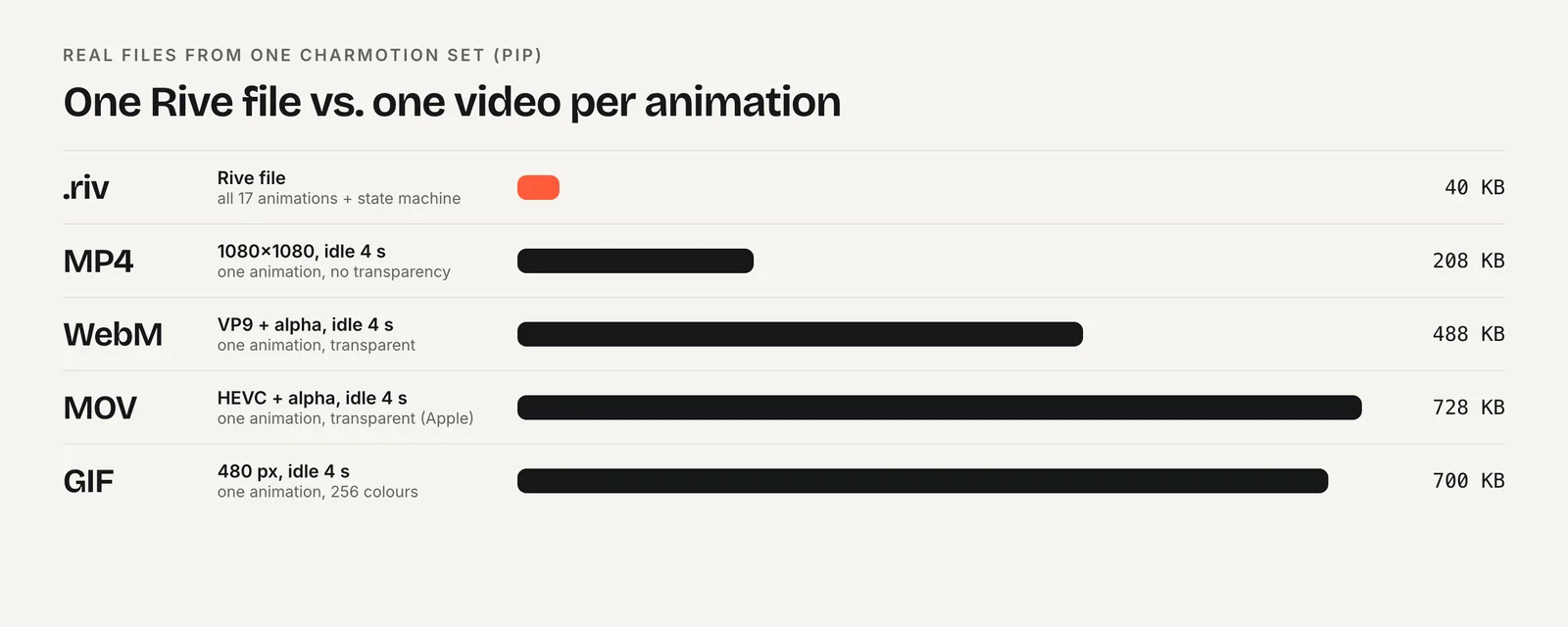
For one animation, the lightest player usually wins. For many animations, or one character with many states, per-file savings start to outweigh the runtime cost.
Does the renderer (Canvas2D, WebGL2, Rive Renderer) change the result?
Yes, which is one more reason single benchmarks travel badly. On the web, Rive's @rive-app/canvas and canvas-lite packages draw with the browser's Canvas2D API, while @rive-app/webgl2 uses the Rive Renderer on the GPU. Rive's docs say some features, including Vector Feathering, need the Rive Renderer. On Apple, Android and React Native, the Rive Renderer is the default.
Lottie has its own spread. lottie-web can render to SVG, Canvas or HTML, and each behaves differently with many layers. dotLottie players render with ThorVG compiled to WASM, with WebGL and WebGPU builds also available. On iOS, lottie-ios chooses between Core Animation and its main-thread engine per file.
So "Rive vs Lottie" is really a comparison of a specific package, renderer and device. A test that used Rive's GPU renderer against lottie-web's SVG renderer tells you little about canvas-lite against dotLottie. When you read a benchmark, look for the package names first. If they are missing, the result is hard to apply.
Rive also has a runtime optimization worth knowing: its state machines can "settle", meaning the runtime detects that nothing will change and stops advancing frames. An idle Rive animation that has settled costs very little.
How should you benchmark your own animation?
Use your real animation on your real devices. A short checklist:
- Match the content. Build or export the same animation in both formats, at the same artboard size and frame rate.
- Measure the total download. Add the compressed animation file to the compressed runtime, as served by your CDN.
- Test your weakest target device. A mid-range Android phone is more revealing than a new flagship.
- Record frame rate, CPU and memory over time. Run each for at least a minute. On iOS, include
backboardd. - Test your real layout. Ten small animations on a page behave differently from one large one.
- Check idle cost. A paused or settled animation should use close to nothing.
If you are choosing a format for a character rather than for a single clip, also count files. A set of loops and reactions as one Rive file is one request and one parse; the same set as separate Lottie files is many. Our own example: a Charmotion character set holds 17 animations in a single .riv of about 35–45 KB for flat characters (3D or rendered art is larger, because images are embedded), plus MP4, GIF and transparent WebM/MOV copies for places where no runtime can load.
For the broader trade-offs beyond speed, see Rive vs Lottie: which to use in 2026.
Which should you choose for performance?
Choose Lottie if you ship one or two simple animations on the web, where lottie-web's small player is hard to beat; your files already play on the lottie-ios Core Animation engine without fallback; or your team's pipeline is After Effects and the animations perform fine in testing.
Choose Rive if you need many states or animations from one character, low-end Android performance matters, or your own test reproduces the frame-rate gap Callstack saw. Rive's per-file savings and settling state machines pay off most when the runtime is shared across many animations.
Either way, decide on measured numbers from your own app, and re-test after major runtime upgrades. Both projects are moving quickly: Rive's React Native runtime has been rewritten on Nitro Modules, and LottieFiles now steers new projects toward its ThorVG-based dotLottie players. A result from two years ago may no longer describe either tool.
Frequently asked questions
Is Rive faster than Lottie?
Often, but it depends on the animation, device and package. Callstack's independent 2023 test measured about 60 FPS for Rive and 17 FPS for Lottie on a Sony Xperia Z3 in React Native, while Rive used slightly more memory. No newer independent head-to-head was found, so test your own files.
Are Rive files really 10 to 15 times smaller than Lottie?
That ratio is Rive's own claim, with no published methodology. Callstack independently recreated a 24.37 KB Lottie as a 2 KB .riv, which points the same way. LottieFiles says compressed .lottie files narrow the gap. Compare compressed file plus runtime size for your own animation.
Which web player is smallest?
lottie-web is, at about 76 KB gzipped for the full build and 46 KB for the light build by our October 2026 measurement. Rive's lightest web package, canvas-lite, is 222 KB brotli by Rive's figures and 275 KB by ours. The dotLottie WASM player is about 433 KB brotli.
Why does Lottie look cheaper than Rive in Instruments?
Lottie's Core Animation engine renders in Apple's backboardd process, outside your app, while Rive draws with Metal inside your app. Profiling only your app hides part of Lottie's cost. Rive's docs recommend profiling backboardd too, which is good practice for any fair iOS comparison.
Quick answers from this guide
Sources
- Lottie vs. Rive: Optimizing Mobile App Animation — Callstack
- Apple runtime: Resource usage — Rive
- Runtime sizes — Rive
- Choose a renderer — Rive
- lottie-ios 4.0.0 release notes — Airbnb (GitHub)
- lottie-web on npm — npm
- @lottiefiles/dotlottie-web on npm — npm
- Rive as a Lottie alternative — Rive