Lottie vs GIF: Size, Quality and Where Each Works
By the Charmotion team · Updated
Use Lottie for vector animation inside websites and apps you control, where it stays sharp at any size and has smooth transparent edges. Use GIF where no player can run, such as email and many chat tools. Lottie is usually smaller for flat vector art, but it needs a player library that a GIF does not.
Key takeaways
- GIF is limited to 256 colors and 1-bit transparency; Lottie draws vectors with smooth, anti-aliased edges.
- Lottie files are often much smaller than GIFs for flat art, but the player adds roughly 46–76 KB (lottie-web, gzipped) or more.
- GIF plays anywhere an image shows, including email; Lottie needs JavaScript or a native player.
- For raster or 3D-rendered artwork, video usually beats both.
What is the difference between Lottie and GIF?
A GIF is a sequence of bitmap frames that any image viewer can show. A Lottie file is a description of vector shapes and keyframes, originally exported from After Effects with the Bodymovin plugin, that a player library draws at runtime on web, iOS, Android, React Native and Windows. The dotLottie (.lottie) variant zips that JSON and can bundle several animations, themes and state machines.
| Lottie | GIF | |
|---|---|---|
| Content | Vector shapes and keyframes (JSON or .lottie) | Bitmap frames, indexed color |
| Colors | Full color, gradients | Up to 256 per frame |
| Transparency | Smooth, anti-aliased edges | 1-bit: each pixel fully on or off |
| Scaling | Sharp at any size | Blurs or pixelates when enlarged |
| Needs a player | Yes (JavaScript or native library) | No |
| Email and chat | Generally not playable | Widely supported |
| Interactivity | Playback control; state machines via dotLottie | None |
The table already hints at the answer: the formats compete only inside surfaces you control. Everywhere else, GIF is the only one of the two that plays.
Is Lottie always smaller than a GIF?
Often, but not always, and the comparison needs two numbers: the animation file and the player.
For flat vector motion the file gap can be large. LottieFiles cites The Washington Post replacing a 2 MB GIF with a 385 KB Lottie JSON; that is a vendor-published example, not an independent test. The reason is structural: a GIF stores pixels for every frame, so its size grows with dimensions and duration, while a Lottie file stores shapes and keyframes, so its size grows with artwork complexity.
That flips when the Lottie contains embedded bitmaps, many layers, or long frame-by-frame sequences. A Lottie that wraps photos is just a heavier GIF with a runtime attached.
Then add the player. Measured by Charmotion from the npm package on 2026-10-12, lottie-web 5.13.0 is about 76 KB gzipped for the full build and 46 KB for the light build. LottieFiles' newer dotlottie-web player loads a WebAssembly engine that measured about 433 KB with brotli, plus roughly 23 KB of JavaScript. For one small animation on one page, the player can outweigh the GIF; across many animations it amortizes quickly.
GIF is not efficient either. In web.dev's example, a 3.7 MB GIF became a 551 KB MP4 and a 341 KB WebM, which is why video is often the better replacement for raster content.
Why do GIFs look jagged on transparent backgrounds?
GIF transparency is binary. MDN describes it as a single palette index that is fully transparent, with no partial alpha. An anti-aliased edge needs semi-transparent pixels to blend into whatever is behind it, and GIF cannot store them.
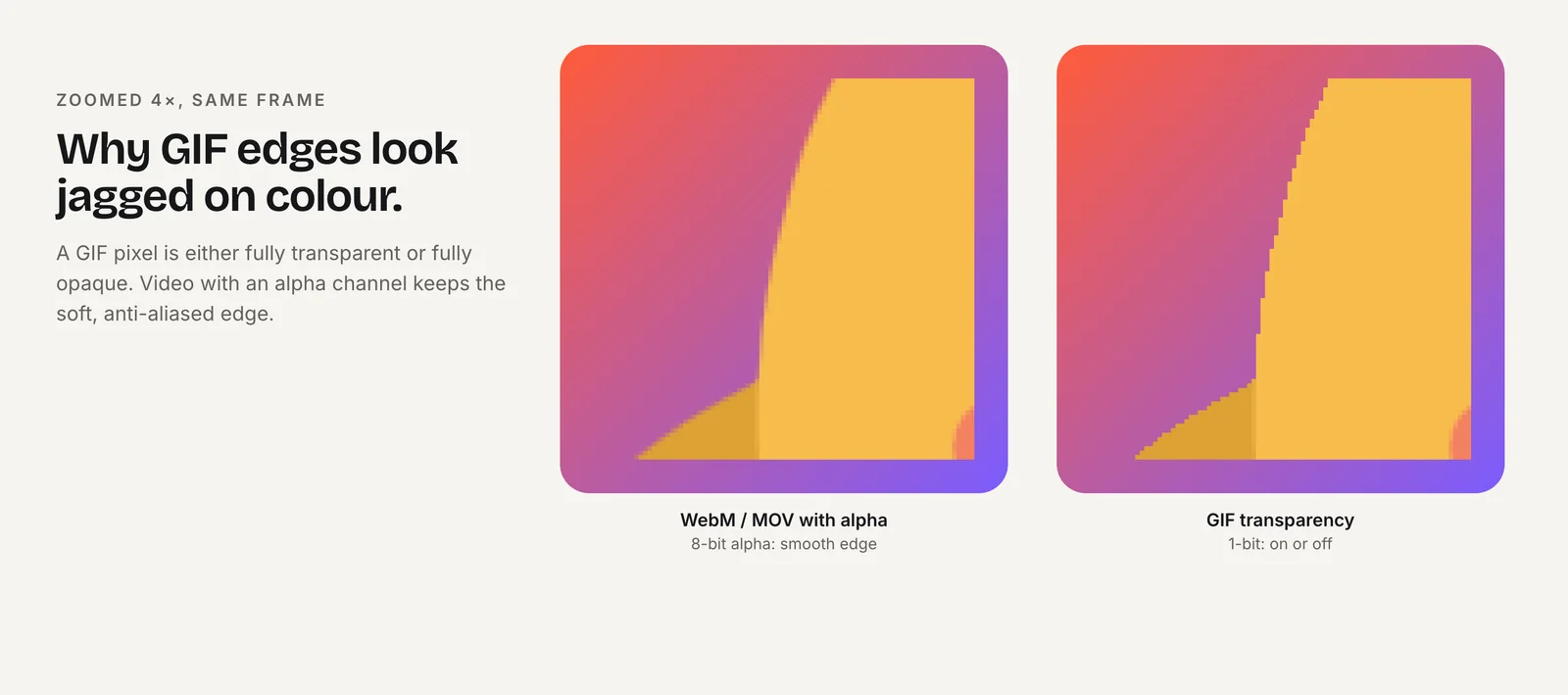
Exporters work around this by blending the edge against a fixed matte color, usually white. That looks fine on a white page and leaves a pale halo on a dark one. Without a matte, the edge is a staircase. Either way, a transparent GIF only looks right on the background it was made for.
Lottie draws vector shapes onto a transparent canvas or SVG, so edges are anti-aliased against the real background at display time. The same file sits cleanly on a light card, a dark hero or a gradient.
The 256-color limit adds a second artifact: gradients, soft shadows and 3D-rendered art band or dither. Lottie has no palette limit for vector fills. If your artwork is photographic, though, neither format is ideal; a transparent WebM plus an HEVC .mov keeps both full color and a real alpha channel.
Where can't you use Lottie?
Anywhere that displays images but will not run your code. A Lottie file is data; something has to execute a player to turn it into pixels. That rules it out in:
- Email. Email clients do not run scripts in messages, so there is no way to load a Lottie player. GIF is the standard choice for motion in email.
- Chat and social uploads. Messaging tools and social networks accept images and video files, not arbitrary JSON plus a player.
- Documents, slides and README files that accept images but not scripts.
- CMS fields limited to images, unless the platform adds its own Lottie element, as Webflow and Wix do.
Inside your own website or app, Lottie works wherever a player is installed. In those places the question becomes Lottie versus video versus Rive, which GIF vs WebM vs MP4 vs Lottie vs Rive covers format by format.
Keep GIFs for email short, small and readable on the first frame, because some clients show only that frame.
Does Lottie cost CPU that a GIF doesn't?
Yes, in principle. A browser decodes a GIF natively. A Lottie player evaluates shapes and keyframes and redraws them every frame, in JavaScript on the web (lottie-web renders to SVG, canvas or HTML) or in native code on mobile.
How much that matters depends on the platform and the file:
- iOS. lottie-ios 4.0 made its Core Animation rendering engine the default for supported animations, so playback no longer does per-frame work on the main thread. Animations using unsupported features fall back to the older main-thread engine, which InfoQ reported could use 5–20% or more CPU.
- React Native on Android. In Callstack's January 2023 test on an old Sony Xperia Z3, a Lottie animation ran at roughly 17 FPS. That is one device and one file, so treat it as a warning about low-end hardware, not a general rule.
Practical habits close most of the gap: pause animations that are off screen, avoid dozens of simultaneous players, and keep layer counts and masks low. A GIF has no such knobs, but it also keeps decoding while visible and cannot be paused without swapping the image.
When does a video beat both?
When the artwork is raster: photos, 3D renders, painted illustration or screen recordings. Video codecs store mostly what changes between frames, so they compress that kind of content far better than GIF, and a vector format cannot represent it efficiently at all.
web.dev recommends replacing animated GIFs on web pages with a <video autoplay loop muted playsinline> element, which behaves like a GIF while downloading a fraction of the bytes. For a transparent overlay, serve an HEVC-with-alpha .mov for Safari and a VP9 WebM for other browsers; Transparent Video on Websites has the markup.
Video still shares GIF's main limitation inside apps: it can play, pause and seek, but it cannot react to state. If the animation needs to switch between loading, success and error, a state machine in Lottie (via dotLottie) or Rive is the better fit.
A useful rule: vector and interactive inside your product, video for raster clips you control, GIF only where neither can play.
Should you choose Lottie or GIF?
Choose Lottie if:
- the animation plays inside your own website or app, where you can load a player;
- the artwork is flat vector illustration, icons or UI motion;
- it must sit on different backgrounds, or scale across screen densities;
- you need playback control, or state-driven behavior through dotLottie state machines;
- your team already produces motion in After Effects or Lottie Creator.
Choose GIF if:
- the destination is email, a chat app, a document or any surface that shows images but runs no code;
- you need a single file that works with zero integration;
- the clip is short and small enough that GIF's size penalty does not matter.
If neither list fits, because the content is raster or must be transparent in full color, use video. Many teams ship all three: Lottie in the product, video on the marketing site and GIF in email.
How do you ship both from one source?
Keep one master animation and render the GIF from it, rather than maintaining two hand-made versions that drift apart. With After Effects, export Lottie through Bodymovin and render a video for the GIF; with Lottie Creator, use its exports. Then convert video to GIF with a generated palette, which looks far better than a default conversion:
ffmpeg -i loop.mp4 -vf "fps=15,scale=480:-1:flags=lanczos,split[a][b];[a]palettegen[p];[b][p]paletteuse" loop.gifLower the frame rate and width first if the file is too big; both shrink a GIF faster than any other setting.
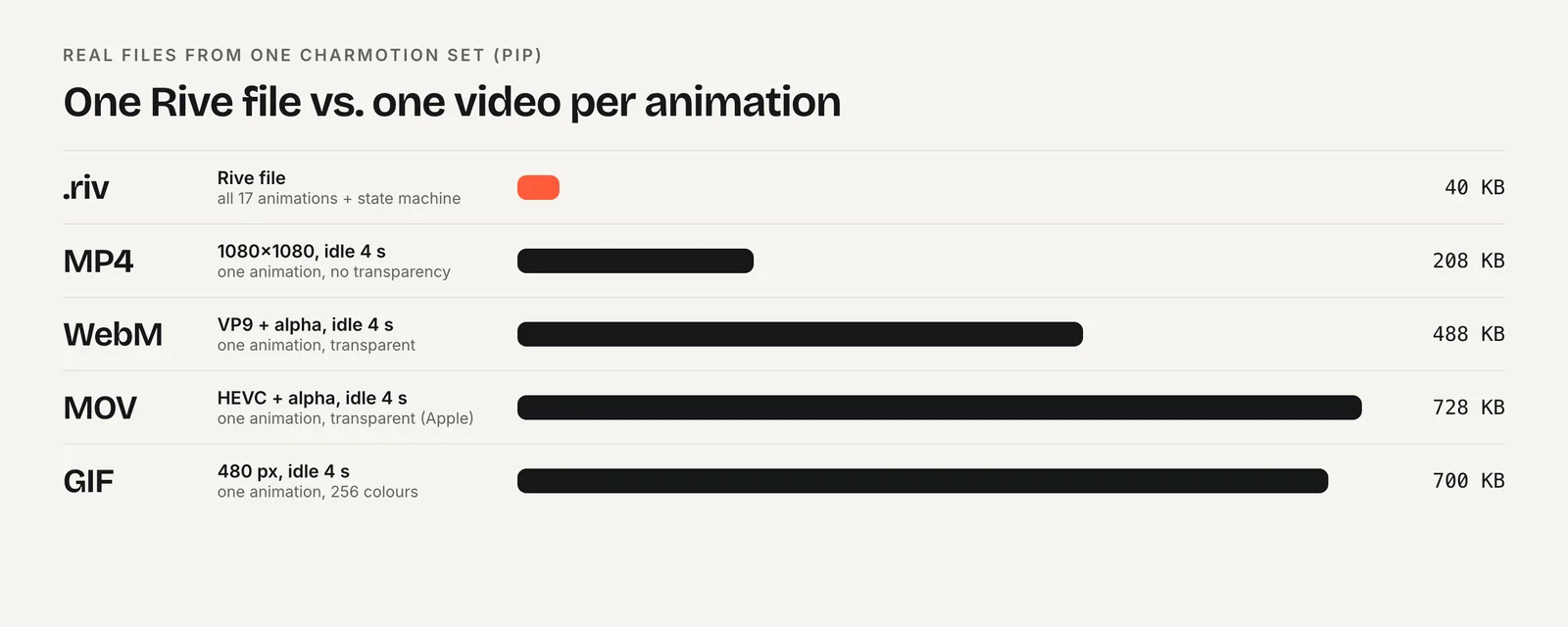
For a character or mascot specifically, Charmotion takes the opposite route: you upload the character, mascot or logo and get 17 animations in about 1–2 hours as one Rive file plus MP4, GIF and transparent WebM and MOV exports. It does not produce Lottie files, so if your product standardizes on Lottie, keep your existing pipeline and use the ffmpeg step above for the GIF.
Frequently asked questions
Can I use a Lottie animation in an email?
Not reliably. Email clients do not run scripts, so there is no way to load the player a Lottie file needs. Export the animation as a GIF for email instead, keep it short and small, and make sure the first frame works on its own, because some clients show only that frame.
How do I convert a GIF to Lottie?
You generally cannot convert one cleanly. A GIF is bitmap frames and Lottie is vector shapes, so a converted file just embeds the frames as images and keeps GIF's limitations. For real gains, rebuild the animation as vectors in After Effects or Lottie Creator, or use a video format for raster content.
Does Lottie support transparency?
Yes. Lottie players draw vector shapes onto a transparent canvas or SVG, so edges are anti-aliased against whatever sits behind them. GIF only has 1-bit transparency, which causes jagged edges or a halo from the matte color used at export. Lottie looks clean on light, dark and gradient backgrounds.
Is Lottie better than GIF for website loading speed?
Usually, if you show several animations, because vector files are small and one player serves them all. For a single tiny animation, the player library can outweigh the GIF. Measure the file plus the player, and consider an MP4 or WebM video when the artwork is raster.
Quick answers from this guide
Sources
- Image file type and format guide — MDN Web Docs
- Replace animated GIFs with video for faster page loads — web.dev
- lottie-web — Airbnb on GitHub
- lottie-web package — npm
- @lottiefiles/dotlottie-web package — npm
- Lottie vs GIF — LottieFiles
- lottie-ios 4.0.0 release notes — Airbnb on GitHub
- Lottie vs Rive: optimizing mobile app animation — Callstack