dotLottie vs Lottie JSON: What .lottie Adds
By the Charmotion team · Updated
A .lottie (dotLottie) file is a ZIP archive that wraps one or more Lottie JSON animations together with images, themes and state machines. Plain Lottie JSON holds a single animation as text. dotLottie is usually smaller and adds interactivity, but it needs a dotLottie-capable player, which can be heavier than lottie-web.
Key takeaways
- dotLottie 2.0 is a Deflate-compressed ZIP with a manifest and folders for animations, images, state machines and themes.
- LottieFiles says .lottie is up to 80% smaller than JSON; real savings shrink when your server already gzips JSON.
- Themes and state machines exist only in dotLottie, and only dotLottie players run them.
- The dotLottie web player's WASM engine is about 433 KB brotli by our measurement, versus about 76 KB gzip for lottie-web.
What is a .lottie file?
A .lottie file is a container defined by the open dotLottie specification, maintained by LottieFiles under the MIT license. Version 2.0 of the spec defines it as a ZIP archive compressed with Deflate, with the .lottie extension and the MIME type application/zip+dotlottie.
Inside the archive:
manifest.jsonlists what the file contains.a/holds the animations, each a regular Lottie JSON document.i/holds images used by those animations.s/holds state machines.t/holds themes.
So a .lottie doesn't replace Lottie JSON. It packages it. Every animation inside is still the same JSON that After Effects and Bodymovin produce, which is why tools can convert between the two easily and why your existing animations keep working.
| Feature | Lottie JSON | dotLottie (.lottie) |
|---|---|---|
| Container | Plain text JSON | ZIP archive with manifest |
| Compression | None in the file (server may gzip) | Deflate inside the file |
| Animations per file | One | One or more |
| Images | External files or inlined as base64 text | Stored as files in i/ |
| Themes | No | Yes, in t/ |
| State machines | No | Yes, in s/ |
| Web player | lottie-web, dotlottie-web | dotlottie-web and other dotLottie players |
Is .lottie really smaller than JSON?
Usually, but less than the marketing suggests once you account for how files travel. LottieFiles' pricing page says optimized JSON and dotLottie formats can reduce file sizes by up to 80%, and its dotLottie page claims files up to 10 times smaller. Both are vendor claims without a published method.
The mechanism is ordinary compression. Lottie JSON is verbose text with repeated keys and numbers, so it compresses well. dotLottie applies Deflate inside the file. But most web servers and CDNs already compress JSON in transit with gzip or brotli. If yours does, a JSON file and a .lottie file may arrive at similar sizes, because both are compressed on the wire.
Where dotLottie saves more reliably:
- Images. JSON often inlines images as base64 text, which inflates them by about a third. dotLottie stores them as binary files.
- Several animations. One archive replaces several requests, and shared images are stored once.
- Storage and app bundles. Files shipped inside a mobile app aren't compressed by a CDN, so the in-file compression counts fully.
Measure both formats as your users actually receive them before deciding on size grounds alone.
Can one .lottie hold multiple animations?
Yes. The a/ folder can contain several animations, listed in the manifest, and a dotLottie player can switch between them by id. This is useful for sets that belong together: the idle, loading and success versions of an illustration, or the light and dark variants of an icon.
Bundling has practical advantages. Your app or page loads one file instead of several, images shared between animations are stored once in i/, and a state machine in s/ can move between the bundled animations in response to user input.
There are trade-offs. Users download every animation in the archive even if they only see one. For a large set, splitting into a few files may load faster on the first screen. And every animation in the bundle is still an independent Lottie timeline. Switching between them is a cut or a tweened transition defined in the state machine, not a blend of two animations playing at once.
That last point is where dotLottie and Rive differ in approach. A .riv file also holds many animations, but they share one artboard, one rig and one set of shapes, and the state machine can blend between them. For characters with many states, compare both. See Lottie vs Rive state machines.
What are dotLottie themes?
Themes are files in the t/ folder that override properties of an animation, such as colors, without editing the animation itself. A single illustration can ship with a light theme, a dark theme and a brand-color theme, and the player applies one at runtime.
Without themes, the usual approach with plain JSON is to export a separate file per color scheme, or to edit color values in the JSON from code, which is fragile. Themes make color variants a supported feature of the format rather than a workaround.
Themes also connect to interactivity. The dotLottie state machine specification includes a SetTheme action, so a state machine can switch themes in response to an input or event, for example changing an icon's colors when it becomes active.
Like state machines, themes work only in players that implement the dotLottie format. The classic lottie-web player reads the JSON animation and ignores the rest of the archive's features, so if you rely on themes, check your player on every platform you ship to.
How do dotLottie state machines work?
A dotLottie state machine is a JSON definition stored in the s/ folder. LottieFiles added a visual editor for them to Lottie Creator on September 23, 2025, so designers can build them without writing the JSON.
The specification describes:
- States: playback states that play a segment or animation, plus a global state whose transitions are checked first, regardless of the current state.
- Inputs: numeric, string, boolean and event.
- Transitions: instant or tweened with cubic-bezier easing, gated by guards on input values.
- Interactions: pointer enter, exit, down, up and move; click; animation complete and loop complete.
- Actions: set, toggle, increment or decrement inputs, fire events, set frame or progress, set a theme, open a URL, or fire a custom event to your code.
That is enough for hover and press states, toggles, multi-step illustrations and simple characters. It runs only in dotLottie players; JSON-only players play the animation without any of the logic.
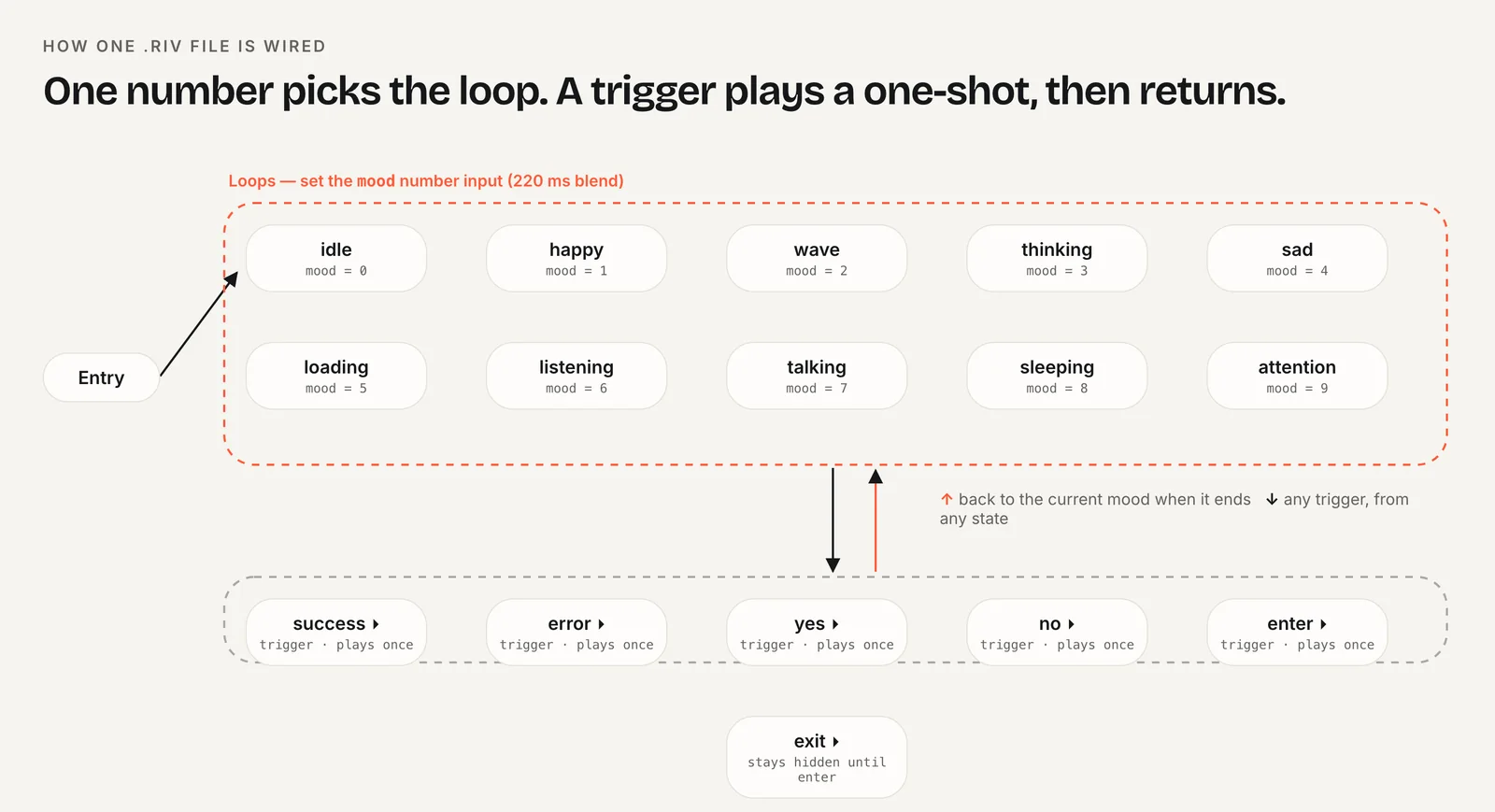
The diagram shows the loop-plus-trigger pattern many interactive characters use. dotLottie can express it with inputs and guards; Rive expresses it with its own state machine and data binding. For a side-by-side table, see Lottie vs Rive state machines.
Which players support .lottie?
Support has spread quickly, but check each platform:
- Web: LottieFiles'
@lottiefiles/dotlottie-webplays both .json and .lottie and has wrappers for React, Vue, Svelte, Solid and Web Components. It renders with ThorVG compiled to WASM. The classiclottie-webplays JSON only and was last published in May 2025. - React Native:
lottie-react-nativesupports .lottie with a Metro config change and uses@lottiefiles/dotlottie-reacton web. Its current README requires React Native 0.84 or newer and the New Architecture. - Flutter: the popular
lottiepackage is an unofficial pure Dart port that can read .lottie with a custom decoder; LottieFiles maintains a separatedotlottie_flutterplugin with state machines and themes.
The trade-off on the web is runtime weight. By our measurement of the npm packages in October 2026, dotlottie-web's WASM engine is about 433 KB brotli plus about 23 KB of JavaScript, while lottie-web's full build is about 76 KB gzipped. LottieFiles says its ThorVG renderer is faster and uses less memory than its previous engine, a vendor comparison against itself rather than against lottie-web. For one simple JSON animation, lottie-web is lighter; for themes, state machines or many animations, dotLottie earns its size.
LottieFiles reports dotLottie npm downloads rising from about 65,000 a month in June 2024 to 4.7 million in November 2025, a vendor-reported figure that still shows the direction of the ecosystem.
Should you use dotLottie or Lottie JSON?
Choose Lottie JSON if you ship one or two simple animations on the web, want the smallest player (lottie-web), or use a platform or plugin that accepts only JSON.
Choose dotLottie if you need themes, state machines, several animations in one file or embedded images, or you ship files inside a mobile app where in-file compression counts fully.
Consider Rive or video if you're building a character with many blended states (Rive) or the art is rendered rather than vector (video). For performance details see Rive vs Lottie performance.
Switching between the two Lottie formats is low-risk in either direction, because the animations inside a .lottie are ordinary Lottie JSON. You can change players first, then migrate files gradually.
Frequently asked questions
Can I rename a .json Lottie file to .lottie?
No. A .lottie file is a ZIP archive with a manifest.json and an a/ folder, not renamed JSON. Use LottieFiles' tools or the dotLottie libraries to package JSON into .lottie. Going the other way works: unzip a .lottie and the animations are regular Lottie JSON files.
Does lottie-web play .lottie files?
No. lottie-web plays Lottie JSON only. To play .lottie files on the web, including their themes and state machines, use @lottiefiles/dotlottie-web or one of its framework wrappers. It also plays plain JSON, so you can switch players first and migrate files gradually.
Is dotLottie open source?
Yes. The dotLottie format is an open specification published at dotlottie.io and maintained by LottieFiles under the MIT license. LottieFiles also publishes open-source players such as dotlottie-web. Lottie Creator, the editor that builds state machines visually, is part of LottieFiles' paid plans.
Do I need dotLottie for Lottie state machines?
Yes. Lottie state machines are defined by the dotLottie specification and stored in the .lottie file's s/ folder. They run only in dotLottie players. A plain JSON animation played in lottie-web, lottie-ios or lottie-android has no state machine support of this kind.
Quick answers from this guide
Sources
- dotLottie 2.0 specification — dotLottie
- dotLottie format — dotLottie
- dotLottie state machines: Specification — LottieFiles
- State machines are finally in Lottie Creator — LottieFiles
- LottieFiles pricing — LottieFiles
- dotLottie — LottieFiles
- dotlottie-web — LottieFiles (GitHub)
- lottie-react-native — GitHub