How to Add Animation to a Flutter App
By the Charmotion team · Updated
To add animation to a Flutter app, use implicit widgets such as AnimatedContainer for simple UI changes and an AnimationController when you need control over timing. Use Hero for shared-element transitions, the lottie package for designer-made vector loops, the rive package for interactive characters, and video_player for clips.
Key takeaways
- Implicit animations animate from old to new values for you; explicit ones run on an
AnimationController. Heroimplements shared-element transitions between routes.- The
lottiepackage (3.6.x) is pure Dart and plays files withLottie.asset. - The
rivepackage (0.14.x) needsRiveNative.init(), thenFile.assetand aRiveWidgetController. - Check
MediaQuery.disableAnimationsOf(context)to respect the user's motion setting.
Already have a character or logo? Preview your own character animated in a phone splash, a website hero and an empty state — free, in your browser, nothing uploaded.
Which animation approach should you use in Flutter?
Pick the tool by what is moving and where the artwork comes from:
| You want to animate | Use |
|---|---|
| Size, color, padding or opacity after a state change | Implicit widgets: AnimatedContainer, AnimatedOpacity, TweenAnimationBuilder |
| Loops, staggered or gesture-driven motion | An AnimationController with transition widgets |
| An element moving between two screens | Hero |
| A designer-made vector loop | The lottie package |
| A character that reacts to app events | The rive package with a state machine |
| A fixed, pre-rendered clip | The video_player plugin |
Built-in animation needs no assets and no extra packages, so start there for UI feedback. Add a package only when a designer delivers a file. Lottie and Rive both run on iOS, Android, desktop and web, so one asset serves every platform your Flutter app targets.
The rule of thumb for packages: if the animation plays from start to end, Lottie or video is enough. If your code has to tell it what to do next, such as "keep looping while the upload runs, then celebrate", use Rive.
What is the difference between implicit and explicit animations?
Flutter's docs split built-in animation into two kinds:
- Implicit animations animate a change for you. Give
AnimatedContainer,AnimatedOpacityorTweenAnimationBuildera new value and a duration, and Flutter interpolates from the old value. - Explicit animations are driven by your own
AnimationController. You decide when to start, stop, repeat or reverse.
AnimatedContainer(
  duration: const Duration(milliseconds: 300),
  curve: Curves.easeOut,
  width: selected ? 200 : 120,
  height: 120,
  decoration: BoxDecoration(
    color: selected ? Colors.indigo : Colors.grey,
    borderRadius: BorderRadius.circular(16),
  ),
)
Call setState to flip selected, and the container animates its width and color. Start with implicit widgets; they cover most buttons, cards and toggles.
If no ready-made implicit widget fits, TweenAnimationBuilder animates any value you can describe with a Tween, such as a rotation angle, and rebuilds its builder with the current value on every frame.
How do you use AnimationController and Hero?
An AnimationController produces values from 0.0 to 1.0 over a duration and needs a vsync ticker, usually from SingleTickerProviderStateMixin:
class Pulse extends StatefulWidget {
  const Pulse({super.key, required this.child});
  final Widget child;
  @override
  State<Pulse> createState() => _PulseState();
}

class _PulseState extends State<Pulse> with SingleTickerProviderStateMixin {
  late final AnimationController controller = AnimationController(
    vsync: this,
    duration: const Duration(milliseconds: 900),
  )..repeat(reverse: true);

  @override
  void dispose() {
    controller.dispose();
    super.dispose();
  }

  @override
  Widget build(BuildContext context) =>
      FadeTransition(opacity: controller, child: widget.child);
}
Always dispose the controller. Transition widgets such as FadeTransition, ScaleTransition and SlideTransition rebuild only what they animate.
For a shared-element transition between routes, wrap the same widget on both screens in Hero with a matching tag:
Hero(tag: 'avatar', child: CircleAvatar(backgroundImage: image))When you push the second route, Flutter flies the widget from one position to the other.
How do you add a Lottie file in Flutter?
Add the lottie package (3.6.1 at the time of writing). It is written in pure Dart, so it runs wherever Flutter runs. Declare the file as an asset:
dependencies:
  lottie: ^3.6.1

flutter:
  assets:
    - assets/loading.json
Then play it with Lottie.asset, or Lottie.network for a hosted file:
import 'package:lottie/lottie.dart';

Lottie.asset('assets/loading.json', width: 160, height: 160)
By default the animation plays and repeats. Pass your own AnimationController through the controller parameter if you need to start it on an event or sync it with something else. The package also supports dotLottie (.lottie) files through a custom loader.
Lottie is a good fit for spinners, success checks and onboarding illustrations that play from start to end. It is less suited to a character whose behavior must change mid-loop based on app state.
How do you add a Rive file and switch states in Flutter?
Add the rive package. Rive's docs show rive: ^0.14.11, which depends on rive_native and lets you choose the Rive renderer (Factory.rive) or the Flutter renderer (Factory.flutter). Declare assets/character.riv in pubspec.yaml, then initialize the runtime once:
Future<void> main() async {
  WidgetsFlutterBinding.ensureInitialized();
  await RiveNative.init();
  runApp(const MyApp());
}
Load the file, create a controller for the state machine, and render it with RiveWidget:
final f = await File.asset('assets/character.riv', riveFactory: Factory.rive);
final controller = RiveWidgetController(
  f!,
  stateMachineSelector: StateMachineSelector.byName('CharacterStateMachine'),
);

// in build():
RiveWidget(controller: controller, fit: Fit.contain)
To switch states in an input-based file, look up inputs on the state machine and set them:
final mood = controller.stateMachine.number('mood');
final success = controller.stateMachine.trigger('success');
mood?.value = 5;   // loading loop
success?.fire();   // one-shot reaction
Do the loading in initState, not build, and dispose the controller, the inputs and the file when the widget goes away. Inputs are deprecated in favor of data binding, which Rive's Flutter runtime also supports for files with view models. See the Rive on Flutter guide for a full widget.
How do you loop a video with video_player?
For a fixed clip, the video_player plugin is the standard choice. Create a controller, initialize it, then loop and play:
late final VideoPlayerController video;

@override
void initState() {
  super.initState();
  video = VideoPlayerController.asset('assets/logo_reveal.mp4')
    ..setLooping(true)
    ..setVolume(0)
    ..initialize().then((_) {
      setState(() {});
      video.play();
    });
}

@override
void dispose() {
  video.dispose();
  super.dispose();
}

// in build():
video.value.isInitialized
    ? AspectRatio(aspectRatio: video.value.aspectRatio, child: VideoPlayer(video))
    : const SizedBox.shrink()
The cascade (..) configures the controller before initialize() completes; the then callback rebuilds the widget once the first frame is available. Muting with setVolume(0) keeps a decorative loop silent.
Video handles photographic and 3D detail well, but every variation is another file and nothing reacts to state. Use it for a launch reveal or a marketing loop, and a Rive file for a character that has to respond to the user.
Which option is best for an animated mascot in Flutter?
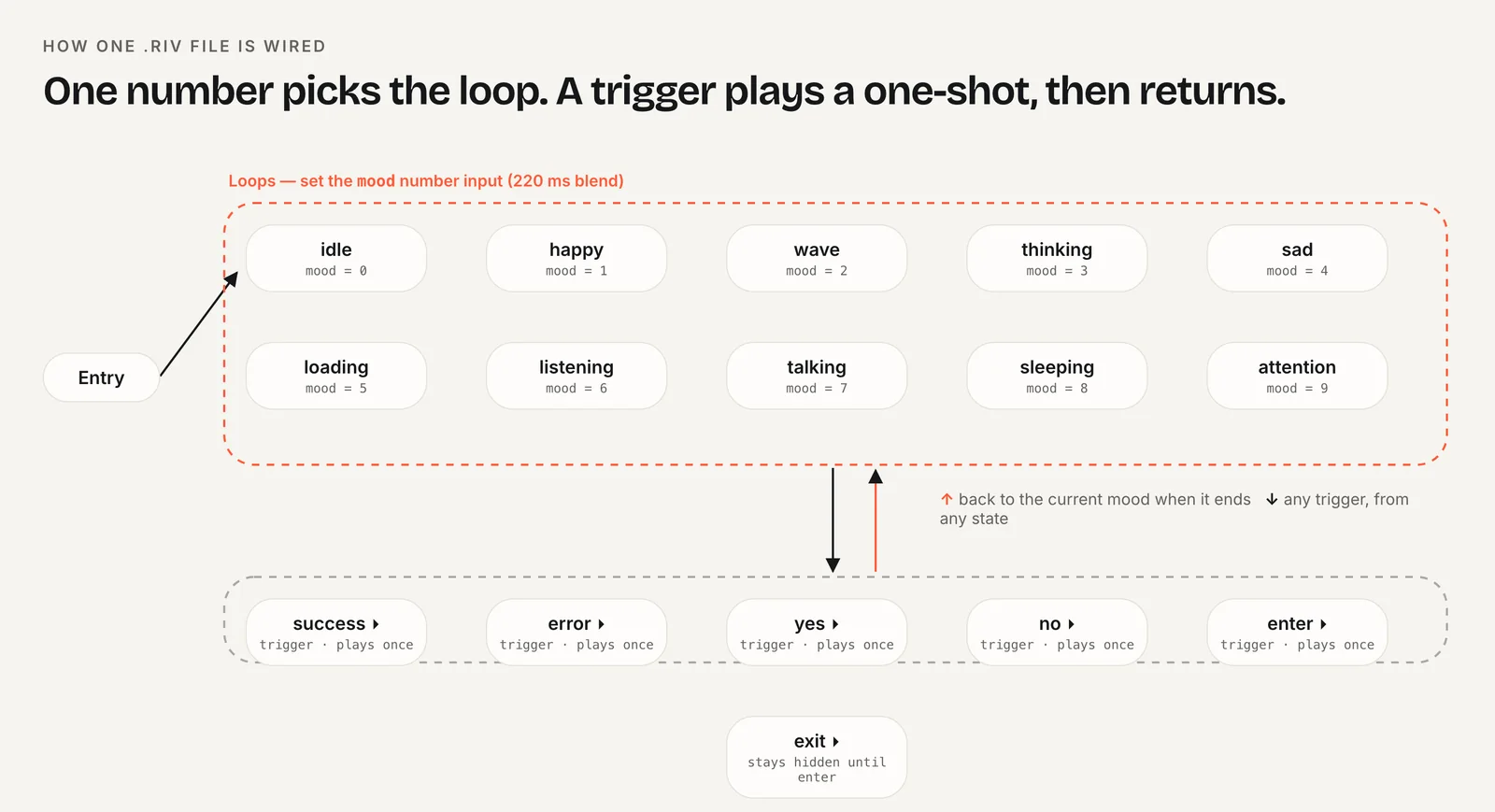
For a mascot that reacts to the app, Rive is the practical choice: one file holds every loop and reaction, and a state machine handles the transitions. Your code maps app events to values:
- Screen idle: mood 0. Network call running: mood 5.
- Call finished: fire
successorerror. - User away for a while: a sleeping loop.
Keep the mapping in one place, such as a listener on your state management (a ChangeNotifier, Bloc or Riverpod provider) that updates the inputs. Widgets then never need to know which animation is playing.
Lottie works for a mascot that only plays one loop per screen; swapping files for each state is possible, but transitions will cut. Video is the heaviest option and the least flexible.
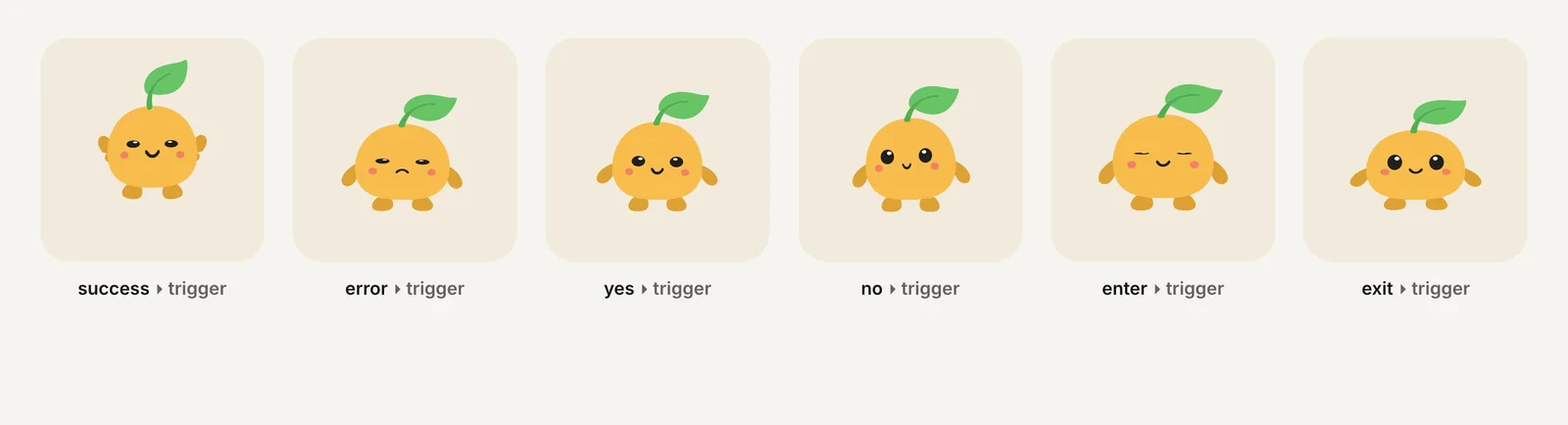
If you have a character but no animator, Charmotion generates a 17-animation set from an upload, including a .riv whose CharacterStateMachine takes a mood number from 0 to 9 and triggers such as success and error, so the Flutter calls above work unchanged. See mascot animation states for which states to plan.
How do you keep Flutter animations smooth and accessible?
Most jank comes from rebuilding too much on every frame. A few habits help:
- Use transition widgets (
FadeTransition,ScaleTransition) orAnimatedBuilderwith achild, so only the animated part rebuilds. - Dispose every
AnimationController, Rive controller and video controller. - Load Lottie and Rive files once per screen, never inside
build. - Profile in profile mode on a real device; debug mode is much slower.
Respect the platform's reduce-motion setting. MediaQuery.disableAnimationsOf(context) returns the nearest MediaQueryData.disableAnimations value and rebuilds only when that property changes:
final reduce = MediaQuery.disableAnimationsOf(context);
return reduce
    ? Image.asset('assets/mascot_still.png', width: 220)
    : RiveWidget(controller: controller, fit: Fit.contain);
Keep the information the animation carries, such as "loading", available in text. The reduced motion guide covers the WCAG rules.
Add animation to a Flutter app
- Start implicit. Use
AnimatedContainer,AnimatedOpacityorTweenAnimationBuilderfor simple UI changes. - Go explicit when needed. Create an
AnimationControllerwithvsyncfor loops and timed sequences, and dispose it. - Add packages for art. Add
lottieorrivetopubspec.yamland declare the files underflutter: assets:. - Render the file. Use
Lottie.asset(), or callRiveNative.init()and renderRiveWidgetwith aRiveWidgetController. - Connect app state. Set
stateMachine.number('mood').valueand fire triggers when your state changes. - Respect motion settings. Check
MediaQuery.disableAnimationsOf(context)and show a still image when it is true.
Frequently asked questions
Should I use Lottie or Rive in Flutter?
Use Lottie for linear vector animations made in After Effects, such as spinners and success checks. Use Rive when the animation must react to app state, such as a mascot switching between idle, loading and success, because its state machine handles transitions inside one file. Both packages support mobile, desktop and web.
Why does my AnimationController need vsync?
The vsync ticker tells the controller when a new frame is due and pauses it when the widget is not visible, which saves battery. Mix SingleTickerProviderStateMixin into your State class and pass this as vsync. Use TickerProviderStateMixin if one State owns several controllers.
Does RiveNative.init() need to run before anything else?
It must run before you load any Rive file. Rive's examples call WidgetsFlutterBinding.ensureInitialized() and then await RiveNative.init() in main(), before runApp. Keep the call at startup rather than inside a widget, so it runs exactly once and every screen can load files immediately.
Quick answers from this guide
Sources
- Introduction to animations — Flutter
- lottie package — pub.dev
- rive package — pub.dev
- Flutter runtime — Rive
- video_player package — pub.dev
- MediaQuery.disableAnimationsOf — Flutter API