Rive Editor vs Lottie Creator vs After Effects: Cost
By the Charmotion team · Updated
As of October 2026, Rive's editor is free with a splash screen on exports, and paid seats start at $9 per month (Cadet), which also unlocks video export. LottieFiles lists Lottie Creator on paid plans from $19.99 per month billed annually. After Effects needs an Adobe subscription; Bodymovin itself is free. Prices change, so check each pricing page.
Key takeaways
- Rive Free: unlimited members and 3 collaborative files, but exported .riv files play a Rive splash screen and video export is unavailable.
- Rive paid seats: Cadet $9, Voyager $32, Enterprise $120 per seat per month, as listed on 2026-10-12.
- LottieFiles: Individual $19.99 and Team $24.99 per month billed annually, with Lottie Creator on all paid tiers.
- Bodymovin is free and open source; After Effects pricing is on Adobe's site.
- Animator time, not software, is usually the largest cost of an animation set.
What does each tool cost?
Prices below were read from each vendor's pricing page on 2026-10-12. Monthly prices are as displayed; Rive's page also has an annual toggle. Prices change, so treat this as a snapshot.
| Tool | Plan | Price (October 2026) | Exports | Notes |
|---|---|---|---|---|
| Rive editor | Free | $0 | .riv with Rive splash screen | Unlimited members, 3 collaborative files, no video export |
| Rive editor | Cadet | $9 per seat per month | .riv without splash; MP4, GIF, WebM, PNG sequence | Up to 3 seats |
| Rive editor | Voyager | $32 per seat per month | As Cadet | Up to 25 seats |
| Rive editor | Enterprise | $120 per seat per month | As Cadet | For companies with $10M+ revenue |
| LottieFiles | Individual | $19.99 per month, billed annually | Lottie JSON, dotLottie | Lottie Creator included |
| LottieFiles | Team | $24.99 per month, billed annually | Lottie JSON, dotLottie | Lottie Creator included; Team+ and Enterprise are custom |
| After Effects + Bodymovin | Adobe plan | See Adobe's pricing page | Lottie JSON via Bodymovin | Bodymovin is free and open source |
Runtimes are a separate question from editors. Rive's runtimes are MIT-licensed and free to ship in commercial apps, and the Lottie players are open source, so none of the plans above charge per install or per view.
What does the Rive free plan let you export?
Rive's free plan is a full editor with real limits on output. According to its pricing page, the free tier allows unlimited members and 3 collaborative files, and its .riv exports play a Rive splash screen. Video and image export are not included.
That makes it workable for learning, prototyping and internal demos. It is usually not workable for shipping a production app, because the splash screen plays inside your interface wherever the file appears. Removing it is the first feature of the Cadet plan: "Export .riv files without the splash screen".
The free plan also cannot render your animation to video. Rive's export docs say video and image exports (H.264, GIF, PNG and SVG sequences, WebM, PNG and SVG) are available on paid plans only, through render presets and a cloud render queue. If you need an MP4 for social posts or a GIF for email, budget for at least one Cadet seat or another way to produce the video.
The runtimes that play .riv files in your apps are free regardless of plan. The paywall is on clean export, not on playback.
What do Rive paid seats cost?
As of October 2026, Rive lists three paid tiers, all priced per seat per month:
- Cadet, $9: up to 3 seats. Splash-free .riv exports and video export. The entry point for freelancers and small teams.
- Voyager, $32: up to 25 seats, for larger teams.
- Enterprise, $120: aimed at companies with more than $10M in revenue.
Only people who edit files need seats. Developers who integrate a .riv into an app use the free runtimes and do not need a plan.
One feature has inconsistent documentation: importing Lottie files. Rive's Lottie import doc says it is available on Enterprise plans, while the pricing page's comparison lists it on paid tiers more broadly. If converting existing Lottie work is part of your plan, confirm with Rive before choosing a tier. Rive also notes that an imported Lottie is not automatically optimized for Rive, and some blend modes (Plus, Add, Hard Mix) are unsupported.
For a single animator, Cadet covers production use. The real decision is whether you need the editor at all, or only its output.
What does LottieFiles charge for Lottie Creator?
LottieFiles' pricing page, read on 2026-10-12, lists the Individual plan at $19.99 per month and the Team plan at $24.99 per month, both billed annually. Team+ and Enterprise are priced on request. Lottie Creator, LottieFiles' browser-based animation editor, is included on all paid tiers, and its After Effects plugin is listed for paid subscribers.
Lottie Creator added visual state machines in September 2025, stored in dotLottie files. LottieFiles has not made clear, in sources we could verify, which plan tiers include state machine authoring, and we could not verify what the free tier includes today. Check the pricing page directly if either matters to you.
LottieFiles also offers a marketplace of ready-made animations and a free Rive-to-Lottie converter that handles files up to 20 MB but does not convert state machines. Those can reduce cost if a stock animation or a timeline-only conversion is good enough.
Note that a LottieFiles plan is optional for playback. The Lottie players and the dotLottie format are open, so an app can play Lottie files made anywhere without a subscription.
Is After Effects + Bodymovin still the default?
For Lottie, it is still the classic pipeline. Lottie was built to render After Effects animations exported as JSON with the Bodymovin plugin, and Bodymovin ships in the open-source lottie-web project at no cost. The cost is After Effects itself, which requires an Adobe subscription; we have not quoted a price because Adobe's plans vary by region and bundle, so check Adobe's plans page.
The strengths are depth and talent supply. After Effects is a mature motion-design tool, and many motion designers already know it. The weakness is that not every After Effects feature exports to Lottie, so designers have to work within a Lottie-safe subset, and interactivity has to be added elsewhere, such as in Lottie Creator's state machines or in app code.
After Effects is not a route to Rive. Rive files are built in the Rive editor; Rive can import Lottie as a starting point, subject to the plan caveat above, but complex After Effects work usually needs rebuilding. If your output must be Rive, the Rive editor is the tool to budget for.
For many teams the choice is already made by who they hire: an After Effects motion designer will deliver Lottie, a Rive animator will deliver .riv.
What does one animation set actually cost?
Software is rarely the big number. A mascot with idle, loading, success, error and a few reactions is days of animation work whichever tool you use, and the animator's time costs far more than a month of any plan above. A useful way to budget:
- Software: one editor seat for the months you are producing. Rive needs a paid seat for splash-free files and video export; Lottie needs After Effects (with free Bodymovin) or a LottieFiles plan for Lottie Creator.
- Labor: design, rigging, animating each state, and wiring the state machine or segments. Get quotes, because rates vary widely.
- Exports: video and GIF versions for marketing and email. In Rive these are paid-plan exports; with After Effects you render video directly.
- Integration: developer time to load the file and drive states. Runtimes are free.
- Revisions: every design change repeats some of steps 2 and 3.
Teams that already employ a motion designer mostly pay for seats. Teams without one pay mostly for labor, which is where cheaper routes matter.
Is there a cheaper route for one mascot?
If you have a character but no animator, generating the set can replace most of the labor line. Charmotion takes an uploaded character, mascot or logo and returns 17 animations in about 1–2 hours: one .riv with a mood number, triggers, a Data Binding view model and legacy inputs; MP4 at 1080×1080 and 9:16; a GIF; transparent WebM and MOV; and web, React and SwiftUI code. Plans are Starter at $4.99 per month, Studio at $29 per month and Expert at $499 one-time.
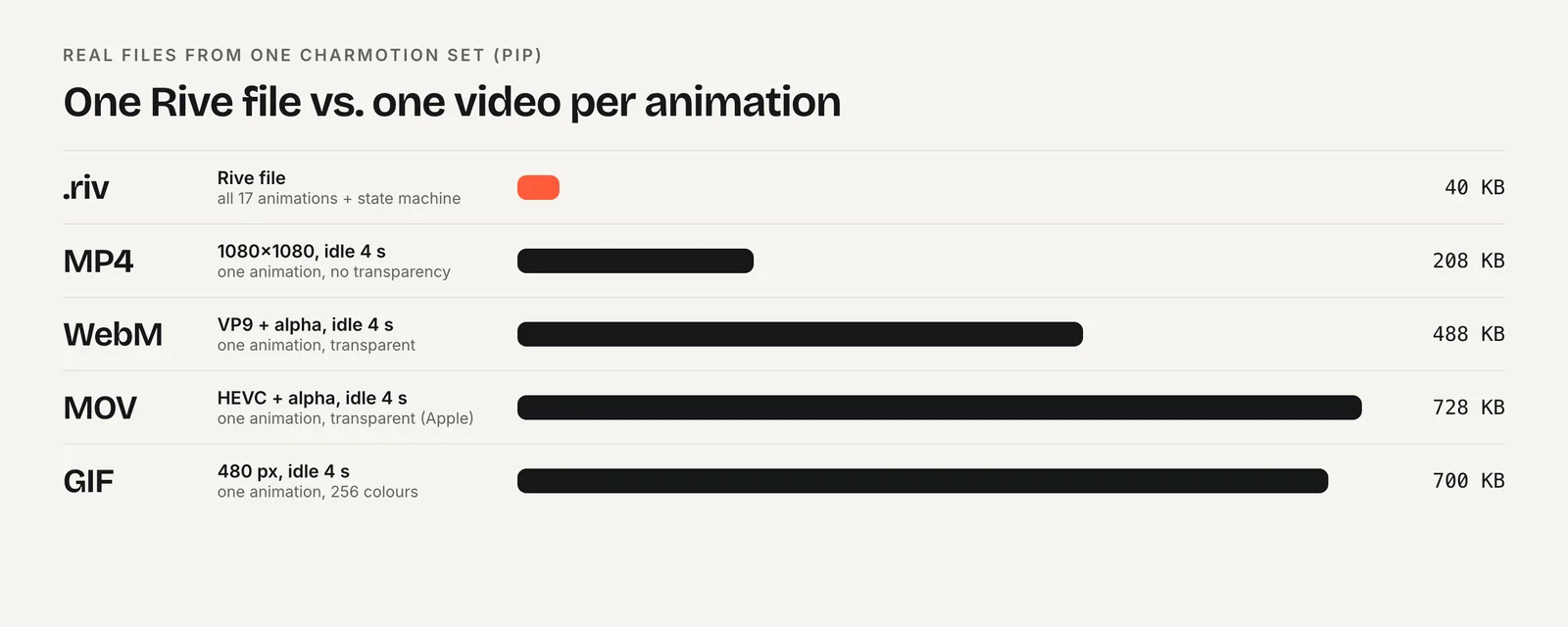
Be clear about the trade-offs. Charmotion delivers Rive and video, not Lottie, so it does not fit a Lottie-only pipeline. Its states are a standard set rather than bespoke choreography; a custom sequence or a specific brand gesture still needs an animator in the Rive editor or After Effects. And because the .riv comes ready, you can ship it without buying a Rive seat, since the runtimes are free.
The other cheap routes are stock animations from marketplaces, which cost little but are not your character, and the Rive free plan for prototypes, which costs nothing but shows a splash screen.
Which tool should you pay for?
Choose the Rive editor if:
- you want interactive characters or controls with state machines and data binding;
- someone on the team will animate, so a $9 Cadet seat (as of October 2026) unlocks clean exports and video;
- you ship to several platforms from one file.
Choose Lottie Creator if:
- your product already uses Lottie players and you want a browser editor with dotLottie state machines;
- you value LottieFiles' marketplace and team tools;
- a plan from $19.99 per month billed annually fits your budget.
Choose After Effects + Bodymovin if:
- your motion designers already work in After Effects;
- animations are mostly linear and also needed as rendered video;
- you already pay for Adobe's apps.
If the job is one mascot and you have no animator, compare those costs against a generated set. For the format decision itself, see Rive vs Lottie.
Frequently asked questions
How do I remove the Rive splash screen?
Export from a paid Rive plan. As of October 2026, the Cadet plan at $9 per seat per month is the cheapest tier that exports .riv files without the splash screen, according to Rive's pricing page. Free-plan exports always play it. The runtimes themselves are free and add no splash of their own.
Is Bodymovin free?
Yes. Bodymovin, the After Effects plugin that exports Lottie JSON, is part of the open-source lottie-web project from Airbnb. You still need After Effects to use it, which requires an Adobe subscription. LottieFiles also offers its own After Effects plugin to paid subscribers.
Do I need a paid plan to use Rive files in my app?
No. Rive's runtimes are MIT-licensed and free for commercial use. A paid editor plan matters for creating the file: free-plan exports play a Rive splash screen and cannot be rendered to video. A .riv exported from a paid plan, or delivered by a vendor, plays without a subscription.
Can I export video from Lottie Creator?
We could not verify Lottie Creator's video export options or which plan includes them, so check LottieFiles' pricing and documentation for current details. Rive's paid plans export MP4, GIF, WebM and image sequences, and After Effects renders video directly alongside a Bodymovin Lottie export.
Quick answers from this guide
Sources
- Pricing — Rive
- Exporting for video and static design — Rive
- Importing Lottie files — Rive
- Pricing — LottieFiles
- State machines are finally in Lottie Creator — LottieFiles
- lottie-web — Airbnb on GitHub
- After Effects plans and pricing — Adobe