Convert Lottie to Rive (and Rive to Lottie or Video)
By the Charmotion team · Updated
You can convert Lottie to Rive by importing the Lottie JSON into the Rive editor, but treat the result as a starting point. Some blend modes and complex timelines need rebuilding, and no state machine is created for you. Rive's docs and pricing page disagree on which plans include Lottie import, so check yours first.
Key takeaways
- Rive's editor imports Lottie JSON; its docs say Enterprise plans, its pricing page lists paid tiers. Confirm on your account.
- Imported files are not automatically optimized; blend modes Plus, Add and Hard Mix are unsupported.
- LottieFiles' free Rive-to-Lottie converter accepts files up to 20 MB but drops state machines.
- Rive exports MP4, GIF, WebM and image sequences on paid plans only (as of October 2026).
Can Rive import Lottie JSON?
Yes. The Rive editor can import a Lottie JSON file and turn its layers and keyframes into Rive shapes and timeline animations. Rive's documentation is careful about expectations: a Lottie file "is not automatically optimized for Rive just because it can be imported". The importer translates what it can, and you clean up the rest by hand.
What the importer gives you is timeline animation. It does not invent the interactive part. A Lottie export has no idea which animation should play when the user taps, or how a character should move from idle to celebrating. You build that logic yourself in Rive's state machine editor after the import.
If your source is a dotLottie (.lottie) file rather than JSON, remember that a .lottie is a ZIP archive. The animation JSON lives inside its a/ folder, so you can extract it before importing. Any state machine stored in the .lottie's s/ folder follows the dotLottie format and will not carry over to Rive.
For a single short animation, importing is a fast way to get the artwork into Rive. For a library of complex After Effects work, plan for review and rework on every file.
Which Rive plan includes Lottie import?
The official sources disagree, which is why we can't give a single answer. As of October 12, 2026, Rive's Lottie import documentation says: "Importing Lottie files is available on Enterprise plans." Rive's pricing page, checked the same day, lists Lottie import in its plan comparison across paid tiers, including Cadet and Voyager.
| Plan (Oct 2026) | Price, monthly display | Lottie import per docs | Lottie import per pricing page |
|---|---|---|---|
| Free | $0 | No | No |
| Cadet | $9/seat (max 3 seats) | No | Listed |
| Voyager | $32/seat (max 25 seats) | No | Listed |
| Enterprise | $120/seat | Yes | Listed |
Before you buy a plan just for conversion, open the editor on the plan you have, try the import, or ask Rive support which page is current. Prices also change, and the pricing page has an annual toggle that alters the displayed amounts.
Whichever plan you use, remember that plan limits apply to the editor only. Rive's runtimes, which play the finished .riv in your app, are MIT-licensed and free.
What breaks when you import a Lottie into Rive?
Rive's docs name some specific gaps and imply others. Expect to check:
- Blend modes. Plus, Add and Hard Mix are listed as unsupported. Layers using them will look different.
- Complex timelines. Deeply nested precomps, time remapping and expression-driven motion may not translate cleanly.
- Effects. Many After Effects effects never made it into Lottie in the first place; those that did may not have Rive equivalents.
- Structure. Imported layers keep a Lottie-shaped hierarchy, which is rarely the clean bone rig you'd build for a Rive character.
- File size. An import isn't optimized. Redundant keyframes and shapes come across too, so the .riv may be larger than a native rebuild.
The size point matters if smaller files were your reason to switch. Rive says natively built .riv files are often 10–15 times smaller than Lottie JSON, and Callstack independently rebuilt a 24.37 KB Lottie as a 2 KB .riv. Both examples are rebuilds, not imports. An imported file may land somewhere in between.
Always compare the imported animation with the original frame by frame, at the sizes you'll actually display it.
Can you convert Rive back to Lottie?
Partly. Rive itself does not export Lottie. LottieFiles offers a free online Rive-to-Lottie converter that accepts .riv files up to 20 MB and outputs Lottie JSON. Its tool page says state machines are not converted.
That last point decides whether the converter is useful to you. You get the timeline animations, each as linear playback. You lose the logic that made the Rive file interactive: transitions, blends, inputs, data binding and pointer listeners. If the .riv was a character with ten loops and six reactions, the conversion gives you sixteen separate clips with no wiring between them.
It can still be handy when a platform accepts Lottie but not Rive, or when a teammate needs a quick preview in a Lottie-only tool. Test the output in your target Lottie player, since rendering differences between engines can show up in gradients, clipping and strokes.
| Path | Official? | Cost (Oct 2026) | What is kept | What is lost |
|---|---|---|---|---|
| Lottie to Rive (editor import) | Yes, Rive | Paid plan; check which | Shapes, keyframed timelines | Unsupported blend modes, some effects; no state machine created |
| Rive to Lottie (LottieFiles tool) | Yes, LottieFiles | Free, 20 MB max | Timeline animations | State machines and all interactivity |
| Rive to video or images (editor) | Yes, Rive | Paid plans | Exact rendered look | Interactivity, vector scaling |
How do you export a Rive animation as MP4, GIF or WebM?
From the Rive editor, on a paid plan. Rive's docs list export to H.264 video, GIF, PNG sequence, SVG sequence, WebM, and single PNG or SVG frames, configured with Render Presets and processed in a cloud Render Queue. The docs state plainly that "exporting video and images is available on paid plans", and the pricing page shows the Free plan without video export (as of October 2026).
A few practical notes:
- Pick one state at a time. A video captures a timeline, not a state machine. Render each loop or reaction you need as its own clip.
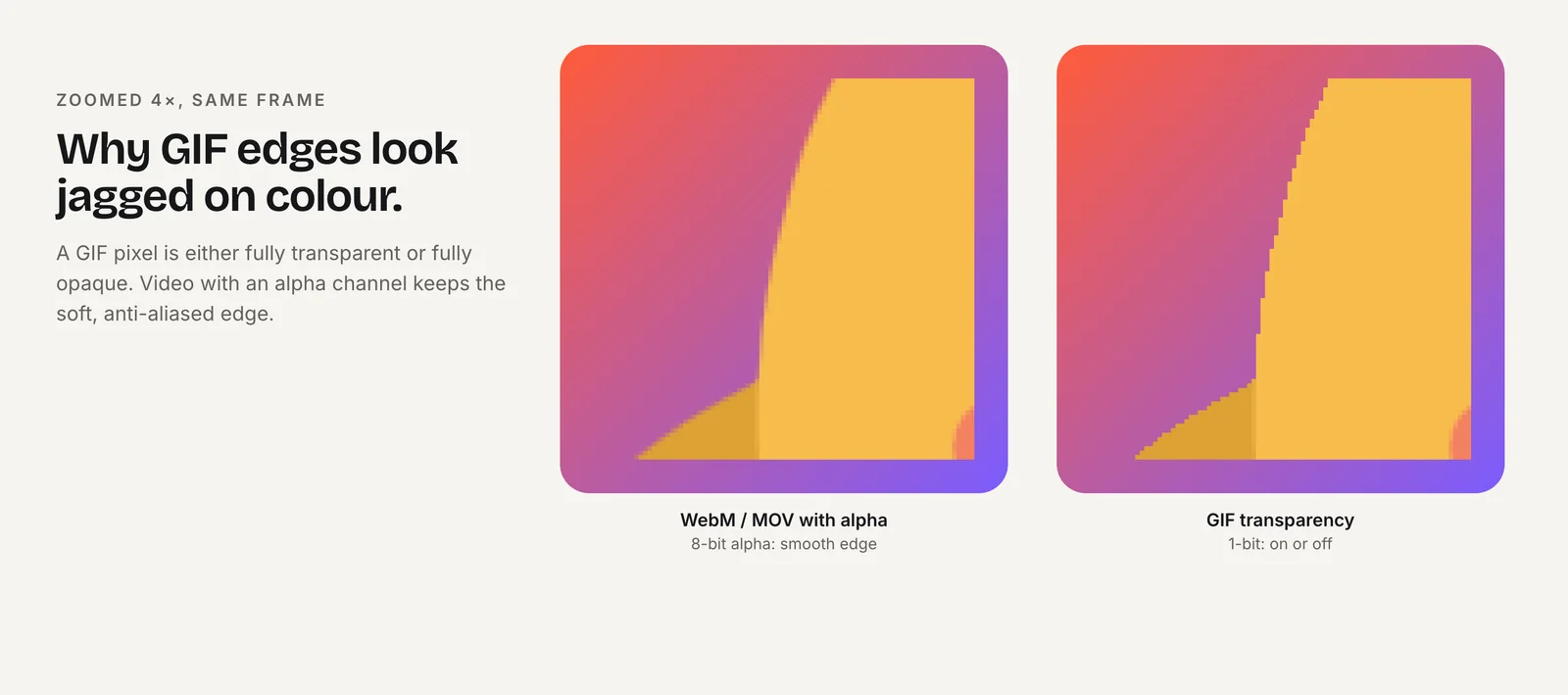
- Transparency needs the right codec. WebM with VP9 can carry alpha for Chrome, Edge and Firefox. Safari ignores VP9 alpha and needs HEVC with alpha in a .mov, which you may have to encode separately.
- GIF is lossy in its own way. 256 colors and 1-bit transparency mean jagged edges on transparent backgrounds; use it only where video can't play.
If you need video of a character but don't have a paid editor seat, the alternative is a service that delivers both. Charmotion generates a .riv and the video formats together from one uploaded image: 17 animations in about 1–2 hours, with MP4 in 1080×1080 and 9:16, GIF, and transparent WebM and MOV. It does not output Lottie.
When should you rebuild instead of convert?
Convert when the animation is short, mostly shapes and keyframes, and you just need it playing from a Rive runtime alongside other Rive content. Rebuild when any of these apply:
- The animation is a character that will need several states and transitions. A clean rig built in Rive is much easier to extend than an imported layer stack.
- File size was the reason to switch. Native rebuilds are where the large size reductions come from.
- The source relies on unsupported blend modes, effects or expressions.
- You'll maintain the animation for years, and future edits will happen in Rive.
A middle path works well for many teams: import to get the artwork and rough timing into Rive, then rebuild the rig, timelines and state machine on top of the imported shapes. That saves redrawing while avoiding the structural problems of a raw import.
For deciding whether to switch at all, see Rive vs Lottie. For what the interactive part looks like on each side, see Lottie vs Rive state machines.
Should you convert, rebuild or keep both formats?
Convert Lottie to Rive if you have a few simple animations, a paid Rive plan that includes import, and want everything on one runtime.
Rebuild in Rive if the animation is a character, you want the full file-size benefit, or the source uses unsupported features.
Convert Rive to Lottie if a platform only accepts Lottie and linear playback is enough.
Keep both, or add video, if different destinations need different formats. Many products ship an interactive file in the app and video everywhere else.
Whatever you choose, keep the original source files. A conversion in either direction loses information, so the After Effects project or the .riv you started from remains the version to edit later. Converting back and forth between formats compounds the losses each time.
How to import a Lottie animation into Rive
- Confirm your plan. Open the Rive editor on your account and check that Lottie import is available. Rive's docs say Enterprise; its pricing page lists paid tiers. Don't buy a plan for this without checking.
- Get the JSON. Export Lottie JSON from After Effects with Bodymovin. If you only have a
.lottiefile, unzip it and take the animation JSON from itsa/folder. - Simplify the source. Replace layers that use the Plus, Add or Hard Mix blend modes, and flatten effects and expressions where you can, before exporting.
- Import into the editor. Import the JSON into a Rive file as described in Rive's Lottie import documentation, then play it next to the original to spot differences.
- Clean up and add logic. Remove redundant keyframes and layers, rebuild any broken parts, then create the state machine or view model your app will control.
- Export and measure. Export the .riv, compare its size with the original JSON or .lottie, and test playback in your target runtime before replacing the Lottie file.
Frequently asked questions
Is Lottie import free in Rive?
No. It is not part of the Free plan. Rive's docs say Lottie import is available on Enterprise plans, while its pricing page lists it on paid tiers including Cadet. Because the two disagree as of October 2026, test the import on your current plan or ask Rive before upgrading.
Does converting Rive to Lottie keep the state machine?
No. LottieFiles' free Rive-to-Lottie converter outputs timeline animations only; its tool page says state machines are not converted. You would need to rebuild interactivity separately, for example with Lottie Creator's state machines in a dotLottie file, which use a different logic model from Rive.
Will my Lottie file be smaller after importing it into Rive?
Not necessarily. Rive's docs say imported Lottie files are not automatically optimized. The large reductions Rive and Callstack report come from rebuilding animations natively in Rive. An import may carry over redundant keyframes, so measure the exported .riv before assuming a size gain.
Can I export a Rive animation as a GIF on the free plan?
No. As of October 2026 Rive limits video and image export, including GIF, MP4, WebM and PNG sequences, to paid plans. On the Free plan you can export .riv files for runtimes, and those play a Rive splash screen. Paid plans remove the splash and add video export.
Quick answers from this guide
Sources
- Importing Lottie files — Rive
- Rive pricing — Rive
- Exporting for video and static design — Rive
- Rive to Lottie converter — LottieFiles
- dotLottie 2.0 specification — dotLottie
- Rive as a Lottie alternative — Rive
- Lottie vs. Rive: Optimizing Mobile App Animation — Callstack
- Video with transparency — Jake Archibald