Animated Splash Screen in SwiftUI (Code Pattern)
By the Charmotion team · Updated
You cannot animate the iOS launch screen itself, but you can make your first SwiftUI view start from the launch screen's exact appearance and play a short intro there. Overlay an intro view on ContentView in a ZStack, remove it with a fade when the animation finishes, and skip it when Reduce Motion is on.
Key takeaways
- The launch screen is a static, system-rendered configuration; it runs no code.
- Match the intro's first frame to the launch screen (same background color, same image position) so there is no visible jump.
- Load
ContentViewunderneath the intro so the app is ready the moment the intro ends. - End the intro on a signal from the animation (a trigger stream) with a timeout fallback, not a guessed timer alone.
- Skip the intro under Reduce Motion and on warm launches.
Can the iOS launch screen itself be animated?
No. The launch screen is drawn by the system before any of your code runs, from either a UILaunchScreen dictionary in Info.plist or a launch storyboard. Neither can run custom classes or animations.
Apple's Human Interface Guidelines also limit what it should show: "Design a launch screen that's nearly identical to the first screen of your app," and "Don't advertise. The launch screen isn't a branding opportunity." The HIG adds that if you need a splash screen, "consider displaying it at the beginning of your onboarding flow." macOS, visionOS and watchOS apps do not require a launch screen at all.
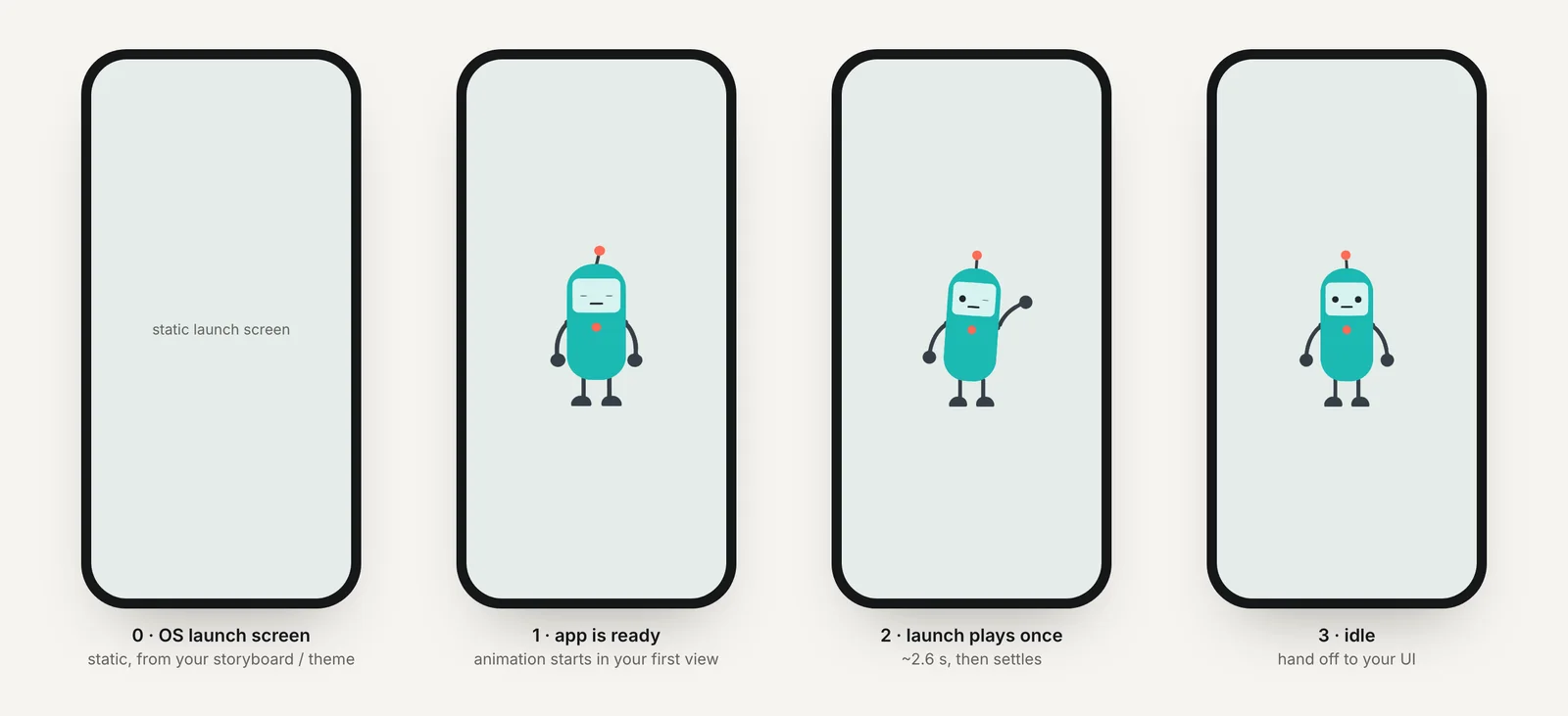
So an "animated splash screen" on iOS is really two things in sequence:
| Launch screen | Intro (your splash) | |
|---|---|---|
| Rendered by | The system | Your first SwiftUI view |
| Content | Static color and image | Anything, including Rive or Lottie |
| Configured in | Info.plist UILaunchScreen or a storyboard | Code |
| Duration | Until your first frame is ready | You decide |
How do I hand off from the static launch screen to an animated first view?
Make the root view a ZStack: your real ContentView underneath, and the intro on top while a flag is set. ContentView starts loading immediately, so the intro hides loading time instead of adding to it.
import SwiftUI

@main
struct PipApp: App {
    var body: some Scene {
        WindowGroup {
            RootView()
        }
    }
}

struct RootView: View {
    @Environment(\.accessibilityReduceMotion) private var reduceMotion
    @State private var showIntro = true

    var body: some View {
        ZStack {
            ContentView()
            if showIntro && !reduceMotion {
                IntroView {
                    withAnimation(.easeOut(duration: 0.25)) { showIntro = false }
                }
                .transition(.opacity)
                .zIndex(1)
            }
        }
    }
}
.zIndex(1) keeps the fading intro above ContentView during the removal transition; without it the outgoing view can be drawn underneath and the fade disappears.
How do I play a one-shot Rive intro and then show ContentView?
The intro loads a launch file with Rive's new Apple runtime, plays it, and calls onFinish when the animation signals it is done. Because the new runtime has no state-change callback, the cleanest signal is a trigger property the file fires at the end of the intro; observe it with stream(of:). A timeout guarantees the app never gets stuck.
import SwiftUI
import RiveRuntime

struct IntroView: View {
    let onFinish: () -> Void
    @State private var rive: Rive?
    @State private var instance: ViewModelInstance?

    var body: some View {
        ZStack {
            Color("LaunchBackground").ignoresSafeArea()
            RiveUIViewRepresentable(rive: rive)
                .frame(width: 200, height: 200)
                .accessibilityHidden(true)
        }
        .task { await play() }
    }

    private func play() async {
        let timeout = Task { @MainActor in
            try? await Task.sleep(for: .seconds(3))
            onFinish()
        }
        do {
            let worker = try await Worker()
            let file = try await File(source: .local("launch", Bundle.main), worker: worker)
            let artboard = try await file.createArtboard()
            let instance = try await file.createViewModelInstance(
                .viewModelDefault(from: .artboardDefault(artboard))
            )
            let machine = try await artboard.createStateMachine("LaunchStateMachine", binding: instance)
            self.instance = instance
            rive = try await Rive(file: file, artboard: artboard, stateMachine: machine)

            // A Charmotion LaunchStateMachine plays its 2.6 s intro once and settles on idle;
            // it fires no "done" trigger, so wait for the intro's length. If your own file
            // fires an end trigger, await it instead: instance.stream(of: TriggerProperty(path: …)).
            try await Task.sleep(for: .seconds(2.6))
        } catch {
            // Load failure or cancellation: fall through and show the app.
        }
        timeout.cancel()
        onFinish()
    }
}
Calling onFinish twice is harmless here because it only sets showIntro to false. If your launch file has no view model, createViewModelInstance throws; in that case use try await Rive(file: file) and rely on the timeout, set to the animation's length.
Charmotion sets include a separate LaunchStateMachine for this kind of one-shot intro: it plays the 2.6-second launch animation once and ends on the idle pose, which is why the sample simply waits for that length.
How do I avoid a flash between the launch screen and the first view?
A visible "blink" happens when the launch screen and the intro's first frame differ. Fix it at the source:
- Use a named color for both. In Info.plist, set
UILaunchScreen→UIColorNameto an asset catalog color (hereLaunchBackground), and use the sameColor("LaunchBackground")behind the intro. Both then follow light and dark mode identically. - Match the image position. If the launch screen shows an image (
UIImageName), draw the intro's first frame with the character at the same size and center. Easiest: leave the launch screen as color only and let the character appear in the intro. - Do not block the first frame. Heavy synchronous work in
App.initor a view'sinitdelays the first frame and lengthens the static launch screen. Move it into.task. - Keep the Rive view transparent until loaded.
RiveUIViewRepresentable(rive: nil)draws nothing, so the background color alone shows until the file is ready.
Apple's guide to specifying the launch screen covers the Info.plist keys and storyboard option in detail.
How long should a splash animation be?
Apple publishes no duration for in-app intros, but its guidance points one way: launch should feel instant, and the launch screen exists to make the app appear ready, not to brand it. Treat the intro the same way.
- Overlap it with real work. If the intro covers authentication or a first network fetch that would take that long anyway, it costs the user nothing.
- Play it once per cold launch. Returning from the background should show the app directly.
- Let a tap skip it. Add
.onTapGesture { onFinish() }to the intro. - Consider first launch only. Store a flag with
@AppStorageand show the intro only the first time, or after an update.
For timing guidance on loading and feedback animations generally, see animation durations and loading UX, and for the cross-platform picture, app launch and splash screen animation.
How do I skip the intro under Reduce Motion?
The RootView above already does it: if showIntro && !reduceMotion never inserts the intro when accessibilityReduceMotion is true. The user goes straight from the static launch screen to ContentView, which already matches it.
If the intro also hides loading, replace it with a still version rather than nothing: the same background and a static character pose, removed with a short fade when loading completes. The point of Reduce Motion is to remove movement, not to show an empty screen.
if showIntro {
    if reduceMotion {
        StaticIntro()            // background + still pose
            .transition(.opacity)
            .zIndex(1)
    } else {
        IntroView { withAnimation { showIntro = false } }
            .transition(.opacity)
            .zIndex(1)
    }
}
Hide the intro character from VoiceOver with .accessibilityHidden(true); it adds nothing to the experience for screen reader users.
Add an animated intro after the iOS launch screen
- Configure the launch screen. In Info.plist, set
UILaunchScreenwith aUIColorNamepointing at an asset catalog color. - Build a root ZStack. Put
ContentView()underneath and anIntroViewon top whileshowIntrois true. - Match the first frame. Use the same named color behind the intro, and keep the Rive view empty until loaded.
- Play the intro. Load the launch .riv with the new runtime and wait for its end trigger with
stream(of:), with a timeout fallback. - Fade out. Set
showIntro = falseinsidewithAnimation, with.transition(.opacity)and.zIndex(1)on the intro. - Respect Reduce Motion. Skip the intro or show a still version when
accessibilityReduceMotionis true.
Frequently asked questions
Can I use a GIF or video as the iOS launch screen?
No. The launch screen supports a static color and image through Info.plist, or a storyboard without custom code, and the system renders it before your app runs. Play a GIF, video, Lottie or Rive animation in your first view instead, starting from the launch screen's appearance.
Why does my splash animation flash white first?
The launch screen background and the intro's first frame differ, often because one uses a fixed color and the other follows dark mode. Use the same asset catalog color for UILaunchScreen's UIColorName and the intro background, and keep heavy work out of App.init.
Should the splash intro play every time the app opens?
Usually only on a cold launch, and many apps limit it to the first launch or after an update. Returning from the background should show the app immediately. Let users skip it with a tap and skip it automatically when Reduce Motion is on.