Voice Agent Avatar: OpenAI Realtime Event Mapping
By the Charmotion team · Updated
Drive a voice agent avatar from OpenAI Realtime server events: input_audio_buffer.speech_started to listening, speech_stopped to thinking, the first audio of a response to talking, and the end of playback to idle. Over WebRTC, output_audio_buffer.started and stopped mark playback; over WebSocket, track your own playback queue.
Key takeaways
input_audio_buffer.speech_startedandspeech_stoppedcome from server VAD and map to listening and thinking.- The current audio event name is
response.output_audio.delta; older tutorials useresponse.audio.delta. output_audio_buffer.started,stoppedandclearedare documented as WebRTC/SIP only.- Treat a cancelled response after barge-in as normal, and keep a fallback for a late
stoppedevent.
Already have a character or logo? Preview your own character animated in a phone splash, a website hero and an empty state — free, in your browser, nothing uploaded.
Which Realtime events tell me the user started or stopped speaking?
With server voice activity detection (VAD) enabled, the Realtime API sends input_audio_buffer.speech_started when it detects speech in the audio buffer. OpenAI's reference says the client may want to use this event to interrupt audio playback or provide visual feedback, which is exactly what an avatar is for. It then sends input_audio_buffer.speech_stopped when speech ends (OpenAI server events).
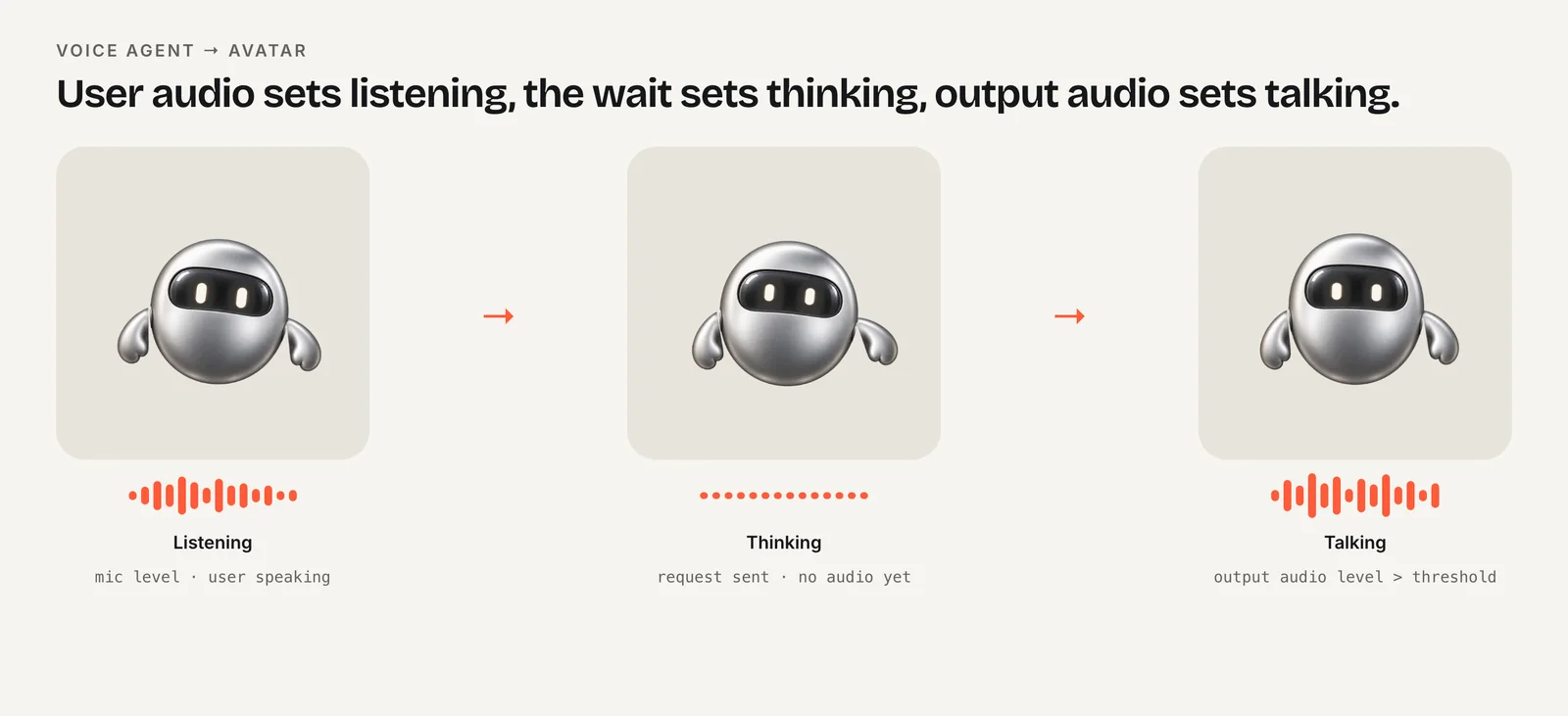
Map them like this:
speech_started→ listening. Switch immediately. This is the "I hear you" moment, and any delay feels like the agent isn't paying attention.speech_stopped→ thinking. The model is about to respond. This gap is usually short, but it is visible.
These events depend on VAD. If you turn VAD off and commit the audio buffer yourself (push-to-talk), you already know when the user starts and stops, because your own button handlers do it. Set listening on press and thinking on release.
Community threads report that speech_stopped can occasionally arrive late or not at all in noisy conditions. Don't let the avatar get stuck: if a response starts while you are still in listening, move straight to talking.
How do I know when the model starts and stops talking?
This is where transport matters. The Realtime API can run over WebRTC (audio on a media track, events on a data channel) or over WebSocket (audio and events as JSON messages).
| Phase | WebRTC | WebSocket | Avatar |
|---|---|---|---|
| User starts speaking | input_audio_buffer.speech_started | Same | Listening (6) |
| User stops speaking | input_audio_buffer.speech_stopped | Same | Thinking (3) |
| Model audio begins | output_audio_buffer.started | First response.output_audio.delta | Talking (7) |
| Model audio ends | output_audio_buffer.stopped | Your playback queue drains | Idle (0) or listening (6) |
| User interrupts | output_audio_buffer.cleared | speech_started + stop your playback | Listening (6) |
| Response failed | response.done, status failed | Same | Fire error |
OpenAI documents output_audio_buffer.started as emitted when the server begins streaming audio to the client, and stopped as emitted when the output buffer has been completely drained on the server, after response.done. Both are labeled WebRTC/SIP only. Over WebSocket, audio arrives as Base64 chunks in response.output_audio.delta, followed by response.output_audio.done (OpenAI server events).
Note that response.output_audio.done means the server finished sending audio, not that the user finished hearing it. Chunks still queued in your player can play for seconds after it.
How do I wire the events to a Rive avatar over WebRTC?
Over WebRTC, server events arrive as JSON strings on the data channel you created for events. Parse each message and switch on type. The avatar is updated through the Rive web runtime's data binding API: number("mood").value for loops and trigger("error").trigger() for one-shots (Rive web data binding).
import type { ViewModelInstance } from "@rive-app/webgl2";

const MOOD = { idle: 0, thinking: 3, listening: 6, talking: 7 } as const;

export function bindAvatarToRealtime(dc: RTCDataChannel, vmi: ViewModelInstance) {
  const mood = vmi.number("mood");
  const setMood = (m: number) => {
    if (mood) mood.value = m;
  };

  dc.addEventListener("message", (e) => {
    const ev = JSON.parse(e.data);
    switch (ev.type) {
      case "input_audio_buffer.speech_started":
      case "output_audio_buffer.cleared":
        setMood(MOOD.listening);
        break;
      case "input_audio_buffer.speech_stopped":
        setMood(MOOD.thinking);
        break;
      case "output_audio_buffer.started":
        setMood(MOOD.talking);
        break;
      case "output_audio_buffer.stopped":
        setMood(MOOD.idle);
        break;
      case "response.done":
        if (ev.response?.status === "failed") vmi.trigger("error")?.trigger();
        break;
    }
  });
}
Get vmi from rive.viewModelInstance after loading the file with autoBind: true. In React, call this from an effect once both the data channel and the Rive instance exist, and keep the avatar in a "use client" component.
Pick idle or listening as your resting state between turns. A voice agent with an always-open microphone often looks more natural resting on listening, since it is, in fact, listening.
Why is there no output_audio_buffer event over WebSocket?
Over WebSocket, your code is the audio player. The server sends deltas as fast as it generates them and has no way of knowing when your speakers finish, so there is no server-side buffer to report on. You have to track the end of playback yourself.
If you schedule decoded chunks on a Web Audio AudioContext, keep a running "playhead" of when the queued audio ends:
const ctx = new AudioContext();
let playhead = 0;        // AudioContext time when queued audio ends
let responseDone = false;
let talking = false;

function playChunk(buffer: AudioBuffer) {
  if (!talking) {
    talking = true;
    setMood(MOOD.talking);
  }
  const src = ctx.createBufferSource();
  src.buffer = buffer;
  src.connect(ctx.destination);
  playhead = Math.max(playhead, ctx.currentTime);
  src.start(playhead);
  playhead += buffer.duration;
  src.onended = () => {
    if (responseDone && ctx.currentTime >= playhead - 0.01) {
      talking = false;
      setMood(MOOD.idle);
    }
  };
}

ws.addEventListener("message", (e) => {
  const ev = JSON.parse(e.data);
  if (ev.type === "response.created") responseDone = false;
  if (ev.type === "response.output_audio.delta") playChunk(decode(ev.delta));
  if (ev.type === "response.output_audio.done") responseDone = true;
});
decode() stands for your conversion from the Base64 delta to an AudioBuffer; the exact format depends on your session's output audio settings. Browsers also require a user gesture before an AudioContext can start, so create or resume it from the button that starts the session (MDN autoplay guide).
How do I handle barge-in (user interrupts)?
Barge-in is when the user starts talking over the agent. The avatar should snap to listening immediately, because that is what a person would do.
- WebRTC: in VAD mode, the server emits
output_audio_buffer.clearedwhen the user interrupts, alongsideinput_audio_buffer.speech_started. Either one moves the avatar to listening; the code above handles both. - WebSocket: on
speech_started, stop every queuedAudioBufferSourceNode, reset your playhead and set listening. If you don't stop playback, the avatar shows listening while the old answer keeps playing, which is confusing.
The interrupted response still ends with response.done. OpenAI says this event is always emitted, whatever the final state, and that clients should check its status, which can be completed, cancelled, failed or incomplete (OpenAI server events). Only failed deserves an error reaction. A cancelled response after barge-in is the system working as designed; don't make the avatar look sad about it.
Because every phase in this guide changes the mood rather than firing a trigger, interruptions are cheap: setting a new mood simply switches loops. One-shots are best kept for clear outcomes such as a completed tool call.
Why is output_audio_buffer.stopped late or missing?
Developers on the OpenAI community forum have reported output_audio_buffer.stopped arriving with long delays, and not being sent at all while a function call is pending until the tool result is returned (OpenAI community thread). These are community reports rather than documented behavior, but they are common enough to design for.
Practical defenses:
- Stay in thinking during tool calls. When the model calls a function, the agent is working, not talking. Switch to thinking (or loading) until you send the result and new audio starts.
- Add a fallback timer. After
response.done, ifstoppedhasn't arrived within a few seconds of the audio you expect, return to your resting mood anyway. - Use the audio itself as a second signal. Connect the remote audio track to an
AnalyserNodeand treat several hundred milliseconds of silence as the end of talking. Lip-sync vs amplitude shows the RMS and hysteresis code.
Whichever signal fires first wins, and every later one becomes a no-op because the mood is already set.
How do I show a thinking state between turns?
Thinking covers the gap between the end of the user's speech and the first audio from the model. In this mapping it starts on speech_stopped and ends on output_audio_buffer.started (WebRTC) or the first response.output_audio.delta (WebSocket). You can also set it on response.created when you start responses yourself, for example after sending text input.
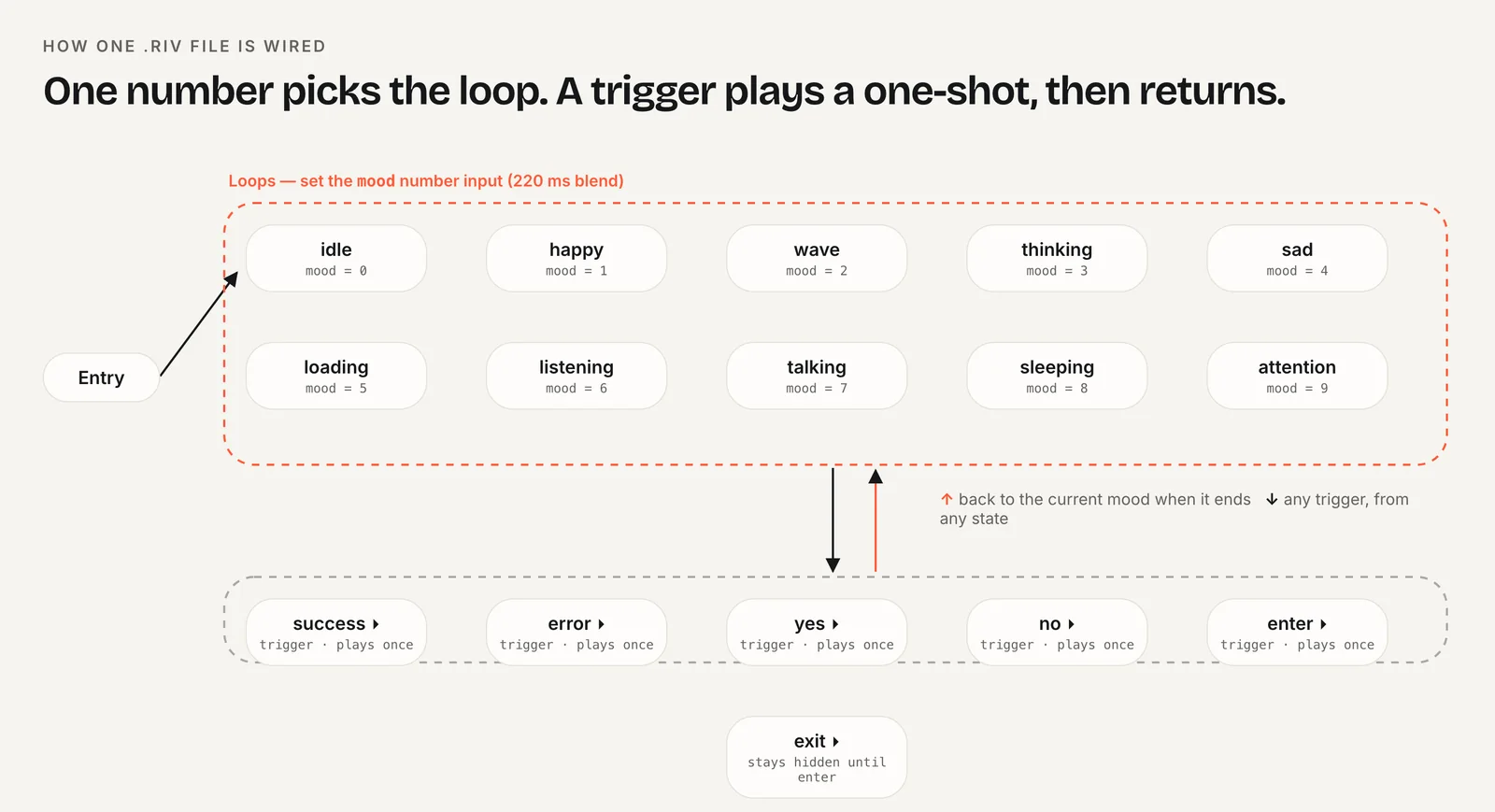
The ten-mood layout used in this guide matches Realtime turns one to one: listening (6) while the user speaks, thinking (3) while the model works, talking (7) while audio plays. Charmotion builds that layout from your own character or logo in about one to two hours, with a Character view model holding the mood number and success/error triggers, plus MP4 and transparent video versions for marketing. Its talking state is a loop rather than lip-sync, which suits an agent whose words also appear as a transcript.
For any character, keep thinking subtle. It may play for a fraction of a second on most turns and for several seconds when a tool call runs, so a gentle loop that looks fine at both lengths beats a dramatic one. Pair long waits with a short text status such as "Checking your calendar."
Frequently asked questions
Which Realtime event means the user started speaking?
input_audio_buffer.speech_started, sent in server VAD mode when the server detects speech in the input buffer. OpenAI suggests using it to interrupt playback or give visual feedback, so it is the natural trigger for a listening state. input_audio_buffer.speech_stopped follows when the user stops.
Is response.audio.delta still the right event name?
No. The current Realtime reference names it response.output_audio.delta, followed by response.output_audio.done. response.audio.delta comes from beta-era examples. If your listener copied from an early tutorial never fires, rename it. The first delta of a response is a good signal to start a talking state over WebSocket.
Does output_audio_buffer.stopped work over WebSocket?
No. OpenAI documents output_audio_buffer.started, stopped and cleared as WebRTC/SIP only. Over WebSocket you play the audio yourself, so track when your own playback queue finishes and switch the avatar back to idle or listening at that point, not on response.output_audio.done.
Should a cancelled response show an error animation?
No. After barge-in, response.done arrives with status cancelled, which is expected. Only a failed status indicates a real problem worth an error reaction. Move the avatar to listening on the interruption, stop any queued playback, and let cancelled responses pass silently without a reaction.
Quick answers from this guide
Sources
- Realtime API server events — OpenAI
- output_audio_buffer.stopped not sent when tool call is pending — OpenAI Developer Community
- Web runtime: Data binding — Rive
- Autoplay guide for media and Web Audio APIs — MDN Web Docs
- AnalyserNode — MDN Web Docs