iMessage Animated Sticker Pack: Sizes and APNG
By the Charmotion team · Updated
Apple specifies iMessage sticker images at @3x dimensions in pixels: small 300×300, regular 408×408 and large 618×618. Use one size for the whole pack and keep each file at 500 KB or less. For animation, use APNG for 8-bit transparency; GIF also animates but supports only single-color transparency.
Key takeaways
- Sizes are @3x pixels: 300×300 small, 408×408 regular, 618×618 large.
- Don't mix sizes in a pack; every sticker file must be 500 KB or smaller.
- APNG animates with 8-bit transparency; GIF animates with single-color transparency.
- Provide a localized alternative description for each sticker for VoiceOver.
- Sticker packs run in Messages on iOS and iPadOS, not macOS, tvOS, visionOS or watchOS.
Already have a character or logo? Preview your own character animated in a phone splash, a website hero and an empty state — free, in your browser, nothing uploaded.
What sizes does Apple require for iMessage stickers?
Apple's Human Interface Guidelines say: "Create your sticker images using the following @3x dimensions."
| Sticker size | Image dimensions (@3x pixels) |
|---|---|
| Small | 300×300 |
| Regular | 408×408 |
| Large | 618×618 |
Pick one size per pack. The HIG says to "prepare all of your stickers at that size; don't mix sizes within a single sticker pack." The size you choose controls how many stickers fit in a row of the Messages drawer, so small suits a large set of simple reactions and large suits a few detailed characters.
Every file has the same weight limit: "A sticker file must be 500 KB or smaller in size." Sticker packs are supported in Messages on iOS and iPadOS; the HIG lists them as "Not supported in macOS, tvOS, visionOS, or watchOS."
Are 300/408/618 points or pixels?
Pixels. The HIG labels them "@3x dimensions," which means the numbers are the actual pixel size of the image file you export, already at three times the on-screen point size. A regular sticker is a 408×408-pixel image, not a 408-point image that you would multiply again.
This is a common source of oversized packs. If you treat 408 as points and export at 1224×1224, every file is nine times the needed pixel count, and animated stickers blow past the 500 KB limit almost immediately.
You supply only the @3x image. Messages scales it for the device. Export the exact pixel size of your chosen category, with the character centered and a small transparent margin so it does not touch the edges when people peel and place it on a message.
APNG or GIF: which keeps soft transparent edges?
APNG. Apple's format table lists these properties:
| Format | Transparency | Animation |
|---|---|---|
| PNG | 8-bit | No |
| APNG | 8-bit | Yes |
| GIF | Single-color | Yes |
| JPEG | No | No |
8-bit transparency means each pixel has 256 levels of opacity, so anti-aliased outlines, soft shadows and glows blend into whatever message bubble or photo the sticker lands on. Single-color transparency means one palette color is fully transparent and every other pixel is fully opaque, which leaves stair-stepped edges and a fringe in the color the GIF was matted against.
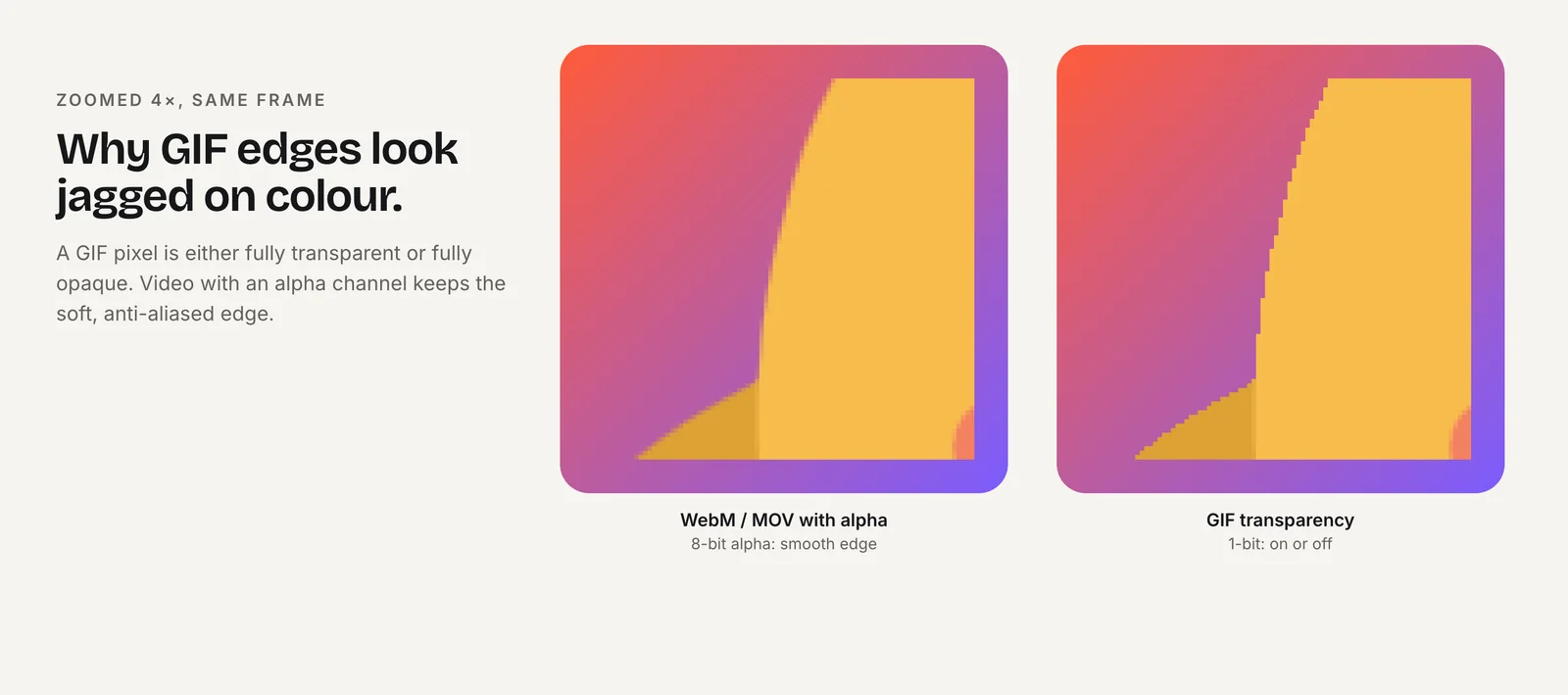
Stickers are placed over bubbles, photos and both light and dark modes, so edge quality shows more here than on a fixed background. Use GIF only if your art has hard pixel edges by design.
How do I convert a transparent animation to APNG?
ffmpeg writes APNG directly. This is the tested Discord/iMessage APNG command with the scale set to the regular iMessage size of 408 px:
ffmpeg -c:v libvpx-vp9 -i character.webm -vf "fps=15,scale=408:408" -plays 0 -f apng sticker.png-c:v libvpx-vp9before-imakes ffmpeg decode the WebM's alpha; the default VP9 decoder ignores it.scale=408:408sets the pack size; use 300 or 618 for small or large.-plays 0loops forever. FFmpeg's docs: "0 causes an infinite loop, with 1 there is no loop."-f apngwith a.pngname gives a file Xcode's sticker asset catalog accepts.
The same command at scale=320:320 was run on ffmpeg 7.1.1 and produced an RGBA APNG with transparency intact. From a GIF, drop the leading -c:v libvpx-vp9; you will keep the GIF's hard edges.
How do I keep each animated sticker under 500 KB?
APNG frames are compressed losslessly, so file size grows quickly with frame count and pixel count. If ls -l sticker.png shows more than 500 KB:
- Lower the frame rate. Try
fps=12orfps=10. Stickers read fine at modest rates. - Shorten the clip. Use the core of the reaction; 1.5–3 seconds is usually enough.
- Use a smaller pack size. 300×300 has about half the pixels of 408×408.
- Simplify motion. Full-body movement changes more pixels per frame than a blink or a head tilt.
Check every file. One oversized sticker is enough for Xcode to warn or for the pack to fail validation, and the limit applies per file, not to the pack as a whole.
How do I build a Sticker Pack app in Xcode?
A sticker-only pack needs no code. In Xcode, create a new project from the iOS Sticker Pack App template. It contains a Stickers asset catalog with a Sticker Pack folder; drag your APNG, GIF or PNG files into it. Set the sticker size (small, regular or large) on the pack to match the dimensions you exported.
The template also has an iMessage App Icon set, which you fill like any other app icon. Then build to a device or Simulator, open Messages, and check each sticker over a light bubble, a dark bubble and a photo.
Ship it through App Store Connect like any app. If you need custom behavior, such as generating stickers at runtime, Apple's Messages framework supports a full iMessage app extension instead of the template.
Do I need alt text for stickers?
Yes. The HIG says: "For each sticker, provide a localized alternative description." VoiceOver reads it when someone navigates to the sticker, so a blind or low-vision recipient knows what was sent. Describe the meaning, not the file: "Robot giving a thumbs-up" is useful, "sticker_04" is not.
Keep descriptions short and localized for every language your app supports, since the recipient may use a different language from the sender.
Good descriptions name the character and the action, and the emotion when it matters: "Fox waving hello," "Fox laughing," "Fox shrugging, unsure." Avoid repeating the pack name on every sticker; VoiceOver users hear it each time. Write them while you name the files, so no sticker ships without one.
How do I start from a Charmotion character animation?
Charmotion turns an uploaded character, mascot or logo into 17 animations in about 1–2 hours, including transparent WebM (VP9 alpha) and MOV (HEVC alpha) at 1080×1080, MP4, a 480 px GIF and a .riv file. It does not export iMessage packs. Its 480 px GIF has single-color transparency, so for clean edges convert the transparent WebM (Studio plan, $29/month) to APNG at 300, 408 or 618 px with the command above.
The 1080×1080 source covers even the large 618×618 size without upscaling. Short one-shot reactions such as success, yes and no fit comfortably under 500 KB as APNG at the regular size; longer looping moods may need a lower frame rate or the small size to stay within the limit.
How to make an animated iMessage sticker pack
- Pick a size. Choose small (300×300), regular (408×408) or large (618×618) @3x pixels for the whole pack.
- Convert to APNG. Run ffmpeg with
-c:v libvpx-vp9before-i,scaleset to your size,-plays 0and-f apng. - Check size. Make sure each file is 500 KB or smaller; lower fps or shorten if not.
- Create the Xcode project. Start from the Sticker Pack App template and drag the files into the Sticker Pack folder.
- Add descriptions. Give each sticker a localized alternative description for VoiceOver.
- Test in Messages. Check each sticker over light and dark bubbles and photos on an iPhone or iPad.
Frequently asked questions
Can iMessage stickers be animated?
Yes. Apple's HIG lists APNG and GIF as the animated formats. APNG supports 8-bit transparency for smooth edges, while GIF supports only single-color transparency. Static stickers can be PNG or JPEG, though JPEG has no transparency. Every sticker file must be 500 KB or smaller, animated or not.
Can I mix small and large stickers in one pack?
No. Apple's guidelines say to prepare all stickers at one size and not to mix sizes within a single sticker pack. Choose small at 300×300, regular at 408×408 or large at 618×618 pixels, and export every file at exactly that size before adding it to Xcode.
Do iMessage sticker packs work on Mac?
Apple's Human Interface Guidelines list iMessage apps and stickers as not supported in macOS, tvOS, visionOS or watchOS. Build and test your pack for Messages on iPhone and iPad, which is where people browse the App Store for Messages and add sticker packs.
Quick answers from this guide
Sources
- Human Interface Guidelines: iMessage apps and stickers — Apple Developer
- FFmpeg formats documentation (GIF and APNG muxers) — FFmpeg
- ffmpeg loses WebM alpha with the default VP9 decoder — VideoHelp Forum